- 3.1. Utility classes
- 3.2. Interfaces
- 3.3. Address
- 3.4. Message
- 3.5. Header
- 3.6. Event
- 3.7. View
- 3.8. JChannel
- 3.8.1. Creating a channel
- 3.8.2. Giving the channel a logical name
- 3.8.3. Generating custom addresses
- 3.8.4. Joining a cluster
- 3.8.5. Joining a cluster and getting the state in one operation
- 3.8.6. Getting the local address and the cluster name
- 3.8.7. Getting the current view
- 3.8.8. Sending messages
- 3.8.9. Receiving messages
- 3.8.10. Receiving view changes
- 3.8.11. Getting the group's state
- 3.8.12. Disconnecting from a channel
- 3.8.13. Closing a channel
This chapter explains the classes available in JGroups that will be used by applications to build reliable group communication applications. The focus is on creating and using channels.
Information in this document may not be up-to-date, but the nature of the classes in JGroups
described here is the same. For the most up-to-date information refer to the Javadoc-generated documentation in
the doc/javadoc directory.
All of the classes discussed here are in the org.jgroups package unless
otherwise mentioned.
The org.jgroups.util.Util class contains useful common functionality which
cannot be assigned to any other package.
The first method takes an object as argument and serializes it into a byte buffer (the object has to be serializable or externalizable). The byte array is then returned. This method is often used to serialize objects into the byte buffer of a message. The second method returns a reconstructed object from a buffer. Both methods throw an exception if the object cannot be serialized or unserialized.
These interfaces are used with some of the APIs presented below, therefore they are listed first.
The MessageListener interface below provides callbacks for message reception and
for providing and setting the state:
public interface MessageListener {

    void receive(Message msg);

    void getState(OutputStream output) throws Exception;

    void setState(InputStream input) throws Exception;

}
Method receive() is be called whenever a message is received. The
getState() and setState()
methods are used to fetch and set the group state (e.g. when joining). Refer to
Section 3.8.11, “Getting the group's state” for a discussion of state transfer.
The MembershipListener interface is similar to the
MessageListener interface above: every time a new view, a suspicion message,
or a block event is received, the corresponding method of the class implementing
MembershipListener will be called.
public interface MembershipListener {

    public void viewAccepted(View new_view);

    public void suspect(Object suspected_mbr);

    public void block();

    public void unblock();

}
Oftentimes the only callback that needs to be implemented will be
viewAccepted() which notifies the receiver that a new member has joined the
group or that an existing member has left or crashed. The suspect()
callback is invoked by JGroups whenever a member if suspected of having crashed, but not yet excluded
[1].
The block() method is called to notify the member that it will soon be blocked
sending messages. This is done by the FLUSH protocol, for example to ensure that nobody is sending
messages while a state transfer or view installation is in progress. When block() returns, any thread
sending messages will be blocked, until FLUSH unblocks the thread again, e.g. after the state has been
transferred successfully.
Therefore, block() can be used to send pending messages or complete some other work. Note that block() should be brief, or else the entire FLUSH protocol is blocked.
The unblock()
method is called to notify the member that the FLUSH protocol has completed and the member can resume
sending messages. If the member did not stop sending messages on block(), FLUSH simply blocked them and
will resume, so no action is required from a member. Implementation of the unblock() callback is
optional.
public interface Receiver extends MessageListener, MembershipListener;
A Receiver can be used to receive messages and view changes; receive() will be invoked as soon as a message has been received, and viewAccepted() will be called whenever a new view is installed.
This class implements Receiver with no-op implementations. When implementing a callback, we can simply extend ReceiverAdapter and overwrite receive() in order to not having to implement all callbacks of the interface.
ReceiverAdapter looks as follows:
public class ReceiverAdapter implements Receiver {

    public void receive(Message msg) {}

    public void getState(OutputStream output) throws Exception {}

    public void setState(InputStream input) throws Exception {}

    public void viewAccepted(View view) {}

    public void suspect(Address mbr) {}

    public void block() {}

    public void unblock() {}

}
A ReceiverAdapter is the recommended way to implement callbacks.
Sending messages in callbacks
Note that anything that could block should not be done in a callback. This includes sending of messages; if we have FLUSH on the stack, and send a message in a viewAccepted() callback, then the following happens: the FLUSH protocol blocks all (multicast) messages before installing a view, then installs the view, then unblocks. However, because installation of the view triggers the viewAccepted() callback, sending of messages inside of viewAccepted() will block. This in turn blocks the viewAccepted() thread, so the flush will never return !
If we need to send a message in a callback, the sending should be done on a separate thread, or a timer task should be submitted to the timer.
public interface ChannelListener {

    void channelConnected(Channel channel);

    void channelDisconnected(Channel channel);

    void channelClosed(Channel channel);

}
A class implementing ChannelListener can use the
Channel.addChannelListener()
method to register with a channel to obtain information about state changes in a channel. Whenever a
channel is closed, disconnected or opened, the corresponding callback will be invoked.
Each member of a group has an address, which uniquely identifies the member. The interface for such an address is Address, which requires concrete implementations to provide methods such as comparison and sorting of addresses. JGroups addresses have to implement the following interface:
public interface Address extends Externalizable, Comparable, Cloneable {

    int size();

}
For marshalling purposes, size() needs to return the number of bytes an instance of an address implementation takes up in serialized form.
Please never use implementations of Address directly; Address should always be used as an opaque identifier of a cluster node !
Actual implementations of addresses are often generated by the bottommost protocol layer (e.g. UDP or TCP). This allows for all possible sorts of addresses to be used with JGroups.
Since an address uniquely identifies a channel, and therefore a group member, it can be used to send messages to that group member, e.g. in Messages (see next section).
The default implementation of Address is org.jgroups.util.UUID. It uniquely identifies
a node, and when disconnecting and reconnecting to a cluster, a node is given a new UUID on reconnection.
UUIDs are never shown directly, but are usually shown as a logical name (see Section 3.8.2, “Giving the channel a logical name”). This is a name given to a node either via the user or via JGroups, and its sole purpose is to make logging output a bit more readable.
UUIDs maps to IpAddresses, which are IP addresses and ports. These are eventually used by the transport protocol to send a message.
Data is sent between members in the form of messages (org.jgroups.Message).
A message can be sent by a member to a single member, or to
all members of the group of which the channel is an endpoint.
The structure of a message is shown in Figure 3.1, “Structure of a message”.
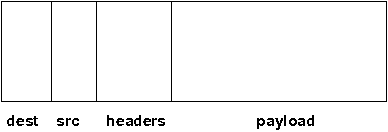
A message has 5 fields:
- Destination address
The address of the receiver. If
null, the message will be sent to all current group members. Message.getDest() returns the destination address of a message.- Source address
The address of the sender. Can be left
null, and will be filled in by the transport protocol (e.g. UDP) before the message is put on the network. Message.getSrc() returns the source address, ie. the address of the sender of a message.- Flags
This is one byte used for flags. The currently recognized flags are OOB, DONT_BUNDLE, NO_FC, NO_RELIABILITY, NO_TOTAL_ORDER, NO_RELAY and RSVP. For OOB, see the discussion on the concurrent stack (Section 5.4, “The concurrent stack”). For the use of flags see Section 5.13, “Tagging messages with flags”.
- Payload
The actual data (as a byte buffer). The Message class contains convenience methods to set a serializable object and to retrieve it again, using serialization to convert the object to/from a byte buffer. A message also has an offset and a length, if the buffer is only a subrange of a larger buffer.
- Headers
A list of headers that can be attached to a message. Anything that should not be in the payload can be attached to a message as a header. Methods
putHeader(),getHeader()andremoveHeader()of Message can be used to manipulate headers.Note that headers are only used by protocol implementers; headers should not be added or removed by application code !
A message is similar to an IP packet and consists of the payload (a byte buffer) and the addresses of the sender and receiver (as Addresses). Any message put on the network can be routed to its destination (receiver address), and replies can be returned to the sender's address.
A message usually does not need to fill in the sender's address when sending a message; this is done automatically by the protocol stack before a message is put on the network. However, there may be cases, when the sender of a message wants to give an address different from its own, so that for example, a response should be returned to some other member.
The destination address (receiver) can be an Address, denoting the address of a member, determined e.g.
from a message received previously, or it can be null, which means that the message
will be sent to all members of the group. A typical multicast message, sending string
"Hello" to all members would look like this:
Message msg=new Message(null, "Hello");

channel.send(msg);
A header is a custom bit of information that can be added to each message. JGroups uses headers extensively, for example to add sequence numbers to each message (NAKACK and UNICAST), so that those messages can be delivered in the order in which they were sent.
Events are means by which JGroups protcols can talk to each other. Contrary to Messages, which travel over the network between group members, events only travel up and down the stack.
Headers and events
Headers and events are only used by protocol implementers; they are not needed by application code !
A view (org.jgroups.View) is a list of the current members of a group. It consists
of a ViewId, which uniquely identifies the view (see below), and a list of members.
Views are installed in a channel automatically by the underlying protocol stack whenever a new member joins
or an existing one leaves (or crashes). All members of a group see the same sequence of views.
Note that the first member of a view is the coordinator (the one who emits new views). Thus, whenever the membership changes, every member can determine the coordinator easily and without having to contact other members, by picking the first member of a view.
The code below shows how to send a (unicast) message to the first member of a view (error checking code omitted):
View view=channel.getView();

Address first=view.getMembers().get(0);

Message msg=new Message(first, "Hello world");

channel.send(msg);
Whenever an application is notified that a new view has been installed (e.g. by
Receiver.viewAccepted(), the view is already set in the channel. For example,
calling Channel.getView() in a viewAccepted()
callback would return the same view (or possibly the next one in case there has already been a new view !).
The ViewId is used to uniquely number views. It consists of the address of the view creator and a sequence number. ViewIds can be compared for equality and put in a hashmaps as they implement equals() and hashCode(). [2]
Whenever a group splits into subgroups, e.g. due to a network partition, and later the subgroups merge
back together, a MergeView instead of a View will be received by the application. The MergeView is
a subclass of View and contains as additional instance variable the list of views that were merged. As
an example if the group denoted by view V1:(p,q,r,s,t) split into subgroups
V2:(p,q,r) and V2:(s,t), the merged view might be
V3:(p,q,r,s,t). In this case the MergeView would contains a list of 2 views:
V2:(p,q,r) and V2:(s,t).
In order to join a group and send messages, a process has to create a channel. A channel is like a socket. When a client connects to a channel, it gives the the name of the group it would like to join. Thus, a channel is (in its connected state) always associated with a particular group. The protocol stack takes care that channels with the same group name find each other: whenever a client connects to a channel given group name G, then it tries to find existing channels with the same name, and joins them, resulting in a new view being installed (which contains the new member). If no members exist, a new group will be created.
A state transition diagram for the major states a channel can assume are shown in Figure 3.2, “Channel states”.
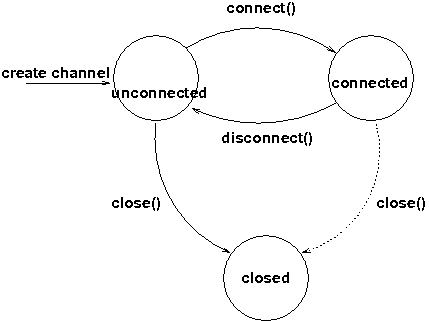
When a channel is first created, it is in the unconnected state. An attempt to perform certain operations which are only valid in the connected state (e.g. send/receive messages) will result in an exception. After a successful connection by a client, it moves to the connected state. Now the channel will receive messages from other members and may send messages to other members or to the group, and it will get notified when new members join or leave. Getting the local address of a channel is guaranteed to be a valid operation in this state (see below). When the channel is disconnected, it moves back to the unconnected state. Both a connected and unconnected channel may be closed, which makes the channel unusable for further operations. Any attempt to do so will result in an exception. When a channel is closed directly from a connected state, it will first be disconnected, and then closed.
The methods available for creating and manipulating channels are discussed now.
A channel is created using one of its public constructors (e.g. new JChannel()).
The most frequently used constructor of JChannel looks as follows:
public JChannel(String props) throws Exception;
The props argument points to an XML file containing the configuration of the
protocol stack to be used. This can be a String, but there are also other constructors which take for
example a DOM element or a URL (see the javadoc for details).
The code sample below shows how to create a channel based on an XML configuration file:
JChannel ch=new JChannel("/home/bela/udp.xml");
If the props argument is null, the default properties will be used. An exception will be thrown if the channel cannot be created. Possible causes include protocols that were specified in the property argument, but were not found, or wrong parameters to protocols.
For example, the Draw demo can be launched as follows:
java org.javagroups.demos.Draw -props file:/home/bela/udp.xml
or
java org.javagroups.demos.Draw -props http://www.jgroups.org/udp.xml
In the latter case, an application downloads its protocol stack specification from a server, which allows for central administration of application properties.
A sample XML configuration looks like this (edited from udp.xml):
<config xmlns="urn:org:jgroups"

        xmlns:xsi="http://www.w3.org/2001/XMLSchema-instance"

        xsi:schemaLocation="urn:org:jgroups http://www.jgroups.org/schema/jgroups.xsd">

    <UDP

         mcast_port="${jgroups.udp.mcast_port:45588}"

         tos="8"

         ucast_recv_buf_size="20M"

         ucast_send_buf_size="640K"

         mcast_recv_buf_size="25M"

         mcast_send_buf_size="640K"

         loopback="true"

         discard_incompatible_packets="true"

         max_bundle_size="64K"

         max_bundle_timeout="30"

         ip_ttl="${jgroups.udp.ip_ttl:2}"

         enable_bundling="true"

         enable_diagnostics="true"

         thread_naming_pattern="cl"


         timer_type="new"

         timer.min_threads="4"

         timer.max_threads="10"

         timer.keep_alive_time="3000"

         timer.queue_max_size="500"


         thread_pool.enabled="true"

         thread_pool.min_threads="2"

         thread_pool.max_threads="8"

         thread_pool.keep_alive_time="5000"

         thread_pool.queue_enabled="true"

         thread_pool.queue_max_size="10000"

         thread_pool.rejection_policy="discard"


         oob_thread_pool.enabled="true"

         oob_thread_pool.min_threads="1"

         oob_thread_pool.max_threads="8"

         oob_thread_pool.keep_alive_time="5000"

         oob_thread_pool.queue_enabled="false"

         oob_thread_pool.queue_max_size="100"

         oob_thread_pool.rejection_policy="Run"/>


    <PING timeout="2000"

            num_initial_members="3"/>

    <MERGE3 max_interval="30000"

            min_interval="10000"/>

    <FD_SOCK/>

    <FD_ALL/>

    <VERIFY_SUSPECT timeout="1500"  />

    <BARRIER />

    <pbcast.NAKACK use_stats_for_retransmission="false"

                   exponential_backoff="0"

                   use_mcast_xmit="true"

                   retransmit_timeout="300,600,1200"

                   discard_delivered_msgs="true"/>

    <UNICAST timeout="300,600,1200"/>

    <pbcast.STABLE stability_delay="1000" desired_avg_gossip="50000"

                   max_bytes="4M"/>

    <pbcast.GMS print_local_addr="true" join_timeout="3000"

                view_bundling="true"/>

    <UFC max_credits="2M"

         min_threshold="0.4"/>

    <MFC max_credits="2M"

         min_threshold="0.4"/>

    <FRAG2 frag_size="60K"  />

    <pbcast.STATE_TRANSFER />

</config>
A stack is wrapped by <config> and </config> elements and lists all protocols from bottom (UDP) to top (STATE_TRANSFER). Each element defines one protocol.
Each protocol is implemented as a Java class. When a protocol stack is created based on the above XML configuration, the first element ("UDP") becomes the bottom-most layer, the second one will be placed on the first, etc: the stack is created from the bottom to the top.
Each element has to be the name of a Java class that resides in the org.jgroups.protocols
package. Note that only the base name has to be given, not the fully specified class name (
UDP instead of org.jgroups.protocols.UDP).
If the protocol class is not found, JGroups assumes that the name given is a fully qualified classname
and will therefore try to instantiate that class. If this does not work an exception is thrown.
This allows for protocol classes to reside in different packages altogether, e.g. a valid protocol name
could be com.sun.eng.protocols.reliable.UCAST.
Each layer may have zero or more arguments, which are specified as a list of name/value pairs in parentheses directly after the protocol name. In the example above, UDP is configured with some options, one of them being the IP multicast port (mcast_port) which is set to 45588, or to the value of the system property jgroups.udp.mcast_port, if set.
Note that all members in a group have to have the same protocol stack.
Usually, channels are created by passing the name of an XML configuration file to the JChannel() constructor. On top of this declarative configuration, JGroups provides an API to create a channel programmatically. The way to do this is to first create a JChannel, then an instance of ProtocolStack, then add all desired protocols to the stack and finally calling init() on the stack to set it up. The rest, e.g. calling JChannel.connect() is the same as with the declarative creation.
An example of how to programmatically create a channel is shown below (copied from ProgrammaticChat):
public class ProgrammaticChat {


    public static void main(String[] args) throws Exception {

        JChannel ch=new JChannel(false);         // (1)

        ProtocolStack stack=new ProtocolStack(); // (2)

        ch.setProtocolStack(stack);

        stack.addProtocol(new UDP().setValue("bind_addr",

                                              InetAddress.getByName("192.168.1.5")))

                .addProtocol(new PING())

                .addProtocol(new MERGE3())

                .addProtocol(new FD_SOCK())

                .addProtocol(new FD_ALL().setValue("timeout", 12000)

                                         .setValue("interval", 3000))

                .addProtocol(new VERIFY_SUSPECT())

                .addProtocol(new BARRIER())

                .addProtocol(new NAKACK())

                .addProtocol(new UNICAST2())

                .addProtocol(new STABLE())

                .addProtocol(new GMS())

                .addProtocol(new UFC())

                .addProtocol(new MFC())

                .addProtocol(new FRAG2());       // (3)

        stack.init();                            // (4)


        ch.setReceiver(new ReceiverAdapter() {

            public void viewAccepted(View new_view) {

                System.out.println("view: " + new_view);

            }


            public void receive(Message msg) {

                Address sender=msg.getSrc();

                System.out.println(msg.getObject() + " [" + sender + "]");

            }

        });


        ch.connect("ChatCluster");


        for(;;) {

            String line=Util.readStringFromStdin(": ");

            ch.send(null, line);

        }

    }


}
First a JChannel is created (1). The 'false' argument tells the channel not to create a ProtocolStack. This is needed because we will create one ourselves later and set it in the channel (2).
Next, all protocols are added to the stack (3). Note that the order is from bottom (transport protocol) to top. So UDP as transport is added first, then PING and so on, until FRAG2, which is the top protocol. Every protocol can be configured via setters, but there is also a generic setValue(String attr_name, Object value), which can be used to configure protocols as well, as shown in the example.
Once the stack is configured, we call ProtocolStack.init() to link all protocols correctly and to call init() in every protocol instance (4). After this, the channel is ready to be used and all subsequent actions (e.g. connect()) can be executed. When the init() method returns, we have essentially the equivalent of new JChannel(config_file).
A channel can be given a logical name which is then used instead of the channel's address in toString().
A logical name might show the function of a channel, e.g. "HostA-HTTP-Cluster", which is more legible
than a UUID 3c7e52ea-4087-1859-e0a9-77a0d2f69f29.
For example, when we have 3 channels, using logical names we might see a view "{A,B,C}", which is nicer
than "{56f3f99e-2fc0-8282-9eb0-866f542ae437,
ee0be4af-0b45-8ed6-3f6e-92548bfa5cde,
9241a071-10ce-a931-f675-ff2e3240e1ad} !"
If no logical name is set, JGroups generates one, using the hostname and a random number, e.g. linux-3442. If this is not desired and the UUIDs should be shown, use system property -Djgroups.print_uuids=true.
The logical name can be set using:
public void setName(String logical_name);
This must be done before connecting a channel. Note that the logical name stays with a channel until the channel is destroyed, whereas a UUID is created on each connection.
When JGroups starts, it prints the logical name and the associated physical address(es):
-------------------------------------------------------------------
GMS: address=mac-53465, cluster=DrawGroupDemo, physical address=192.168.1.3:49932
-------------------------------------------------------------------
The logical name is mac-53465 and the physical address is 192.168.1.3:49932. The UUID is not shown here.
Since 2.12 address generation is pluggable. This means that an application can determine what kind of addresses it uses. The default address type is UUID, and since some protocols use UUID, it is recommended to provide custom classes as subclasses of UUID.
This can be used to for example pass additional data around with an address, for example information about the location of the node to which the address is assigned. Note that methods equals(), hashCode() and compare() of the UUID super class should not be changed.
To use custom addresses, an implementation of org.jgroups.stack.AddressGenerator
has to be written.
For any class CustomAddress, it will need to get registered with the ClassConfigurator in order to marshal it correctly:
class CustomAddress extends UUID {

    static {

        ClassConfigurator.add((short)8900, CustomAddress.class);

    }

}
Note
Note that the ID should be chosen such that it doesn't collide with any IDs defined in jg-magic-map.xml.
Set the address generator in JChannel: setAddressGenerator(AddressGenerator). This has to be done before the channel is connected.
An example of a subclass is org.jgroups.util.PayloadUUID, and there are
2 more shipped with JGroups.
When a client wants to join a cluster, it connects to a channel giving the name of the cluster to be joined:
public void connect(String cluster) throws Exception;
The cluster name is the name of the cluster to be joined. All channels that call connect() with the same name form a cluster. Messages sent on any channel in the cluster will be received by all members (including the one who sent it [3] ).
The connect() method returns as soon as the cluster has been joined successfully. If the channel is in the closed state (see Figure 3.2, “Channel states”), an exception will be thrown. If there are no other members, i.e. no other member has connected to a cluster with this name, then a new cluster is created and the member joins it as first member. The first member of a cluster becomes its coordinator. A coordinator is in charge of installing new views whenever the membership changes [4] .
Clients can also join a cluster and fetch cluster state in one operation. The best way to conceptualize the connect and fetch state connect method is to think of it as an invocation of the regular connect() and getState() methods executed in succession. However, there are several advantages of using the connect and fetch state connect method over the regular connect. First of all, the underlying message exchange is heavily optimized, especially if the flush protocol is used. But more importantly, from a client's perspective, the connect() and fetch state operations become one atomic operation.
public void connect(String cluster, Address target, long timeout) throws Exception;
Just as in a regular connect(), the cluster name represents a cluster to be joined. The target parameter indicates a cluster member to fetch the state from. A null target indicates that the state should be fetched from the cluster coordinator. If the state should be fetched from a particular member other than the coordinator, clients can simply provide the address of that member. The timeout paremeter bounds the entire join and fetch operation. An exception will be thrown if the timeout is exceeded.
Method getAddress() returns the address of the channel. The address may or may
not be available when a channel is in the unconnected state.
public Address getAddress();
Method getClusterName() returns the name of the cluster which the member joined.
public String getClusterName();
Again, the result is undefined if the channel is in the disconnected or closed state.
The following method can be used to get the current view of a channel:
public View getView();
This method returns the current view of the channel. It is updated every time a new view is installed (viewAccepted() callback).
Calling this method on an unconnected or closed channel is implementation defined. A channel may return null, or it may return the last view it knew of.
Once the channel is connected, messages can be sent using one of the send()
methods:
public void send(Message msg) throws Exception;

public void send(Address dst, Serializable obj) throws Exception;

public void send(Address dst, byte[] buf) throws Exception;

public void send(Address dst, byte[] buf, int off, int len) throws Exception;
The first send() method has only one argument, which is the message to be sent.
The message's destination should either be the address of the receiver (unicast) or null (multicast).
When the destination is null, the message will be sent to all members of the cluster (including itself).
The remainaing send() methods are helper methods; they take either a byte[]
buffer or a serializable, create a Message and call send(Message).
If the channel is not connected, or was closed, an exception will be thrown upon attempting to send a message.
Here's an example of sending a message to all members of a cluster:
Map data; // any serializable data

channel.send(null, data);
The null value as destination address means that the message will be sent to all members in the cluster. The payload is a hashmap, which will be serialized into the message's buffer and unserialized at the receiver. Alternatively, any other means of generating a byte buffer and setting the message's buffer to it (e.g. using Message.setBuffer()) also works.
Here's an example of sending a unicast message to the first member (coordinator) of a group:
Map data;

Address receiver=channel.getView().getMembers().get(0);

channel.send(receiver, "hello world");
The sample code determines the coordinator (first member of the view) and sends it a "hello world" message.
Sometimes, it is desirable not to have to deal with one's own messages, ie. messages sent by oneself.
To do this, JChannel.setDiscardOwnMessages(boolean flag) can be set to
true (false by default). This means that every cluster node will receive a message sent
by P, but P itself won't.
Note that this method replaces the old JChannel.setOpt(LOCAL, false) method, which was removed in 3.0.
While JGroups guarantees that a message will eventually be delivered at all non-faulty members, sometimes this might take a while. For example, if we have a retransmission protocol based on negative acknowledgments, and the last message sent is lost, then the receiver(s) will have to wait until the stability protocol notices that the message has been lost, before it can be retransmitted.
This can be changed by setting the Message.RSVP flag in a message: when this flag is encountered, the message send blocks until all members have acknowledged reception of the message (of course excluding members which crashed or left meanwhile).
This also serves as another purpose: if we send an RSVP-tagged message, then - when the send() returns - we're guaranteed that all messages sent before will have been delivered at all members as well. So, for example, if P sends message 1-10, and marks 10 as RSVP, then, upon JChannel.send() returning, P will know that all members received messages 1-10 from P.
Note that since RSVP'ing a message is costly, and might block the sender for a while, it should be used sparingly. For example, when completing a unit of work (ie. member P sending N messages), and P needs to know that all messages were received by everyone, then RSVP could be used.
To use RSVP, 2 things have to be done:
First, the RSVP protocol has to be in the config, somewhere above the reliable transmission protocols such as NAKACK or UNICAST(2), e.g.:
<config>

    <UDP/>

    <PING />

    <FD_ALL/>

    <pbcast.NAKACK use_mcast_xmit="true"

                   discard_delivered_msgs="true"/>

    <UNICAST timeout="300,600,1200"/>

    <RSVP />

    <pbcast.STABLE stability_delay="1000" desired_avg_gossip="50000"

                   max_bytes="4M"/>

    <pbcast.GMS print_local_addr="true" join_timeout="3000"

                view_bundling="true"/>

    ...

</config>
Secondly, the message we want to get ack'ed must be tagged with RSVP:
Message msg=new Message(null, null, "hello world");

msg.setFlag(Message.RSVP);

ch.send(msg);
Here, we send a message to all cluster members (dest = null). (Note that RSVP also works for sending a message to a unicast destination). Method send() will return as soon as it has received acks from all current members. If there are 4 members A, B, C and D, and A has received acks from itself, B and C, but D's ack is missing and D crashes before the timeout kicks in, then this will nevertheless make send() return, as if D had actually sent an ack.
If the timeout property if greater than 0, and we don't receive all acks within
timeout milliseconds, a TimeoutException will be thrown (if RSVP.throw_exception_on_timeout is true).
The application can choose to catch this (runtime) exception and do something with it, e.g. retry.
The configuration of RSVP is described here: Section 7.6.6, “RSVP”.
Note
RSVP was added in version 3.1.
Method receive() in ReceiverAdapter (or Receiver) can be overridden to
receive messages, views, and state transfer callbacks.
public void receive(Message msg);
A Receiver can be registered with a channel using JChannel.setReceiver(). All received messages, view changes and state transfer requests will invoke callbacks on the registered Receiver:
JChannel ch=new JChannel();

ch.setReceiver(new ReceiverAdapter() {

    public void receive(Message msg) {

        System.out.println("received message " + msg);

    }

    public void viewAccepted(View view) {

        System.out.println("received view " + new_view);

    }

});

ch.connect("MyCluster");
As shown above, the viewAccepted() callback of ReceiverAdapter can be used
to get callbacks whenever a cluster membership change occurs. The receiver needs to be set via
JChannel.setReceiver(Receiver).
As discussed in Section 3.2.4, “ReceiverAdapter”, code in callbacks must avoid anything that takes a lot of time, or blocks; JGroups invokes this callback as part of the view installation, and if this user code blocks, the view installation would block, too.
A newly joined member may want to retrieve the state of the cluster before starting work. This is done
with getState():
public void getState(Address target, long timeout) throws Exception;
This method returns the state of one member (usually of the oldest member, the coordinator). The target parameter can usually be null, to ask the current coordinator for the state. If a timeout (ms) elapses before the state is fetched, an exception will be thrown. A timeout of 0 waits until the entire state has been transferred.
Note
The reason for not directly returning the state as a result of
getState() is that the state has to be returned in the correct position
relative to other messages. Returning it directly would violate the FIFO properties of a channel,
and state transfer would not be correct !
To participate in state transfer, both state provider and state requester have to implement the following callbacks from ReceiverAdapter (Receiver):
public void getState(OutputStream output) throws Exception;

public void setState(InputStream input) throws Exception;
Method getState() is invoked on the state provider (usually the coordinator). It needs to write its state to the output stream given. Note that output doesn't need to be closed when done (or when an exception is thrown); this is done by JGroups.
The setState() method is invoked on the state requester; this is the member which called JChannel.getState(). It needs to read its state from the input stream and set its internal state to it. Note that input doesn't need to be closed when done (or when an exception is thrown); this is done by JGroups.
In a cluster consisting of A, B and C, with D joining the cluster and calling Channel.getState(), the following sequence of callbacks happens:
- D calls JChannel.getState(). The state will be retrieved from the oldest member, A
- A's getState() callback is called. A writes its state to the output stream passed as a parameter to getState().
- D's setState() callback is called with an input stream as argument. D reads the state from the input stream and sets its internal state to it, overriding any previous data.
- D: JChannel.getState() returns. Note that this will only happen after the state has been transferred successfully, or a timeout elapsed, or either the state provider or requester throws an exception. Such an exception will be re-thrown by getState(). This could happen for instance if the state provider's getState() callback tries to stream a non-serializable class to the output stream.
The following code fragment shows how a group member participates in state transfers:
public void getState(OutputStream output) throws Exception {

    synchronized(state) {

        Util.objectToStream(state, new DataOutputStream(output));

    }

}


public void setState(InputStream input) throws Exception {

    List<String> list;

    list=(List<String>)Util.objectFromStream(new DataInputStream(input));

    synchronized(state) {

        state.clear();

        state.addAll(list);

    }

    System.out.println(list.size() + " messages in chat history):");

    for(String str: list)

        System.out.println(str);

    }

}
This code is the Chat example from the JGroups tutorial and the state here is a list of strings.
The getState() implementation synchronized on the state (so no incoming messages can modify it during the state transfer), and uses the JGroups utility method objectToStream().
Performance when writing to an output stream
If a lot of smaller fragments are written to an output stream, it is best to wrap the output stream into a BufferedOutputStream, e.g.
Util.objectToStream(state,

                    new BufferedOutputStream(

                        new DataOutputStream(output)));
The setState() implementation also uses the Util.objectFromStream() utility method to read the state from the input stream and assign it to its internal list.
In order to use state transfer, a state transfer protocol has to be included in the configuration. This can either be STATE_TRANSFER, STATE, or STATE_SOCK. More details on the protocols can be found at Chapter 7, List of Protocols.
The is the original state transfer protocol, which used to transfer byte[] buffers. It still does that, but is internally converted to call the getState() and setState() callbacks which use input and output streams.
Note that, because byte[] buffers are converted into input and output streams, this protocol should not be used for transfer of large states.
For details see Section 7.12.1, “pbcast.STATE_TRANSFER”.
This is the STREAMING_STATE_TRANSFER protocol, renamed in 3.0. It sends the entire state across from the provider to the requester in (configurable) chunks, so that memory consumption is minimal.
For details see Section 7.12.3, “pbcast.STATE”.
Same as STREAMING_STATE_TRANSFER, but a TCP connection between provider and requester is used to transfer the state.
For details see Section 7.12.4, “STATE_SOCK”.
Disconnecting from a channel is done using the following method:
public void disconnect();
It will have no effect if the channel is already in the disconnected or closed state. If connected, it will leave the cluster. This is done (transparently for a channel user) by sending a leave request to the current coordinator. The latter will subsequently remove the leaving node from the view and install a new view in all remaining members.
After a successful disconnect, the channel will be in the unconnected state, and may subsequently be reconnected.
To destroy a channel instance (destroy the associated protocol stack, and release all resources),
method close() is used:
public void close();
Closing a connected channel disconnects the channel first.
The close() method moves the channel to the closed state, in which no further operations are allowed (most throw an exception when invoked on a closed channel). In this state, a channel instance is not considered used any longer by an application and -- when the reference to the instance is reset -- the channel essentially only lingers around until it is garbage collected by the Java runtime system.
[1] It could be that the member is suspected falsely, in which case the next view would still
contain the suspected member (there is no unsuspect() method
[2] Note that the latter 2 methods only take the ID into account.
[3]
Local delivery can be turned off using setDiscardOwnMessages(true).
[4] This is managed internally however, and an application programmer does not need to be concerned about it.