Copyright © 1998-2006 Bela Ban
Copyright © 2006-2011 Red Hat Inc
This document is licensed under the Creative Commons Attribution-ShareAlike (CC-BY-SA) 3.0
Jan 2011
Table of Contents
- Foreword
- Acknowledgments
- 1. Overview
- 2. Installation and Configuration
- 2.1. Requirements
- 2.2. Installing the binary distribution
- 2.3. Installing the source distribution
- 2.4. Building JGroups (source distribution only)
- 2.5. Testing your Setup
- 2.6. Running a Demo Program
- 2.7. Using IP Multicasting without a network connection
- 2.8. It doesn't work !
- 2.9. The instances still don't find each other !
- 2.10. Problems with IPv6
- 2.11. Wiki
- 2.12. I have discovered a bug !
- 2.13. Supported classes
- 3. API
- 3.1. Utility classes
- 3.2. Interfaces
- 3.3. Address
- 3.4. Message
- 3.5. View
- 3.6. JChannel
- 3.6.1. Creating a channel
- 3.6.2. Setting options
- 3.6.3. Giving the channel a logical name
- 3.6.4. Generating custom addresses
- 3.6.5. Connecting to a channel
- 3.6.6. Connecting to a channel and getting the state in one operation
- 3.6.7. Getting the local address and the group name
- 3.6.8. Getting the current view
- 3.6.9. Sending a message
- 3.6.10. Receiving a message
- 3.6.11. Using a Receiver to receive messages
- 3.6.12. Peeking at a message
- 3.6.13. Getting the group's state
- 3.6.14. Getting the state with a Receiver
- 3.6.15. Partial state transfer
- 3.6.16. Streaming state transfer
- 3.6.17. Disconnecting from a channel
- 3.6.18. Closing a channel
- 4. Building Blocks
- 5. Advanced Concepts
- 5.1. Using multiple channels
- 5.2. The shared transport: sharing a transport between multiple channels in a JVM
- 5.3. Transport protocols
- 5.4. The concurrent stack
- 5.4.1. Overview
- 5.4.2. Elimination of up and down threads
- 5.4.3. Concurrent message delivery
- 5.4.4. Scopes: concurrent message delivery for messages from the same sender
- 5.4.5. Out-of-band messages
- 5.4.6. Replacing the default and OOB thread pools
- 5.4.7. Sharing of thread pools between channels in the same JVM
- 5.5. Misc
- 5.6. Handling network partitions
- 5.7. Flushing: making sure every node in the cluster received a message
- 5.8. Large clusters
- 5.9. Bridging between remote clusters
- 5.10. Daisychaining
- 5.11. Ergonomics
- 6. Writing protocols
- 7. List of Protocols
- Bibliography
This is the JGroups manual. It provides information about:
Installation and configuration
Using JGroups (the API)
Configuration of the JGroups protocols
The focus is on how to use JGroups, not on how JGroups is implemented.
Here are a couple of points I want to abide by throughout this book:
I like brevity. I will strive to describe concepts as clearly as possible (for a non-native English speaker) and will refrain from saying more than I have to to make a point.
I like simplicity. Keep It Simple and Stupid. This is one of the biggest goals I have both in writing this manual and in writing JGroups. It is easy to explain simple concepts in complex terms, but it is hard to explain a complex system in simple terms. I'll try to do the latter.
So, how did it all start?
I spent 1998-1999 at the Computer Science Department at Cornell University as a post-doc, in Ken Birman's group. Ken is credited with inventing the group communication paradigm, especially the Virtual Synchrony model. At the time they were working on their third generation group communication prototype, called Ensemble. Ensemble followed Horus (written in C by Robbert VanRenesse), which followed ISIS (written by Ken Birman, also in C). Ensemble was written in OCaml, developed at INRIA, and is a functional language and related to ML. I never liked the OCaml language, which in my opinion has a hideous syntax. Therefore I never got warm with Ensemble either.
However, Ensemble had a Java interface (implemented by a student in a semester project) which allowed me to program in Java and use Ensemble underneath. The Java part would require that an Ensemble process was running somewhere on the same machine, and would connect to it via a bidirectional pipe. The student had developed a simple protocol for talking to the Ensemble engine, and extended the engine as well to talk back to Java.
However, I still needed to compile and install the Ensemble runtime for each different platform, which is exactly why Java was developed in the first place: portability.
Therefore I started writing a simple framework (now JChannel ), which would allow me to treat Ensemble as just another group communication transport, which could be replaced at any time by a pure Java solution. And soon I found myself working on a pure Java implementation of the group communication transport (now: ProtocolStack ). I figured that a pure Java implementation would have a much bigger impact that something written in Ensemble. In the end I didn't spend much time writing scientific papers that nobody would read anyway (I guess I'm not a good scientist, at least not a theoretical one), but rather code for JGroups, which could have a much bigger impact. For me, knowing that real-life projects/products are using JGroups is much more satisfactory than having a paper accepted at a conference/journal.
That's why, after my time was up, I left Cornell and academia altogether, and started a job in the industry: with Fujitsu Network Communications in Silicon Valley.
At around that time (May 2000), SourceForge had just opened its site, and I decided to use it for hosting JGroups. I guess this was a major boost for JGroups because now other developers could work on the code. From then on, the page hit and download numbers for JGroups have steadily risen.
In the fall of 2002, Sacha Labourey contacted me, letting me know that JGroups was being used by JBoss for their clustering implementation. I joined JBoss in 2003 and have been working on JGroups and JBossCache. My goal is to make JGroups the most widely used clustering software in Java ...
Bela Ban, San Jose, Aug 2002, Kreuzlingen Switzerland 2006
I want to thank all contributors to JGroups, present and past, for their work. Without you, this project would never have taken off the ground.
I also want to thank Ken Birman and Robbert VanRenesse for many fruitful discussions of all aspects of group communication in particular and distributed systems in general.
I want to dedicate this manual to Jeannette and Michelle.
Group communication uses the terms group and member. Members are part of a group. In the more common terminology, a member is a node and a group is a cluster. We use these terms interchangeably.
A node is a process, residing on some host. A cluster can have one or more nodes belonging to it. There can be multiple nodes on the same host, and all may or may not be part of the same cluster.
JGroups is toolkit for reliable group communication. Processes can join a group, send messages to all members or single members and receive messages from members in the group. The system keeps track of the members in every group, and notifies group members when a new member joins, or an existing member leaves or crashes. A group is identified by its name. Groups do not have to be created explicitly; when a process joins a non-existing group, that group will be created automatically. Member processes of a group can be located on the same host, within the same LAN, or across a WAN. A member can be part of multiple groups.
The architecture of JGroups is shown in Figure 1.1, “The architecture of JGroups”.
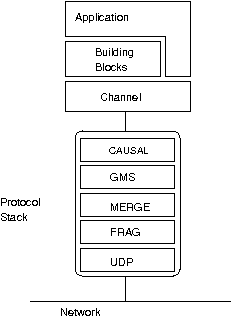
It consists of 3 parts: (1) the Channel used by application programmers to build reliable group communication applications, (2) the building blocks, which are layered on top of the channel and provide a higher abstraction level and (3) the protocol stack, which implements the properties specified for a given channel.
This document describes how to install and use JGroups, ie. the Channel API and the building blocks. The targeted audience is application programmers who want to use JGroups to build reliable distributed programs that need group communication.
A channel is connected to a protocol stack. Whenever the application sends a message, the channel passes it on to the protocol stack, which passes it to the topmost protocol. The protocol processes the message and the passes it on to the protocol below it. Thus the message is handed from protocol to protocol until the bottom (transport) protocol puts it on the network. The same happens in the reverse direction: the transport protocol listens for messages on the network. When a message is received it will be handed up the protocol stack until it reaches the channel. The channel stores the message in a queue until the application consumes it.
When an application connects to the channel, the protocol stack will be started, and when it disconnects the stack will be stopped. When the channel is closed, the stack will be destroyed, releasing its resources.
The following three sections give an overview of channels, building blocks and the protocol stack.
To join a group and send messages, a process has to create a channel and connect to it using the group name (all channels with the same name form a group). The channel is the handle to the group. While connected, a member may send and receive messages to/from all other group members. The client leaves a group by disconnecting from the channel. A channel can be reused: clients can connect to it again after having disconnected. However, a channel allows only 1 client to be connected at a time. If multiple groups are to be joined, multiple channels can be created and connected to. A client signals that it no longer wants to use a channel by closing it. After this operation, the channel cannot be used any longer.
Each channel has a unique address. Channels always know who the other members are in the same group: a list of member addresses can be retrieved from any channel. This list is called a view. A process can select an address from this list and send a unicast message to it (also to itself), or it may send a multicast message to all members of the current view (also including itself). Whenever a process joins or leaves a group, or when a crashed process has been detected, a new view is sent to all remaining group members. When a member process is suspected of having crashed, a suspicion message is received by all non-faulty members. Thus, channels receive regular messages, view messages and suspicion messages. A client may choose to turn reception of views and suspicions on/off on a channel basis.
Channels are similar to BSD sockets: messages are stored in a channel until a client removes the next one (pull-principle). When no message is currently available, a client is blocked until the next available message has been received.
Note that the push approach to receiving messages and views is preferred. This involves setting a Receiver in the channel and getting callbacks invoked by JGroups whenever a message or view is received. The current pull approach (JChannel.receive() method) has been deprecated in 2.8 and will be removed in 3.0.
There is currently only one implementation of Channel: JChannel.
The properties of a channel are typically defined in an XML file, but JGroups also allows for configuration through simple strings, URIs, DOM trees or even programmatically.
The Channel API and its related classes is described in Chapter 3, API.
Channels are simple and primitive. They offer the bare functionality of group communication, and have on purpose been designed after the simple model of BSD sockets, which are widely used and well understood. The reason is that an application can make use of just this small subset of JGroups, without having to include a whole set of sophisticated classes, that it may not even need. Also, a somewhat minimalistic interface is simple to understand: a client needs to know about 12 methods to be able to create and use a channel (and oftentimes will only use 3-4 methods frequently).
Channels provide asynchronous message sending/reception, somewhat similar to UDP. A message sent is essentially put on the network and the send() method will return immediately. Conceptual requests, or responses to previous requests, are received in undefined order, and the application has to take care of matching responses with requests.
Also, an application has to actively retrieve messages from a channel (pull-style); it is not notified when a message has been received. Note that pull-style message reception often needs another thread of execution, or some form of event-loop, in which a channel is periodically polled for messages.
JGroups offers building blocks that provide more sophisticated APIs on top of a Channel. Building blocks either create and use channels internally, or require an existing channel to be specified when creating a building block. Applications communicate directly with the building block, rather than the channel. Building blocks are intended to save the application programmer from having to write tedious and recurring code, e.g. request-response correlation.
Building blocks are described in Chapter 4, Building Blocks.
The protocol stack containins a number of protocol layers in a bidirectional list. All messages sent and received over the channel have to pass through all protocols. Every layer may modify, reorder, pass or drop a message, or add a header to a message. A fragmentation layer might break up a message into several smaller messages, adding a header with an id to each fragment, and re-assemble the fragments on the receiver's side.
The composition of the protocol stack, i.e. its layers, is determined by the creator of the channel: an XML file defines the layers to be used (and the parameters for each layer). The configuration is used to create the stack, depending on the protocol names given in the property.
Knowledge about the protocol stack is not necessary when only using channels in an application. However, when an application wishes to ignore the default properties for a protocol stack, and configure their own stack, then knowledge about what the individual layers are supposed to do is needed. Although it is syntactically possible to stack any layer on top of each other (they all have the same interface), this wouldn't make sense semantically in most cases.
A header is a custom bit of information that can be added to each message. JGroups uses headers extensively, for example to add sequence numbers to each message (NAKACK and UNICAST), so that those messages can be delivered in the order in which they were sent.
The installation refers to version 2.8 of JGroups. Refer to the installation instructions that are shipped with JGroups for details.
Note that these instructions are also available in the JGroups distribution (INSTALL.HTML).
JGroups comes in a binary and a source version: the binary version is JGroups-2.x.x.bin.zip, the source version is JGroups-2.x.x.src.zip. The binary version contains the JGroups JAR file, plus a number of JARs needed by JGroups. The source version contains all source files, plus several JAR files needed by JGroups, e.g. ANT to build JGroups from source.
JGroups 2.5 requires JDK 1.5 or higher. Version 2.9 requires JDK 1.6 or higher.
There is no JNI code present so JGroups should run on all platforms.
If you want to generate HTML-based test reports from the unittests, then xalan.jar needs to be in the CLASSPATH (also available in the lib directory)
The binary version contains
jgroups-all.jar: the JGroups library including the demos
CREDITS: list of contributors
INSTALL.html: this file
log4j.jar. This JAR is optional, for example if JDK logging is used, we don't need it. Note that commons-logging is not a requirement any more since version 2.8.
Place the JAR files somewhere in your CLASSPATH, and you're ready to start using JGroups.
The source version consists of the following directories and files:
src: the sources
test: unit and stress tests
conf: configuration files needed by JGroups, plus default protocol stack definitions
doc: documentation
lib: various JARs needed to build and run JGroups:
Unzip the source distribution, e.g. unzip JGroups-2.x.x.src.zip. This will create the JGroups-2.x.x directory (root directory) under the current directory.
cd to the root directory
Modify build.properties if you want to use a Java compiler other than javac (e.g. jikes), or if you want to change the interface JGroups uses for sending and receiving messages
On UNIX systems use build.sh, on Windows build.bat: $> ./build.sh compile
This will compile all Java files (into the classes directory).
To generate the JARs: $> ./build.sh jar
This will generate the following JAR files in the dist directory:
jgroups-core.jar - the core JGroups library without unit tests and demos
jgroups-all.jar - the complete JGroups library including demos and unit tests
The CLASSPATH now has to be set accordingly: the following directories and/or JARs have to be included:
<JGroups rootdir>/classes
<JGroups rootdir>/conf
All needed JAR files in <JGroups rootdir>/lib . To build from sources, the two Ant JARs are required. To run unit tests, the JUnit (and possibly Xalan) JARs are needed.
To generate JavaDocs simple run $> ./build.sh javadoc and the Javadoc documentation will be generated in the dist/javadoc directory
Note that - if you already have Ant installed on your system - you do not need to use build.sh or build.bat, simply invoke ant on the build.xml file. To be able to invoked ant from any directory below the root directory, place ANT_ARGS="-find build.xml -emacs" into the .antrc file in your home directory.
For more details on Ant see http://jakarta.apache.org/ant/.
To see whether your system can find the JGroups classes, execute the following command:
java org.jgroups.Version
or (from JGroups 2.2.8 on)
java -jar jgroups-all.jar
You should see the following output (more or less) if the class is found:
            [mac] /Users/bela/JGroups$ java org.jgroups.Version

            Version:      2.8.0.GA
            CVS:          $Id: installation.xml,v 1.10 2010/04/30 14:27:39 vlada Exp $
To test whether JGroups works okay on your machine, run the following command twice:
java org.jgroups.demos.Draw
2 whiteboard windows should appear as shown in Figure 2.1, “Screenshot of 2 Draw instances”.
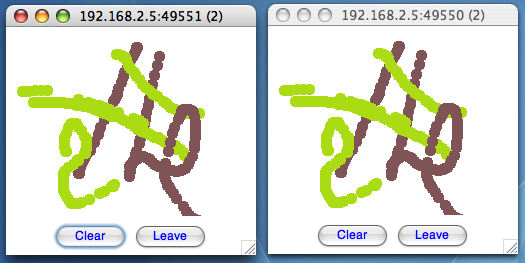
Both windows should show 2 in their title bars. This means that the two instances found each other and formed a group.
When drawing in one window, the second instance should also be updated. As the default group transport uses IP multicast, make sure that - if you want start the 2 instances in different subnets - IP multicast is enabled. If this is not the case, the 2 instances won't find each other and the sample won't work.
You can change the properties of the demo to for example use a different transport if multicast doesn't work (it should always work on the same machine). Please consult the documentation to see how to do this.
State transfer (see the section in the API later) can also be tested by passing the -state flag to Draw.
Sometimes there isn't a network connection (e.g. DSL modem is down), or we want to multicast only on the local machine. For this the loopback interface (typically lo) can be configured, e.g.
route add -net 224.0.0.0 netmask 240.0.0.0 dev lo
This means that all traffic directed to the 224.0.0.0 network will be sent to the loopback interface, which means it doesn't need any network to be running. Note that the 224.0.0.0 network is a placeholder for all multicast addresses in most UNIX implementations: it will catch all multicast traffic. This is an undocumented feature of /sbin/route and may not work across all UNIX flavors. The above instructions may also work for Windows systems, but this hasn't been tested. Note that not all systems allow multicast traffic to use the loopback interface.
Typical home networks have a gateway/firewall with 2 NICs: the first (eth0) is connected to the outside world (Internet Service Provider), the second (eth1) to the internal network, with the gateway firewalling/masquerading traffic between the internal and external networks. If no route for multicast traffic is added, the default will be to use the fdefault gateway, which will typically direct the multicast traffic towards the ISP. To prevent this (e.g. ISP drops multicast traffic, or latency is too high), we recommend to add a route for multicast traffic which goes to the internal network (e.g. eth1).
Make sure your machine is set up correctly for IP multicast. There are 2 test programs that can be used to detect this: McastReceiverTest and McastSenderTest. Start McastReceiverTest, e.g.
java org.jgroups.tests.McastReceiverTest -mcast_addr 224.10.10.10 -port 5555
Then start McastSenderTest:
java org.jgroups.tests.McastSenderTest -mcast_addr 224.10.10.10 -port 5555
If you want to bind to a specific network interface card (NIC), use -bind_addr 192.168.0.2, where 192.168.0.2 is the IP address of the NIC to which you want to bind. Use this parameter in both sender and receiver.
You should be able to type in the McastSenderTest window and see the output in the McastReceiverTest. If not, try to use -ttl 32 in the sender. If this still fails, consult a system administrator to help you setup IP multicast correctly. If you are the system administrator, look for another job :-)
Other means of getting help: there is a public forum on JIRA for questions. Also consider subscribing to the javagroups-users mailing list to discuss such and other problems.
In this case we have to use a sledgehammer (running only under JDK 1.4. and higher): we can enable the above sender and receiver test to use all available interfaces for sending and receiving. One of them will certainly be the right one... Start the receiver as follows:
java org.jgroups.tests.McastReceiverTest1_4 -mcast_addr 228.8.8.8 -use_all_interfaces
The multicast receiver uses the 1.4 functionality to list all available network interfaces and bind to all of them (including the loopback interface). This means that whichever interface a packet comes in on, we will receive it. Now start the sender:
java org.jgroups.tests.McastSenderTest1_4 -mcast_addr 228.8.8.8 -use_all_interfaces
The sender will also determine the available network interfaces and send each packet over all interfaces.
This test can be used to find out which network interface to bind to when previously no packets were received. E.g. when you see the following output in the receiver:
      bash-2.03$ java org.jgroups.tests.McastReceiverTest1_4 -mcast_addr 228.8.8.8
                                                             -bind_addr 192.168.1.4
      Socket=0.0.0.0/0.0.0.0:5555, bind interface=/192.168.168.4
      dd [sender=192.168.168.4:5555]
      dd [sender=192.168.168.1:5555]
      dd [sender=192.168.168.2:5555]
you know that you can bind to any of the 192.168.168.{1,2,4} interfaces to receive your multicast packets. In this case you would need to modify your protocol spec to include bind_addr=192.168.168.2 in UDP, e.g. "UDP(mcast_addr=228.8.8.8;bind_addr=192.168.168.2):..." .
Another source of problems might be the use of IPv6, and/or misconfiguration of /etc/hosts. If you communicate between an IPv4 and an IPv6 host, and they are not able to find each other, try the java.net.preferIP4Stack=true property, e.g.
java -Djava.net.preferIPv4Stack=true org.jgroups.demos.Draw -props /home/bela/udp.xml
JDK 1.4.1 uses IPv6 by default, although is has a dual stack, that is, it also supports IPv4. Here's more details on the subject.
There is a wiki which lists FAQs and their solutions at http://www.jboss.org/wiki/Wiki.jsp?page=JGroups. It is frequently updated and a useful companion to this user's guide.
If you think that you discovered a bug, submit a bug report on JIRA or send email to javagroups-developers if you're unsure about it. Please include the following information:
Version of JGroups (java org.jgroups.Version)
Platform (e.g. Solaris 8)
Version of JDK (e.g. JDK 1.4.2_07)
Stack trace. Use kill -3 PID on UNIX systems or CTRL-BREAK on windows machines
Small program that reproduces the bug
JGroups project has been around since 2001. Over this time, some of the JGroups classes have been used in experimental phases and have never been matured enough to be used in today's production releases. However, they were not removed since some people used them in their products.
The following tables list unsupported and experimental classes. These classes are not actively maintained, and we will not work to resolve potential issues you might find. Their final faith is not yet determined; they might even be removed altogether in the next major release. Weight your risks if you decide to use them anyway.
Table 2.1. Experimental
| Package | Class |
|---|---|
| org.jgroups.util | TimeScheduler2 |
| org.jgroups.util | HashedTimingWheel |
| org.jgroups.util | Proxy |
| org.jgroups.blocks | GridOutputStream |
| org.jgroups.blocks | GridInputStream |
| org.jgroups.blocks | GridFile |
| org.jgroups.blocks | ReplCache |
| org.jgroups.blocks | PartitionedHashMap |
| org.jgroups.blocks | Cache |
| org.jgroups.blocks | GridFilesystem |
| org.jgroups.blocks.locking | LockService |
| org.jgroups.mux | Multiplexer |
| org.jgroups.mux | MuxChannel |
| org.jgroups.client | StompConnection |
| org.jgroups.protocols | FD_ICMP |
| org.jgroups.protocols | STOMP |
| org.jgroups.protocols | BSH |
| org.jgroups.protocols | TUNNEL |
| org.jgroups.protocols | SFC |
| org.jgroups.protocols | UNICAST2 |
| org.jgroups.protocols | BPING |
| org.jgroups.protocols | HTOTAL |
| org.jgroups.protocols | CENTRAL_LOCK |
| org.jgroups.protocols | RELAY |
| org.jgroups.protocols | S3_PING |
| org.jgroups.protocols | MERGE3 |
| org.jgroups.protocols | TCP_NIO |
| org.jgroups.protocols | CENTRAL_EXECUTOR |
| org.jgroups.protocols | SEQUENCER |
| org.jgroups.protocols | FILE_PING |
| org.jgroups.protocols | DAISYCHAIN |
| org.jgroups.protocols | PEER_LOCK |
| org.jgroups.protocols | PRIO |
| org.jgroups.protocols | MERGEFAST |
| org.jgroups.protocols | SCOPE |
| org.jgroups.protocols | RATE_LIMITER |
| org.jgroups.protocols | SMACK |
Table 2.2. Unsupported
| Package | Class |
|---|---|
| org.jgroups.util | HashedTimingWheel |
| org.jgroups.util | Proxy |
| org.jgroups.blocks | DistributedTree |
| org.jgroups.blocks | ReplicatedHashMap |
| org.jgroups.blocks | DistributedQueue |
| org.jgroups.blocks | DistributedLockManager |
| org.jgroups.blocks | NotificationBus |
| org.jgroups.blocks | ReplCache |
| org.jgroups.blocks | ReplicatedTree |
| org.jgroups.blocks | PartitionedHashMap |
| org.jgroups.blocks | Cache |
| org.jgroups.client | StompConnection |
| org.jgroups.protocols | FD_SIMPLE |
| org.jgroups.protocols | DELAY_JOIN_REQ |
| org.jgroups.protocols | SIZE |
| org.jgroups.protocols | BSH |
| org.jgroups.protocols | DISCARD |
| org.jgroups.protocols | EXAMPLE |
| org.jgroups.protocols | HDRS |
| org.jgroups.protocols | SHUFFLE |
| org.jgroups.protocols | PERF_TP |
| org.jgroups.protocols | FD_PING |
| org.jgroups.protocols | MERGE3 |
| org.jgroups.protocols | TCP_NIO |
| org.jgroups.protocols | DISCARD_PAYLOAD |
| org.jgroups.protocols | DUPL |
| org.jgroups.protocols | DELAY |
| org.jgroups.protocols | SMACK |
| org.jgroups.protocols | TRACE |
| org.jgroups.persistence | PersistenceManager |
| org.jgroups.persistence | DBPersistenceManager |
| org.jgroups.persistence | PersistenceFactory |
| org.jgroups.persistence | FilePersistenceManager |
This chapter explains the classes available in JGroups that will be used by applications to build reliable group communication applications. The focus is on creating and using channels.
Information in this document may not be up-to-date, but the nature of the classes in the JGroups toolkit described here is the same. For the most up-to-date information refer to the Javadoc-generated documentation in the doc/javadoc directory.
All of the classes discussed below reside in the org.jgroups package unless otherwise mentioned.
The org.jgroups.util.Util class contains a collection of useful functionality which cannot be assigned to any particular package.
The first method takes an object as argument and serializes it into a byte buffer (the object has to be serializable or externalizable). The byte array is then returned. This method is often used to serialize objects into the byte buffer of a message. The second method returns a reconstructed object from a buffer. Both methods throw an exception if the object cannot be serialized or unserialized.
These interfaces are used with some of the APIs presented below, therefore they are listed first.
Contrary to the pull-style of channels, some building blocks (e.g. PullPushAdapter ) provide an event-like push-style message delivery model. In this case, the entity to be notified of message reception needs to provide a callback to be invoked whenever a message has been received. The MessageListener interface below provides a method to do so:
          public interface MessageListener {
              public void receive(Message msg);
              byte[] getState();
              void setState(byte[] state);
          }
Method receive() will be called when a message is received. The getState() and setState() methods are used to fetch and set the group state (e.g. when joining). Refer to Section 3.6.13, “Getting the group's state” for a discussion of state transfer.
JGroups release 2.3 introduced ExtendedMessageListener enabling partial state transfer (refer to Section 3.6.15, “Partial state transfer” ) while release 2.4 further expands ExtendedMessageListener with streaming state transfer callbacks:
         public interface ExtendedMessageListener extends MessageListener {
             byte[] getState(String state_id);
             void setState(String state_id, byte[] state);

             /*** since JGroups 2.4 *****/
             void getState(OutputStream ostream);
             void getState(String state_id, OutputStream ostream);
             void setState(InputStream istream);
             void setState(String state_id, InputStream istream);
          }
The MembershipListener interface is similar to the MessageListener interface above: every time a new view, a suspicion message, or a block event is received, the corresponding method of the class implementing MembershipListener will be called.
            public interface MembershipListener {
                public void viewAccepted(View new_view);
                public void suspect(Object suspected_mbr);
                public void block();
            }
Oftentimes the only method containing any functionality will be viewAccepted() which notifies the receiver that a new member has joined the group or that an existing member has left or crashed. The suspect() callback is invoked by JGroups whenever a member if suspected of having crashed, but not yet excluded [1].
The block() method is called to notify the member that it will soon be blocked sending messages. This is done by the FLUSH protocol, for example to ensure that nobody is sending messages while a state transfer is in progress. When block() returns, any thread sending messages will be blocked, until FLUSH unblocks the thread again, e.g. after the state has been transferred successfully.
Therefore, block() can be used to send pending messages or complete some other work.
Note that block() should be brief, or else the entire FLUSH protocol is blocked.
Sending messages in callbacks
Note that anything that could block should not be done in a callback. This includes sending of messages; if we have FLUSH on the stack, and send a message in a viewAccepted() callback, then the following happens: the FLUSH protocol blocks all (multicast) messages before installing a view, then installs the view, then unblocks. However, because installation of the view triggers the viewAccepted() callback, sending of messages inside of viewAccepted() will block. This in turn blocks the viewAccepted() thread, so the flush will never return !
If we need to send a message in a callback, the sending should be done on a separate thread, or a timer task should be submitted to the timer.
The ExtendedMembershipListener interface extends MembershipListener:
              public interface ExtendedMembershipListener extends MembershipListener {
                  public void unblock();
              }
The unblock() method is called to notify the member that the FLUSH protocol has completed and the member can resume sending messages. If the member did not stop sending messages on block(), FLUSH simply blocked them and will resume, so no action is required from a member. Implementation of the unblock() callback is optional.
           public interface ChannelListener {
               void channelConnected(Channel channel);
               void channelDisconnected(Channel channel);
               void channelClosed(Channel channel);
               void channelShunned(); // deprecated in 2.8
               void channelReconnected(Address addr); // deprecated in 2.8
           }
A class implementing ChannelListener can use the Channel.setChannelListener() method to register with a channel to obtain information about state changes in a channel. Whenever a channel is closed, disconnected or opened a callback will be invoked.
         public interface Receiver extends MessageListener, MembershipListener {
         }
A Receiver can be used to receive messages and view changes in push-style; rather than having to pull these events from a channel, they will be dispatched to the receiver as soon as they have been received. This saves one thread (application thread, pulling messages from a channel, or the PullPushAdapter thread
Note that JChannel.receive() has been deprecated and will be removed in 3.0. The preferred way of receiving messages is now via a Receiver callback (push style).
      public interface ExtendedReceiver extends ExtendedMessageListener, MembershipListener {
      }
This is a receiver who will be able to handle partial state transfer
These classes implement Receiver and ExtendedReceiver. When implementing a callback, one can simply extend ReceiverAdapter and overwrite receive() in order to not having to implement all callbacks of the interface.
Merging of Extended interfaces with their super interfaces
The Extended- interfaces (ExtendedMessageListener, ExtendedReceiver) will be merged with their parents in the 3.0 release of JGroups. The reason is that this will create an API backwards incompatibility, which we didn't want to introduce in the 2.x series.
Each member of a group has an address, which uniquely identifies the member. The interface for such an address is Address, which requires concrete implementations to provide methods for comparison and sorting of addresses, and for determination whether the address is a multicast address. JGroups addresses have to implement the following interface:
       public interface Address extends Externalizable, Comparable, Cloneable {
           boolean isMulticastAddress();
           int size();
       }
Please never use implementations of Address directly; Address should always be used as an opaque identifier of a cluster node !
Actual implementations of addresses are often generated by the bottommost protocol layer (e.g. UDP or TCP). This allows for all possible sorts of addresses to be used with JGroups, e.g. ATM.
In JChannel, it is the IP address of the host on which the stack is running and the port on which the stack is receiving incoming messages; it is represented by the concrete class org.jgroups.stack.IpAddress. Instances of this class are only used within the JChannel protocol stack; users of a channel see addresses (of any kind) only as Addresses. Since an address uniquely identifies a channel, and therefore a group member, it can be used to send messages to that group member, e.g. in Messages (see next section).
In 2.8, the default implementation of Address was changed from IpAddress to org.jgroups.util.UUID.
Data is sent between members in the form of messages ( org.jgroups.Message ). A message can be sent by a member to a single member , or to all members of the group of which the channel is an endpoint. The structure of a message is shown in Figure 3.1, “Structure of a message” .
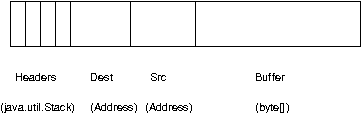
A message contains 5 fields:
- Destination address
The address of the receiver. If null , the message will be sent to all current group members
- Source address
The address of the sender. Can be left null , and will be filled in by the transport protocol (e.g. UDP) before the message is put on the network
- Flags
This is one byte used for flags. The currently recognized flags are OOB, LOW_PRIO and HIGH_PRIO. See the discussion on the concurrent stack for OOB.
- Payload
The actual data (as a byte buffer). The Message class contains convenience methods to set a serializable object and to retrieve it again, using serialization to convert the object to/from a byte buffer.
- Headers
A list of headers that can be attached to a message. Anything that should not be in the payload can be attached to a message as a header. Methods putHeader() , getHeader() and removeHeader() of Message can be used to manipulate headers.
A message is similar to an IP packet and consists of the payload (a byte buffer) and the addresses of the sender and receiver (as Addresses). Any message put on the network can be routed to its destination (receiver address), and replies can be returned to the sender's address.
A message usually does not need to fill in the sender's address when sending a message; this is done automatically by the protocol stack before a message is put on the network. However, there may be cases, when the sender of a message wants to give an address different from its own, so that for example, a response should be returned to some other member.
The destination address (receiver) can be an Address, denoting the address of a member, determined e.g. from a message received previously, or it can be null , which means that the message will be sent to all members of the group. A typical multicast message, sending string "Hello" to all members would look like this:
         Message msg=new Message(null, null, "Hello");
         channel.send(msg);
A View ( View ) is a list of the current members of a group. It consists of a ViewId , which uniquely identifies the view (see below), and a list of members. Views are set in a channel automatically by the underlying protocol stack whenever a new member joins or an existing one leaves (or crashes). All members of a group see the same sequence of views.
Note that there is a comparison function which orders all the members of a group in the same way. Usually, the first member of the list is the coordinator (the one who emits new views). Thus, whenever the membership changes, every member can determine the coordinator easily and without having to contact other members.
The code below shows how to send a (unicast) message to the first member of a view (error checking code omitted):
       View view=channel.getView();
       Address first=view.getMembers().first();
       Message msg=new Message(first, null, "Hello world");
       channel.send(msg);
Whenever an application is notified that a new view has been installed (e.g. by Receiver.viewAccepted(), the view is already set in the channel. For example, calling Channel.getView() in a viewAccepted() callback would return the same view (or possibly the next one in case there has already been a new view !).
The ViewId is used to uniquely number views. It consists of the address of the view creator and a sequence number. ViewIds can be compared for equality and put in a hashtable as they implement equals() and hashCode() methods.[2]
Whenever a group splits into subgroups, e.g. due to a network partition, and later the subgroups merge back together, a MergeView instead of a View will be received by the application. The MergeView class is a subclass of View and contains as additional instance variable the list of views that were merged. As an example if the group denoted by view V1:(p,q,r,s,t) split into subgroups V2:(p,q,r) and V2:(s,t) , the merged view might be V3:(p,q,r,s,t) . In this case the MergeView would contains a list of 2 views: V2:(p,q,r) and V2:(s,t) .
In order to join a group and send messages, a process has to create a channel. A channel is like a socket. When a client connects to a channel, it gives the the name of the group it would like to join. Thus, a channel is (in its connected state) always associated with a particular group. The protocol stack takes care that channels with the same group name find each other: whenever a client connects to a channel given group name G, then it tries to find existing channels with the same name, and joins them, resulting in a new view being installed (which contains the new member). If no members exist, a new group will be created.
A state transition diagram for the major states a channel can assume are shown in Figure 3.2, “Channel states” .
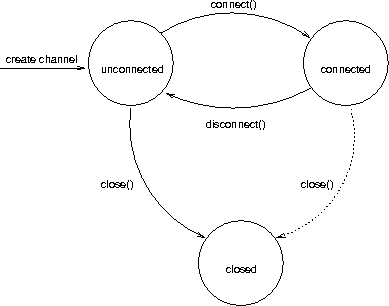
When a channel is first created, it is in the unconnected state. An attempt to perform certain operations which are only valid in the connected state (e.g. send/receive messages) will result in an exception. After a successful connection by a client, it moves to the connected state. Now channels will receive messages, views and suspicions from other members and may send messages to other members or to the group. Getting the local address of a channel is guaranteed to be a valid operation in this state (see below). When the channel is disconnected, it moves back to the unconnected state. Both a connected and unconnected channel may be closed, which makes the channel unusable for further operations. Any attempt to do so will result in an exception. When a channel is closed directly from a connected state, it will first be disconnected, and then closed.
The methods available for creating and manipulating channels are discussed now.
A channel can be created in two ways: an instance of a subclass of Channel is created directly using its public constructor (e.g. new JChannel() ), or a channel factory is created, which -- upon request -- creates instances of channels. We will only look at the first method of creating channel: by direct instantiation.
The public constructor of JChannel looks as follows:
public JChannel(String props) throws ChannelException {}
It creates an instance of JChannel . The props argument points to an XML file containing the configuration of the protocol stack to be used. This can be a String, but there are also other constructors which take for example a DOM element or a URL (more on this later).
If the props argument is null, the default properties will be used. An exception will be thrown if the channel cannot be created. Possible causes include protocols that were specified in the property argument, but were not found, or wrong parameters to protocols.
For example, the Draw demo can be launched as follows:
java org.javagroups.demos.Draw -props file:/home/bela/udp.xml
or
java org.javagroups.demos.Draw -props http://www.jgroups.org/udp.xml
In the latter case, an application downloads its protocol stack specification from a server, which allows for central administration of application properties.
A sample XML configuration looks like this (edited from udp.xml):
              <config>
                  <UDP
                       mcast_addr="${jgroups.udp.mcast_addr:228.10.10.10}"
                       mcast_port="${jgroups.udp.mcast_port:45588}"
                       discard_incompatible_packets="true"
                       max_bundle_size="60000"
                       max_bundle_timeout="30"
                       ip_ttl="${jgroups.udp.ip_ttl:2}"
                       enable_bundling="true"
                       thread_pool.enabled="true"
                       thread_pool.min_threads="1"
                       thread_pool.max_threads="25"
                       thread_pool.keep_alive_time="5000"
                       thread_pool.queue_enabled="false"
                       thread_pool.queue_max_size="100"
                       thread_pool.rejection_policy="Run"
                       oob_thread_pool.enabled="true"
                       oob_thread_pool.min_threads="1"
                       oob_thread_pool.max_threads="8"
                       oob_thread_pool.keep_alive_time="5000"
                       oob_thread_pool.queue_enabled="false"
                       oob_thread_pool.queue_max_size="100"
                       oob_thread_pool.rejection_policy="Run"/>
                  <PING timeout="2000"
                          num_initial_members="3"/>
                  <MERGE2 max_interval="30000"
                          min_interval="10000"/>
                  <FD_SOCK/>
                  <FD timeout="10000" max_tries="5" />
                  <VERIFY_SUSPECT timeout="1500"  />
                  <BARRIER />
                  <pbcast.NAKACK
                                 use_mcast_xmit="false" gc_lag="0"
                                 retransmit_timeout="300,600,1200,2400,4800"
                                 discard_delivered_msgs="true"/>
                  <UNICAST timeout="300,600,1200,2400,3600"/>
                  <pbcast.STABLE stability_delay="1000" desired_avg_gossip="50000"
                                 max_bytes="400000"/>
                  <VIEW_SYNC avg_send_interval="60000"   />
                  <pbcast.GMS print_local_addr="true" join_timeout="3000"
                              view_bundling="true"/>
                  <FC max_credits="20000000"
                                  min_threshold="0.10"/>
                  <FRAG2 frag_size="60000"  />
                  <pbcast.STATE_TRANSFER  />
              </config>
A stack is wrapped by <config> and </config> elements and lists all protocols from bottom (UDP) to top (STATE_TRANSFER). Each element defines one protocol.
Each protocol is implemented as a Java class. When a protocol stack is created based on the above XML configuration, the first element ("UDP") becomes the bottom-most layer, the second one will be placed on the first, etc: the stack is created from the bottom to the top.
Each element has to be the name of a Java class that resides in the org.jgroups.stack.protocols package. Note that only the base name has to be given, not the fully specified class name (UDP instead of org.jgroups.stack.protocols.UDP). If the protocol class is not found, JGroups assumes that the name given is a fully qualified classname and will therefore try to instantiate that class. If this does not work an exception is thrown. This allows for protocol classes to reside in different packages altogether, e.g. a valid protocol name could be com.sun.eng.protocols.reliable.UCAST .
Each layer may have zero or more arguments, which are specified as a list of name/value pairs in parentheses directly after the protocol name. In the example above, UDP is configured with some options, one of them being the IP multicast address (mcast_addr) which is set to 228.10.10.10, or to the value of the system property jgroups.udp.mcast_addr, if set.
Note that all members in a group have to have the same protocol stack.
Usually, channels are created by passing the name of an XML configuration file to the JChannel() constructor. On top of this declarative configuration, JGroups provides an API to create a channel programmatically. The way to do this is to first create a JChannel, then an instance of ProtocolStack, then add all desired protocols to the stack and finally calling init() on the stack to set it up. The rest, e.g. calling JChannel.connect() is the same as with the declarative creation.
An example of how to programmatically create a channel is shown below (copied from ProgrammaticChat):
     JChannel ch=new JChannel(false);         // 1
     ProtocolStack stack=new ProtocolStack(); // 2
     ch.setProtocolStack(stack);              // 3
     stack.addProtocol(new UDP().setValue("bind_addr", InetAddress.getByName("192.168.1.5")))
             .addProtocol(new PING())
             .addProtocol(new MERGE2())
             .addProtocol(new FD_SOCK())
             .addProtocol(new FD_ALL().setValue("timeout", 12000).setValue("interval", 3000))
             .addProtocol(new VERIFY_SUSPECT())
             .addProtocol(new BARRIER())
             .addProtocol(new NAKACK())
             .addProtocol(new UNICAST2())
             .addProtocol(new STABLE())
             .addProtocol(new GMS())
             .addProtocol(new UFC())
             .addProtocol(new MFC())
             .addProtocol(new FRAG2());       // 4
     stack.init();                            // 5

     ch.setReceiver(new ReceiverAdapter() {
         public void viewAccepted(View new_view) {
             System.out.println("view: " + new_view);
         }

         public void receive(Message msg) {
             System.out.println(msg.getObject() + " [" + msg.getSrc() + "]");
         }
     });

     ch.connect("ChatCluster");

     for(;;) {
         String line=Util.readStringFromStdin(": ");
         ch.send(null, null, line);
     }
First a JChannel is created. The 'false' argument tells the channel not to create a ProtocolStack. This is needed because we will create one ourselves later (2) and set it in the channel (3).
Next, all protocols are added to the stack. Note that the order is from bottom (transport protocol) to top. So UDP as transport is added first, then PING and so on, until FRAG2, which is the top protocol. Every protocol can be configured via setters, but there is also a generic setValue(String attr_name, Object value), which can be used to configure protocols as well, as shown in the example.
Once the stack is configured, we call ProtocolStack.init() to link all protocols correctly and to call init() in every protocol instance. After this, the channel is ready to be used and all subsequent actions (e.g. connect()) can be executed. When the init() method returns, we have essentially the equivalent of new JChannel(config_file).
A number of options can be set in a channel. To do so, the following method is used:
public void setOpt(int option, Object value);
Arguments are the options number and a value. The following options are currently recognized:
- Channel.BLOCK
The argument is a boolean object. If true, block messages will be received.
- Channel.LOCAL
Local delivery. The argument is a boolean value. If set to true, a member will receive all messages it sent to itself. Otherwise, all messages sent by itself will be discarded. This option allows to send messages to the group, without receiving a copy. Default is true (members will receive their own copy of messages multicast to the group).
- Channel.AUTO_RECONNECT
When set to true, a shunned channel will leave the group and then try to automatically re-join. Default is false. Note that in 2.8, shunning has been removed, therefore this option has been deprecated.
- Channel.AUTO_GETSTATE
When set to true a shunned channel, after reconnection, will attempt to fetch the state from the coordinator. This requires AUTO_RECONNECT to be true as well. Default is false. Note that in 2.8, shunning has been removed, therefore this option has been deprecated.
The equivalent method to get options is getOpt():
public Object getOpt(int option);
Given an option, the current value of the option is returned.
Deprecating options in 3.0
Most of the options (except LOCAL) have been deprecated in 2.6.x and will be removed in 3.0.
A channel can be given a logical name which is then used instead of the channel's address. A logical name might show the function of a channel, e.g. "HostA-HTTP-Cluster", which is more legible than a UUID 3c7e52ea-4087-1859-e0a9-77a0d2f69f29.
For example, when we have 3 channels, using logical names we might see a view "{A,B,C}", which is nicer than "{56f3f99e-2fc0-8282-9eb0-866f542ae437, ee0be4af-0b45-8ed6-3f6e-92548bfa5cde, 9241a071-10ce-a931-f675-ff2e3240e1ad} !"
If no logical name is set, JGroups generates one, using the hostname and a random number, e.g. linux-3442. If this is not desired and the UUIDs should be shown, use system property -Djgroups.print_uuids=true.
The logical name can be set using:
public void setName(String logical_name);
This should be done before connecting a channel. Note that the logical name stays with a channel until the channel is destroyed, whereas a UUID is created on each connection.
When JGroups starts, it prints the logical name and the associated physical address(es):
            -------------------------------------------------------------------
            GMS: address=mac-53465, cluster=DrawGroupDemo, physical address=192.168.1.3:49932
            -------------------------------------------------------------------
            ** View=[mac-53465|0] [mac-53465]
The logical name is mac-53465 and the physical address is 192.168.1.3:49932. The UUID is not shown here.
Since 2.12 address generation is pluggable. This means that an application can determine what kind of addresses it uses. The default address type is UUID, and since some protocols use UUID, it is recommended to provide custom classes as subclasses of UUID.
This can be used to for example pass additional data around with an address, for example information about the location of the node to which the address is assigned. Note that methods equals(), hashCode() and compare() of the UUID super class should not be changed.
To use custom addresses, the following things have to be done:
- Write an implementation of org.jgroups.stack.AddressGenerator
- For any class CustomAddress, it will need to get registered with the ClassConfigurator
in order to marshal it correctly:
        class CustomAddress extends UUID {
            static {
                ClassConfigurator.add((short)8900, CustomAddress.class);
            }
        }
Note that the ID should be chosen such that it doesn't collide with any IDs defined in jg-magic-map.xml. - Set the address generator in JChannel: setAddressGenerator(AddressGenerator). This has to be done before the channel is connected
An example of a subclass is org.jgroups.util.PayloadUUID.
When a client wants to join a group, it connects to a channel giving the name of the group to be joined:
public void connect(String clustername) throws ChannelClosed;
The cluster name is a string, naming the cluster to be joined. All channels that are connected to the same name form a cluster. Messages multicast on any channel in the cluster will be received by all members (including the one who sent it [3] ).
The method returns as soon as the group has been joined successfully. If the channel is in the closed state (see Figure 3.2, “Channel states” ), an exception will be thrown. If there are no other members, i.e. no other member has connected to a group with this name, then a new group is created and the member joined. The first member of a group becomes its coordinator . A coordinator is in charge of multicasting new views whenever the membership changes [4] .
Clients can also join a cluster group and fetch cluster state in one operation. The best way to conceptualize connect and fetch state connect method is to think of it as an invocation of regular connect and getstate methods executed in succession. However, there are several advantages of using connect and fetch state connect method over regular connect. First of all, underlying message exchange is heavily optimized, especially if the flush protocol is used in the stack. But more importantly, from clients perspective, connect and join operations become one atomic operation.
		      public void connect(string cluster_name, address target,
                                  string state_id, long timeout)
                          throws ChannelException;
Just as in regular connect method cluster name represents a cluster to be joined. Address parameter indicates a cluster member to fetch state from. Null address parameter indicates that state should be fetched from the cluster coordinator. If state should be fetched from a particular member other than coordinator clients can provide an address of that member. State id used for partial state transfer while timeout bounds entire join and fetch operation.
Method getLocalAddress() returns the local address of the channel[5]. In the case of JChannel , the local address is generated by the bottom-most layer of the protocol stack when the stack is connected to. That means that -- depending on the channel implementation -- the local address may or may not be available when a channel is in the unconnected state.
public Address getLocalAddress(); // use getAddress() with 2.8.0+
Method getClusterName() returns the name of the cluster in which the channel is a member:
public String getClusterName();
Again, the result is undefined if the channel is in the unconnected or closed state.
The following method can be used to get the current view of a channel:
public View getView();
This method does not retrieve a new view (message) from the channel, but only returns the current view of the channel. The current view is updated every time a view message is received: when method receive() is called, and the return value is a view, before the view is returned, it will be installed in the channel, i.e. it will become the current view.
Calling this method on an unconnected or closed channel is implementation defined. A channel may return null, or it may return the last view it knew of.
Once the channel is connected, messages can be sent using the send() methods:
         public void send(Message msg) throws ChannelNotConnected, ChannelClosed;
         public void send(Address dst, Address src, Object obj)
                          throws ChannelNotConnected, ChannelClosed;
The first send() method has only one argument, which is the message to be sent. The message's destination should either be the address of the receiver (unicast) or null (multicast). When it is null, the message will be sent to all members of the group (including itself). The source address may be null; if it is, it will be set to the channel's address (so that recipients may generate a response and send it back to the sender).
The second send() method is a helper method and uses the former method internally. It requires the address of receiver and sender and an object (which has to be serializable), constructs a Message and sends it.
If the channel is not connected, or was closed, an exception will be thrown upon attempting to send a message.
Here's an example of sending a (multicast) message to all members of a group:
          Map data; // any serializable data
          try {
              channel.send(null, null, data);
          }
          catch(Exception ex) {
              // handle errors
          }
The null value as destination address means that the message will be sent to all members in the group. The sender's address will be filled in by the bottom-most protocol. The payload is a hashmap, which will be serialized into the message's buffer and unserialized at the receiver's end. Alternatively, any other means of generating a byte buffer and setting the message's buffer to it (e.g. using Message.setBuffer()) would also work.
Here's an example of sending a (unicast) message to the first member (coordinator) of a group:
          Map data;
          try {
              Address receiver=channel.getView().getMembers().first();
              channel.send(receiver, null, data);
          }
          catch(Exception ex) {
              // handle errors
          }
It creates a Message with a specific address for the receiver (the first member of the group). Again, the sender's address can be left null as it will be filled in by the bottom-most protocol.
Method receive() is used to receive messages, views, suspicions and blocks:
         public Object receive(long timeout) throws ChannelNotConnected,
                                                  ChannelClosed, Timeout;
A channel receives messages asynchronously from the network and stores them in a queue. When receive() is called, the next available message from the top of that queue is removed and returned. When there are no messages on the queue, the method will block. If timeout is greater than 0, it will wait the specified number of milliseconds for a message to be received, and throw a TimeoutException exception if none was received during that time. If the timeout is 0 or negative, the method will wait indefinitely for the next available message.
Depending on the channel options (see Section 3.6.2, “Setting options” ), the following types of objects may be received:
- Message
A regular message. To send a response to the sender, a new message can be created. Its destination address would be the received message's source address. Method Message.makeReply() is a helper method to create a response.
- View
A view change, signalling that a member has joined, left or crashed. The application may or may not perform some action upon receiving a view change (e.g. updating a GUI object of the membership, or redistributing a load-balanced collaborative task to all members). Note that a longer action, or any action that blocks should be performed in a separate thread. A MergeView will be received when 2 or more subgroups merged into one (see Section 3.5.2, “MergeView” for details). Here, a possible state merge by the application needs to be done in a separate thread.
- SuspectEvent
Notification of a member that is suspected. Method SuspectEvent.getMember() retrieves the address of the suspected member. Usually this message will be followed by a view change.
- BlockEvent
The application has to stop sending messages. When the application has stopped sending messages, it needs to acknowledge this message with a Channel.blockOk() method.
The BlockEvent reception can be used to complete pending tasks, e.g. send pending messages, but once Channel.blockOk() has been called, all threads that send messages (calling Channel.send() or Channel.down()) will be blocked until FLUSH unblocks them.
- UnblockEvent
The application can resume sending messages. Any previously messages blocked by FLUSH will be unblocked; when the UnblockEvent is received the channel has already been unblocked.
- GetStateEvent
Received when the application's current state should be saved (for a later state transfer. A copy of the current state should be made (possibly wrapped in a synchronized statement and returned calling method Channel.returnState() . If state transfer events are not enabled on the channel (default), then this event will never be received. This message will only be received with the Virtual Synchrony suite of protocols (see the Programmer's Guide).
- StreamingGetStateEvent
Received when the application's current state should be provided to a state requesting group member. If state transfer events are not enabled on the channel (default), or if channel is not configured with pbcast.STREAMING_STATE_TRANSFER then this event will never be received.
- SetStateEvent
Received as response to a getState(s) method call. The argument contains the state of a single member ( byte[] ) or of all members ( Vector ). Since the state of a single member could also be a vector, the interpretation of the argument is left to the application.
- StreamingSetStateEvent
Received at state requesting member when the state InputStream becomes ready for reading. If state transfer events are not enabled on the channel (default), or if channel is not configured with pbcast.STREAMING_STATE_TRANSFER then this event will never be received.
The caller has to check the type of the object returned. This can be done using the instanceof operator, as follows:
          Object obj=channel.receive(0); // wait forever
          if(obj instanceof Message)
              Message msg=(Message)obj;
          else if(obj instanceof View)
              View v=(View)obj;
          else
              ; // don't handle suspicions or blocks
If for example views, suspicions and blocks are disabled, then the caller is guaranteed to only receive return values of type Message . In this case, the return value can be cast to a Message directly, without using the instanceof operator.
If the channel is not connected, or was closed, a corresponding exception will be thrown.
The example below shows how to retrieve the "Hello world" string from a message:
          Message msg; // received above
          try {
              String s=(String)msg.getObject(); // error if obj not Serializable
              // alternative: s=new String(msg.getBuffer());
          }
          catch(Exception ex) {
              // handle errors, e.g. casting error above)
          }
The Message.getObject() method retrieves the message's byte buffer, converts it into a (serializable) object and returns the object.
Instead of pulling messages from a channel in an application thread, a Receiver can be registered with a channel. This is the preferred and recommended way of receiving messages. In 3.0, the receive() method will be removed from JChannel. All received messages, view changes and state transfer requests will invoke callbacks on the registered Receiver:
          JChannel ch=new JChannel();
          ch.setReceiver(new ExtendedReceiverAdapter() {
              public void receive(Message msg) {
                  System.out.println("received message " + msg);
              }
              public void viewAccepted(View new_view) {
                  System.out.println("received view " + new_view);
              }
          });
          ch.connect("bla");
The ExtendedReceiverAdapter class implements all callbacks of ExtendedReceiver with no-ops, in the example above we override receive() and viewAccepted().
The advantage of using a Receiver is that the application doesn't have to waste 1 thread for pulling messages out of a channel. In addition, the channel doesn't have to maintain an (unbounded) queue of messages/views, which can quickly get large if the receiver cannot process messages fast enough, and the sender keeps sending messages.
Note
Note that the Channel.receive() method has been deprecated, and will be removed in 3.0. Use the Receiver interface instead and register as a Receiver with Channel.setReceiver(Receiver r).Instead of removing the next available message from the channel, peek() just returns a reference to the next message, but does not remove it. This is useful when one has to check the type of the next message, e.g. whether it is a regular message, or a view change. The signature of this method is not shown here, it is the same as for receive() .
Note
The peek() method has also been deprecated, and will be removed in 3.0.A newly joined member may wish to retrieve the state of the group before starting work. This is done with getState(). This method returns the state of one member (in most cases, of the oldest member, the coordinator). It returns true or false, depending on whether a valid state could be retrieved. For example, if a member is a singleton, then calling this method would always return false [6] .
The actual state is returned as the return value of one of the subsequent receive() calls, in the form of a SetStateEvent object. If getState() returned true, then a valid state (non-null) will be returned, otherwise a null state will be returned. Alternatively if an application uses MembershipListener (see Section 3.2.3, “MembershipListener” ) instead of pulling messages from a channel, the getState() method will be invoked and a copy of the current state should be returned. By the same token, setting a state would be accomplished by JGroups calling the setState() method of the state fetcher.
The reason for not directly returning the state as a result of getState() is that the state has to be returned in the correct position relative to other messages. Returning it directly would violate the FIFO properties of a channel, and state transfer would not be correct.
The following code fragment shows how a group member participates in state transfers:
          channel=new JChannel();
          channel.connect("TestChannel");
          boolean rc=channel.getState(null, 5000);

          ...

          Object state, copy;
          Object ret=channel.receive(0);
          if(ret instanceof Message)
              ;
          else if(ret instanceof GetStateEvent) {
              // make a copy so that other msgs don't change the state
              copy=copyState(state);
              channel.returnState(Util.objectToByteBuffer(copy));
          }
          else if(ret instanceof SetStateEvent) {
              SetStateEvent e=(SetStateEvent)ret;
              state=e.getArg();
          }
A JChannel has to be created whose stack includes the STATE_TRANSFER or pbcast.STATE_TRANSFER protocols (see Chapter 5, Advanced Concepts ). Method getState() subsequently asks the channel to return the current state. If there is a current state (there may not be any other members in the group !), then true is returned. In this case, one of the subsequent receive() method invocations on the channel will return a SetStateEvent object which contains the current state. In this case, the caller sets its state to the one received from the channel.
Method receive() might return a GetStateEvent object, requesting the state of the member to be returned. In this case, a copy of the current state should be made and returned using JChannel.returnState() . It is important to a) synchronize access to the state when returning it since other accesses may modify it while it is being returned and b) make a copy of the state since other accesses after returning the state may still be able to modify it ! This is possible because the state is not immediately returned, but travels down the stack (in the same address space), and a reference to it could still alter it.
As an alternative to handling the GetStateEvent and SetStateEvent events, and calling Channel.returnState(), a Receiver could be used. The example above would look like this:
          class MyReceiver extends ReceiverAdapter {
              final Map m=new HashMap();
              public byte[] getState() {
                  // so nobody else can modify the map while we serialize it
                  synchronized(m) {
                      byte[] state=Util.objectToByteBuffer(m);
                      return state;
                  }
              }

              public void setState(byte[] state) {
                  synchronized(m) {
                      Map new_m=(Map)Util.objectFromByteBuffer(state);
                      m.clear();
                      m.addAll(new_m);
                  }
              }
          }
          // use default props (has to include STATE_TRANSFER)
          channel=new JChannel();
          channel.setReceiver(new MyReceiver());
          channel.connect("TestChannel");
          boolean rc=channel.getState(null, 5000);
In a group consisting of A,B and C, with D joining the group and calling Channel.getState(), the following sequence of callbacks happens:
- D calls Channel.getState(). The state will be retrieved from the oldest member, A
- A.MyReceiver.getState() is called. A returns a copy of its hashmap
- D: getState() returns true
- D.MyReceiver.setState() is called with the serialized state. D unserializes the state and sets it
Partial state transfer means that instead of transferring the entire state, we may want to transfer only a substate. For example, with HTTP session replication, a new node in a cluster may want to transfer only the state of a specific session, not all HTTP sessions. This can be done with either the pull or push model. The method to call would be Channel.getState(), including the ID of the substate (a string). In the pull model, GetStateEvent and SetStateEvent have an additional member, state_id, and in the push model, there are 2 additional getState() and setState() callbacks. The example below shows partial state transfer for the push model:
          class MyReceiver extends ExtendedReceiverAdapter {
              final Map m=new HashMap();

              public byte[] getState() {
                  return getState(null);
              }

              public byte[] getState(String substate_id) {
                  // so nobody can modify the map while we serialize it
                  synchronized(m) {
                      byte[] state=null;
                      if(substate_id == null) {
                          state=Util.objectToByteBuffer(m);
                      }
                      else {
                          Object value=m.get(substate_id);
                          if(value != null) {
                              return Util.objectToByteBuffer(value);
                          }
                      }
                      return state;
                  }
              }

              public void setState(byte[] state) {
                  setState(null, state);
              }

              public void setState(String substate_id, byte[] state) {
                  synchronized(m) {
                      if(substate_id != null) {
                          Object value=Util.objectFromByteBuffer(state);
                          m.put(substate_id, value);
                      }
                      else {
                          Map new_m=(Map)Util.objectFromByteBuffer(state);
                          m.clear();
                          m.addAll(new_m);
                      }
                  }
              }
          }

          // use default props (has to include pbcast.STATE_TRANSFER)
          channel=new JChannel();
          channel.setReceiver(new MyReceiver());
          channel.connect("TestChannel");
          boolean rc=channel.getState(null, "MyID", 5000);
The example shows that the Channel.getState() method specifies the ID of the substate, in this case "MyID". The getState(String substate_id) method checks whether the substate ID is not null, and returns the substate pertaining to the ID, or the entire state if the substate_id is null. The same goes for setting the substate: if setState(String substate_id, byte[] state) has a non-null substate_id, only that part of the current state will be overwritten, otherwise (if null) the entire state will be overwritten.
Streaming state transfer allows transfer of application (partial) state without having to load entire state into memory prior to sending it to a joining member. Streaming state transfer is especially useful if the state is very large (>1Gb), and use of regular state transfer would likely result in OutOfMemoryException. Streaming state transfer was introduced in JGroups 2.4. JGroups channel has to be configured with either regular or streaming state transfer. The JChannel API that invokes state transfer (i.e. JChannel.getState(long timeout, Address member)) remains the same.
Streaming state transfer, just as regular byte based state transfer, can be used in both pull and push mode. Similarly to the current getState and setState methods of org.jgroups.MessageListener, the application interested in streaming state transfer in a push mode would implement streaming getState method(s) by sending/writing state through a provided OutputStream reference and setState method(s) by receiving/reading state through a provided InputStream reference. In order to use streaming state transfer in a push mode, existing ExtendedMessageListener has been expanded to include additional four methods:
         public interface ExtendedMessageListener {

             /*non-streaming callback methods ommitted for clarity*/

             void getState(OutputStream ostream);
             void getState(String state_id, OutputStream ostream);
             void setState(InputStream istream);
             void setState(String state_id, InputStream istream);
          }
For a pull mode (when application uses channel.receive() to fetch events) two new event classes will be introduced:
StreamingGetStateEvent
StreamingSetStateEvent
These two events/classes are very similar to existing GetStateEvent and SetStateEvent but introduce a new field; StreamingGetStateEvent has an OutputStream and StreamingSetStateEvent has an InputStream.
The following code snippet demonstrates how to pull events from a channel, processing StreamingGetStateEvent and sending hypothetical state through a provided OutputStream reference. Handling of StreamingSetStateEvent is analogous to this example:
          ...
          Object obj=channel.receive(0);
          if(obj instanceof StreamingGetStateEvent) {
              StreamingGetStateEvent evt=(StreamingGetStateEvent)obj;
              OutputStream oos = null;
              try {
                  oos=new ObjectOutputStream(evt.getArg());
                  oos.writeObject(state);
                  oos.flush();
              }
              catch (Exception e) {}
              finally {
                  try {
                      oos.close();
                  }
                  catch (IOException e) {
                      System.err.println(e);
                  }
              }
          }
JGroups has a great flexibility with state transfer methodology by allowing application developers to implement both byte based and streaming based state transfers. Application can, for example, implement streaming and byte based state transfer callbacks and then interchange state transfer protocol in channel configuration to use either streaming or byte based state transfer. However, one cannot configure a channel with both state transfers at the same time and then in runtime choose which particular state transfer type to use.
Disconnecting from a channel is done using the following method:
public void disconnect();
It will have no effect if the channel is already in the disconnected or closed state. If connected, it will remove itself from the group membership. This is done (transparently for a channel user) by sending a leave request to the current coordinator. The latter will subsequently remove the channel's address from its local view and send the new view to all remaining members.
After a successful disconnect, the channel will be in the unconnected state, and may subsequently be re-connected to.
To destroy a channel instance (destroy the associated protocol stack, and release all resources), method close() is used:
public void close();
It moves the channel to the closed state, in which no further operations are allowed (most throw an exception when invoked on a closed channel). In this state, a channel instance is not considered used any longer by an application and -- when the reference to the instance is reset -- the channel essentially only lingers around until it is garbage collected by the Java runtime system.
[1] It could be that the member is suspected falsely, in which case the next view would still contain the suspected member (there is currently no unsuspect() method
[3] Local delivery can be turned on/off using setOpt() .
[4] This is managed internally however, and an application programmer does not need to be concerned about it.
[6] A member will never retrieve the state from itself !
Building blocks are layered on top of channels. Most of them do not even need a channel, all they need is a class that implements interface Transport (channels do). This enables them to work on any type of group transport that implements this interface. Building blocks can be used instead of channels whenever a higher-level interface is required.
Whereas channels are simple socket-like constructs, building blocks may offer a far more sophisticated interface. In some cases, building blocks offer access to the underlying channel, so that -- if the building block at hand does not offer a certain functionality -- the channel can be accessed directly. Building blocks are located in the org.jgroups.blocks package. Only the ones that are relevant for application programmers are discussed below.
Note that this building block has been deprecated and should not be used anymore ! Use a Receiver instead.
This class is a converter (or adapter, as used in [Gamma:1995] between the pull-style of actively receiving messages from the channel and the push-style where clients register a callback which is invoked whenever a message has been received. Clients of a channel do not have to allocate a separate thread for message reception.
A PullPushAdapter is always created on top of a class that implements interface Transport (e.g. a channel). Clients interested in being called when a message is received can register with the PullPushAdapter using method setListener(). They have to implement interface MessageListener, whose receive() method will be called when a message arrives. When a client is interested in getting view, suspicion messages and blocks, then it must additionally register as a MembershipListener using method setMembershipListener(). Whenever a view, suspicion or block is received, the corresponding method will be called.
Upon creation, an instance of PullPushAdapter creates a thread which constantly calls the receive() method of the underlying Transport instance, blocking until a message is available. When a message is received, if there is a registered message listener, its receive() method will be called.
As this class does not implement interface Transport, but merely uses it for receiving messages, an underlying object has to be used to send messages (e.g. the channel on top of which an object of this class resides). This is shown in Figure 4.1, “Class PullPushAdapter”.
As is shown, the thread constantly pulls messages from the channel and forwards them to the registered listeners. An application thus does not have to actively pull for messages, but the PullPushAdapter does this for it. Note however, that the application has to directly access the channel if it wants to send a message.
This section shows sample code for using a PullPushAdapter. The example has been shortened for readability (error handling has been removed).
    public class PullPushTest implements MessageListener {
        Channel          channel;
        PullPushAdapter  adapter;
        byte[]           data="Hello world".getBytes();
        String           props; // fetch properties

        public void receive(Message msg) {
            System.out.println("Received msg: " + msg);
        }

        public void start() throws Exception {
            channel=new JChannel(props);
            channel.connect("PullPushTest");
            adapter=new PullPushAdapter(channel);
            adapter.setListener(this);

            for(int i=0; i < 10; i++) {
                System.out.println("Sending msg #" + i);
                channel.send(new Message(null, null, data));
                Thread.currentThread().sleep(1000);
            }
            adapter.stop();
            channel.close();
        }


        public static void main(String args[]) {
            try {
                new PullPushTest().start();
            }
            catch(Exception e) { /* error */ }
        }
    }
First a channel is created and connected to. Then an instance of PullPushAdapter is created with the channel as argument. The constructor of PullPushAdapter starts its own thread which continually reads on the channel. Then the MessageListener is set, which causes all messages received on the channel to be sent to receive(). Then a number of messages are sent via the channel to the entire group. As group messages are also received by the sender, the receive() method will be called every time a message is received. Finally the PullPushAdapter is stopped and the channel closed. Note that explicitly stopping the PullPushAdapter is not actually necessary, a closing the channel would cause the PullPushAdapter to terminate anyway.
Note that, compared to the pull-style example, push-style message reception is considerably easier (no separate thread management) and requires less code to program.
Note
The PullPushAdapter has been deprecated, and will be removed in 3.0. Use a Receiver implementation instead. The advantage of the Receiver-based (push) model is that we save 1 thread.Channels are simple patterns to asynchronously send a receive messages. However, a significant number of communication patterns in group communication require synchronous communication. For example, a sender would like to send a message to the group and wait for all responses. Or another application would like to send a message to the group and wait only until the majority of the receivers have sent a response, or until a timeout occurred.
MessageDispatcher offers a combination of the above pattern with other patterns. It provides synchronous (as well as asynchronous) message sending with request-response correlation, e.g. matching responses with the original request. It also offers push-style message reception (by internally using the PullPushAdapter).
An instance of MessageDispatcher is created with a channel as argument. It can now be used in both client and server role: a client sends requests and receives responses and a server receives requests and send responses. MessageDispatcher allows a application to be both at the same time. To be able to serve requests, the RequestHandler.handle() method has to be implemented:
Object handle(Message msg);
The handle() method is called any time a request is received. It must return a return value (must be serializable, but can be null) or throw an exception. The return value will be returned to the sender (as a null response, see below). The exception will also be propagated to the requester.
The two methods to send requests are:
    public RspList castMessage(Vector dests, Message msg, int mode, long timeout);
    public Object sendMessage(Message msg, int mode, long timeout)
        throws TimeoutException;
The castMessage() method sends a message to all members defined in dests. If dests is null the message will be sent to all members of the current group. Note that a possible destination set in the message will be overridden. If a message is sent synchronously then the timeout argument defines the maximum amount of time in milliseconds to wait for the responses.
The mode parameter defines whether the message will be sent synchronously or asynchronously. The following values are valid (from org.jgroups.blocks.GroupRequest):
- GET_FIRST
Returns the first response received.
- GET_ALL
Waits for all responses (minus the ones from suspected members)
- GET_MAJORITY
Waits for a majority of all responses (relative to the group size)
- GET_ABS_MAJORITY
Waits for the majority (absolute, computed once)
- GET_N
Wait for n responses (may block if n > group size)
- GET_NONE
Wait for no responses, return immediately (non-blocking). This make the call asynchronous.
The sendMessage() method allows an application programmer to send a unicast message to a receiver and optionally receive the response. The destination of the message has to be non-null (valid address of a receiver). The mode argument is ignored (it is by default set to GroupRequest.GET_FIRST) unless it is set to GET_NONE in which case the request becomes asynchronous, ie. we will not wait for the response.
One advantage of using this building block is that failed members are removed from the set of expected responses. For example, when sending a message to 10 members and waiting for all responses, and 2 members crash before being able to send a response, the call will return with 8 valid responses and 2 marked as failed. The return value of castMessage() is a RspList which contains all responses (not all methods shown):
    public class RspList implements Map<Address,Rsp> {
        public boolean isReceived(Address sender);
        public int     numSuspectedMembers();
        public Vector  getResults();
        public Vector  getSuspectedMembers();
        public boolean isSuspected(Address sender);
        public Object  get(Address sender);
        public int     size();
    }
Method isReceived() checks whether a response from sender has already been received. Note that this is only true as long as no response has yet been received, and the member has not been marked as failed. numSuspectedMembers() returns the number of members that failed (e.g. crashed) during the wait for responses. getResults() returns a list of return values. get() returns the return value for a specific member.
This section describes an example of how to use a MessageDispatcher.
    public class MessageDispatcherTest implements RequestHandler {
        Channel            channel;
        MessageDispatcher  disp;
        RspList            rsp_list;
        String             props; // to be set by application programmer

        public void start() throws Exception {
            channel=new JChannel(props);
            disp=new MessageDispatcher(channel, null, null, this);
            channel.connect("MessageDispatcherTestGroup");

            for(int i=0; i < 10; i++) {
                Util.sleep(100);
                System.out.println("Casting message #" + i);
                rsp_list=disp.castMessage(null,
                    new Message(null, null, new String("Number #" + i)),
                    GroupRequest.GET_ALL, 0);
                System.out.println("Responses:\n" +rsp_list);
            }
            channel.close();
            disp.stop();
        }

        public Object handle(Message msg) {
            System.out.println("handle(): " + msg);
            return new String("Success !");
        }

        public static void main(String[] args) {
            try {
                new MessageDispatcherTest().start();
            }
            catch(Exception e) {
                System.err.println(e);
            }
        }
    }
The example starts with the creation of a channel. Next, an instance of MessageDispatcher is created on top of the channel. Then the channel is connected. The MessageDispatcher will from now on send requests, receive matching responses (client role) and receive requests and send responses (server role).
We then send 10 messages to the group and wait for all responses. The timeout argument is 0, which causes the call to block until all responses have been received.
The handle() method simply prints out a message and returns a string.
Finally both the MessageDispatcher and channel are closed.
This class is derived from MessageDispatcher. It allows a programmer to invoke remote methods in all (or single) group members and optionally wait for the return value(s). An application will typically create a channel and layer the RpcDispatcher building block on top of it, which allows it to dispatch remote methods (client role) and at the same time be called by other members (server role).
Compared to MessageDispatcher, no handle() method needs to be implemented. Instead the methods to be called can be placed directly in the class using regular method definitions (see example below). The invoke remote method calls (unicast and multicast) the following methods are used (not all methods shown):
    public RspList callRemoteMethods(Vector dests, String method_name, int mode, long timeout);
    public RspList callRemoteMethods(Vector dests, String method_name, Object arg1, int mode,
                                     long timeout);
    public Object callRemoteMethod(Address dest, String method_name, int mode, long timeout);
    public Object callRemoteMethod(Address dest, String method_name, Object arg1, int mode,
                                   long timeout);
The family of callRemoteMethods() is invoked with a list of receiver addresses. If null, the method will be invoked in all group members (including the sender). Each call takes the name of the method to be invoked and the mode and timeout parameters, which are the same as for MessageDispatcher. Additionally, each method takes zero or more parameters: there are callRemoteMethods() methods with up to 3 arguments. As shown in the example above, the first 2 methods take zero and one parameters respectively.
The family of callRemoteMethod() methods takes almost the same parameters, except that there is only one destination address instead of a list. If the dest argument is null, the call will fail.
If a sender needs to use more than 3 arguments, it can use the generic versions of callRemoteMethod() and callRemoteMethods() which use a MethodCall[7] instance rather than explicit arguments.
Java's Reflection API is used to find the correct method in the receiver according to the method name and number and types of supplied arguments. There is a runtime exception if a method cannot be resolved.
(* Update: these methods are deprecated; must use MethodCall argument now *)
The code below shows an example:
    public class RpcDispatcherTest {
        Channel            channel;
        RpcDispatcher      disp;
        RspList            rsp_list;
        String             props; // set by application

        public int print(int number) throws Exception {
            return number * 2;
        }

        public void start() throws Exception {
            channel=new JChannel(props);
            disp=new RpcDispatcher(channel, null, null, this);
            channel.connect("RpcDispatcherTestGroup");

            for(int i=0; i < 10; i++) {
                Util.sleep(100);
                rsp_list=disp.callRemoteMethods(null, "print",
                     new Integer(i), GroupRequest.GET_ALL, 0);
                System.out.println("Responses: " +rsp_list);
            }
            channel.close();
            disp.stop();
         }

        public static void main(String[] args) {
            try {
                new RpcDispatcherTest().start();
            }
            catch(Exception e) {
                System.err.println(e);
            }
        }
    }
Class RpcDispatcher defines method print() which will be called subsequently. The entry point start() method creates a channel and an RpcDispatcher which is layered on top. Method callRemoteMethods() then invokes the remote print() method in all group members (also in the caller). When all responses have been received, the call returns and the responses are printed.
As can be seen, the RpcDispatcher building block reduces the amount of code that needs to be written to implement RPC-based group communication applications by providing a higher abstraction level between the application and the primitive channels.
RequestOptions is a collection of options that can be passed into a call, e.g. the mode (GET_ALL, GET_NONE), timeout, flags etc. It is an alternative to passing multiple arguments to a method.
All calls with individual parameters have been deprecated in 2.9 and the new calls with RequestOptions are:
      public RspList callRemoteMethods(Collection<Address> dests, String method_name,
                                       Object[] args,Class[] types, RequestOptions options);
      public RspList callRemoteMethods(Collection<Address> dests, MethodCall method_call,
                                       RequestOptions options);
      public Object callRemoteMethod(Address dest, String method_name, Object[] args,
                                     Class[] types, RequestOptions options);
      public Object callRemoteMethod(Address dest, MethodCall call, RequestOptions options);
An example of how to use RequestOptions is:
        RpcDispatcher disp;
        RequestOptions opts=new RequestOptions(Request.GET_ALL)
                                .setFlags(Message.NO_FC | Message.DONT_BUNDLE);
        Object val=disp.callRemoteMethod(target, method_call, opts);
When invoking a synchronous call, the calling thread is blocked until the response (or responses) has been received.
A Future allows a caller to return immediately and grab the result(s) later. In 2.9, two new methods, which return futures, have been added to RpcDispatcher:
        public NotifyingFuture<RspList> callRemoteMethodsWithFuture(Collection<Address> dests,
                                                   MethodCall method_call, RequestOptions options);
        public <T> NotifyingFuture<T> callRemoteMethodWithFuture(Address dest, MethodCall call,
                                                     RequestOptions options);
A NotifyingFuture extends java.util.concurrent.Future, with its regular methods such as isDone(), get() and cancel(). NotifyingFuture adds setListener<FutureListener> to get notified when the result is available. This is shown in the following code:
        NotifyingFuture<RspList> future=dispatcher.callRemoteMethodsWithFuture(...);
        future.setListener(new FutureListener() {
            void futureDone(Future<T> future) {
                System.out.println("result is " + future.get());
            }
        }
        );
This class was written as a demo of how state can be shared between nodes of a cluster. It has never been heavily tested and is therefore not meant to be used in production, and unsupported.
A ReplicatedHashMap uses a concurrent hashmap internally and allows to create several instances of hashmaps in different processes. All of these instances have exactly the same state at all times. When creating such an instance, a group name determines which group of replicated hashmaps will be joined. The new instance will then query the state from existing members and update itself before starting to service requests. If there are no existing members, it will simply start with an empty state.
Modifications such as put(), clear() or remove() will be propagated in orderly fashion to all replicas. Read-only requests such as get() will only be sent to the local copy.
Since both keys and values of a hashtable will be sent across the network, both of them have to be serializable. This allows for example to register remote RMI objects with any local instance of a hashtable, which can subsequently be looked up by another process which can then invoke remote methods (remote RMI objects are serializable). Thus, a distributed naming and registration service can be built in just a couple of lines.
A ReplicatedHashMap allows to register for notifications, e.g. when a new item is set, or an existing one removed. All registered listeners will notified when such an event occurs. Notification is always local; for example in the case of removing an element, first the element is removed in all replicas, which then notify their listener(s) of the removal (after the fact).
ReplicatedHashMap allow members in a group to share common state across process and machine boundaries.
This class provides notification sending and handling capability. Also, it allows an application programmer to maintain a local cache which is replicated by all instances. NotificationBus also sits on top of a channel, however it creates its channel itself, so the application programmers do not have to provide their own channel. Notification consumers can subscribe to receive notifications by calling setConsumer() and implementing interface NotificationBus.Consumer:
    public interface Consumer {
        void          handleNotification(Serializable n);
        Serializable  getCache();
        void          memberJoined(Address mbr);
        void          memberLeft(Address mbr);
    }
Method handleNotification() is called whenever a notification is received from the channel. A notification is any object that is serializable. Method getCache() is called when someone wants to retrieve our state; the state can be returned as a serializable object. The memberJoined() and memberLeft() callbacks are invoked whenever a member joins or leaves (or crashes).
The most important methods of NotificationBus are:
    public class NotificationBus {
         public void setConsumer(Consumer c);
         public void start() throws Exception;
         public void stop();
         public void sendNotification(Serializable n);
         public Serializable getCacheFromCoordinator(long timeout, int max_tries);
         public Serializable getCacheFromMember(Address mbr, long timeout, int max_tries);
    }
Method setConsumer() allows a consumer to register itself for notifications.
The start() and stop() methods start and stop the NotificationBus.
Method sendNotification() sends the serializable object given as argument to all members of the group, invoking their handleNotification() methods on reception.
Methods getCacheFromCoordinator() and getCacheFromMember() provide functionality to fetch the group state from the coordinator (first member in membership list) or any other member (if its address is known). They take as arguments a timeout and a maximum number of unsuccessful attempts until they return null. Typically one of these methods would be called just after creating a new NotificationBus to acquire the group state. Note that if these methods are used, then the consumers must implement Consumer.getCache(), otherwise the two methods above would always return null.
In 2.12, a new distributed locking service was added, replacing DistributedLockManager. The new service is implemented as a protocol and is used via org.jgroups.blocks.locking.LockService.
LockService talks to the locking protocol via events. The main abstraction of a distributed lock is an implementation of java.util.concurrent.locks.Lock. All lock methods are supported, however, conditions are not yet supported. (Based on feedback, they might be added later).
Below is an example of how LockService is typically used:
            // locking.xml needs to have a locking protocol
            JChannel ch=new JChannel("/home/bela/locking.xml");
            LockService lock_service=new LockService(ch);
            ch.connect("lock-cluster");
            Lock lock=lock_service.getLock("mylock");
            lock.lock();
            try {
                // do something with the locked resource
            }
            finally {
                lock.unlock();
            }
In the example, we create a channel, then a LockService, then connect the channel. Then we grab a lock named "mylock", which we lock and subsequently unlock.
Note that the owner of a lock is always a given thread in a cluster, so the owner is the JGroups address and the thread ID. This means that different threads inside the same JVM trying to access the same named lock will compete for it. If thread-22 grabs the lock first, then thread-5 will block until thread-23 releases the lock.
JGroups includes a demo (org.jgroups.demos.LockServiceDemo), which can be used to interactively experiment with distributed locks. LockServiceDemo -h dumps all command line options.
Currently (Jan 2011), there are 2 protocols which provide locking: Section 7.13.8.2, “PEER_LOCK” and Section 7.13.8.1, “CENTRAL_LOCK”. The locking protocol has to be placed at or towards the top of the stack (close to the channel).
The following scenario is susceptible to merging: we have a cluster view of {A,B,C,D} and then the cluster splits into {A,B} and {C,D}. Assume that B and D now acquire a lock "mylock". This is what happens (with the locking protocol being CENTRAL_LOCK):
- There are 2 coordinators: A for {A,B} and C for {C,D}
- B successfully acquires "mylock" from A
- D successfully acquires "mylock" from C
- The partitions merge back into {A,B,C,D}. Now, only A is the coordinator, but C ceases to be a coordinator
- Problem: D still holds a lock which should actually be invalid !
There is no easy way (via the Lock API) to 'remove' the lock from D. We could for example simply release D's lock on "mylock", but then there's no way telling D that the lock it holds is actually stale !
Therefore the recommended solution here is for nodes to listen to MergeView changes if they expect merging to occur, and re-acquire all of their locks after a merge, e.g.:
                    Lock l1, l2, l3;
                    LockService lock_service;
                    ...
                    public void viewAccepted(View view) {
                        if(view instanceof MergeView) {
                            new Thread() {
                                public void run() {
                                    lock_service.unlockAll();
                                    // stop all access to resources protected by l1, l2 or l3
                                    // every thread needs to re-acquire the locks it holds
                                }
                            }.start
                        }
                    }
In 2.12, a distributed execution service was added. The new service is implemented as a protocol and is used via org.jgroups.blocks.executor.ExecutionService.
ExecutionService talks to the executing protocol via events. The main abstraction is an implementation of java.util.concurrent.locks.ExecutorService. All methods are supported. The restrictions are however that the Callable or Runnable must be Serializable, Externalizable or Streamable. Also the result produced from the future needs to be Serializable, Externalizable or Streamable. If the Callable or Runnable are not then an IllegalArgumentException is immediately thrown. If a result is not then a NotSerializableException with the name of the class will be returned to the Future as an exception cause.
Below is an example of how ExecutionService is typically used:
            // locking.xml needs to have a locking protocol
            JChannel ch=new JChannel("/home/bela/executing.xml");
            ExecutionService exec_service =new ExecutionService(ch);
            ch.connect("exec-cluster");
            Future<Value> future = exec_service.submit(new MyCallable());
            try {
                Value value = future.get();
                // Do something with value
            }
            catch (InterruptedException e) {
                e.printStackTrace();
            }
            catch (ExecutionException e) {
                e.getCause().printStackTrace();
            }
In the example, we create a channel, then an ExecutionService, then connect the channel. Then we submit our callable giving us a Future. Then we wait for the future to finish returning our value and do something with it. If any exception occurs we print the stack trace of that exception.
JGroups includes a demo (org.jgroups.demos.ExecutionServiceDemo), which can be used to interactively experiment with a distributed sort algorithm and performance. This is for demonstration purposes and performance should not be assumed to be better than local. ExecutionServiceDemo -h dumps all command line options.
Currently (March 2011), there is 1 protocol which provide executions: Section 7.13.9, “CENTRAL_EXECUTOR”. The executing protocol has to be placed at or towards the top of the stack (close to the channel).
This chapter discusses some of the more advanced concepts of JGroups with respect to using it and setting it up correctly.
When using a fully virtual synchronous protocol stack, the performance may not be great because of the larger number of protocols present. For certain applications, however, throughput is more important than ordering, e.g. for video/audio streams or airplane tracking. In the latter case, it is important that airplanes are handed over between control domains correctly, but if there are a (small) number of radar tracking messages (which determine the exact location of the plane) missing, it is not a problem. The first type of messages do not occur very often (typically a number of messages per hour), whereas the second type of messages would be sent at a rate of 10-30 messages/second. The same applies for a distributed whiteboard: messages that represent a video or audio stream have to be delivered as quick as possible, whereas messages that represent figures drawn on the whiteboard, or new participants joining the whiteboard have to be delivered according to a certain order.
The requirements for such applications can be solved by using two separate stacks: one for control messages such as group membership, floor control etc and the other one for data messages such as video/audio streams (actually one might consider using one channel for audio and one for video). The control channel might use virtual synchrony, which is relatively slow, but enforces ordering and retransmission, and the data channel might use a simple UDP channel, possibly including a fragmentation layer, but no retransmission layer (losing packets is preferred to costly retransmission).
The Draw2Channels demo program (in the org.jgroups.demos package) demonstrates how to use two different channels.
To save resources (threads, sockets and CPU cycles), transports of channels residing within the same JVM can be shared. If we have 4 channels inside of a JVM (as is the case in an application server such as JBoss), then we have 4 separate thread pools and sockets (1 per transport, and there are 4 transports (1 per channel)).
If those transport happen to be the same (all 4 channels use UDP, for example), then we can share them and only create 1 instance of UDP. That transport instance is created and started only once, when the first channel is created, and is deleted when the last channel is closed.
Each channel created over a shared transport has to join a different cluster. An exception will be thrown if a channel sharing a transport tries to connect to a cluster to which another channel over the same transport is already connected.
When we have 3 channels (C1 connected to "cluster-1", C2 connected to "cluster-2" and C3 connected to "cluster-3") sending messages over the same shared transport, the cluster name with which the channel connected is used to multiplex messages over the shared transport: a header with the cluster name ("cluster-1") is added when C1 sends a message.
When a message with a header of "cluster-1" is received by the shared transport, it is used to demultiplex the message and dispatch it to the right channel (C1 in this example) for processing.
How channels can share a single transport is shown in Figure 5.1, “A shared transport”.
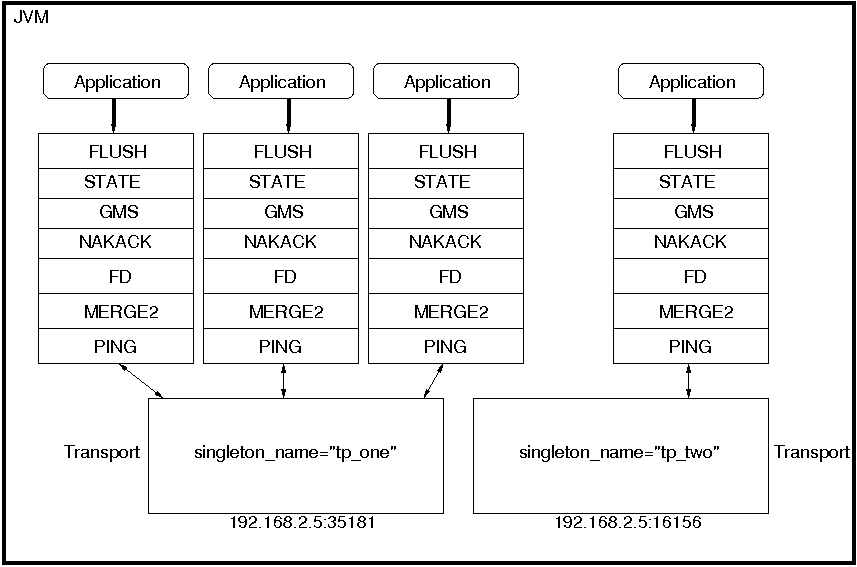
Here we see 4 channels which share 2 transports. Note that first 3 channels which share transport "tp_one" have the same protocols on top of the shared transport. This is not required; the protocols above "tp_one" could be different for each of the 3 channels as long as all applications residing on the same shared transport have the same requirements for the transport's configuration.
To use shared transports, all we need to do is to add a property "singleton_name" to the transport configuration. All channels with the same singleton name will be shared.
A transport protocol refers to the protocol at the bottom of the protocol stack which is responsible for sending and receiving messages to/from the network. There are a number of transport protocols in JGroups. They are discussed in the following sections.
A typical protocol stack configuration using UDP is:
                    <config>
                        <UDP
                             mcast_addr="${jgroups.udp.mcast_addr:228.10.10.10}"
                             mcast_port="${jgroups.udp.mcast_port:45588}"
                             discard_incompatible_packets="true"
                             max_bundle_size="60000"
                             max_bundle_timeout="30"
                             ip_ttl="${jgroups.udp.ip_ttl:2}"
                             enable_bundling="true"
                             thread_pool.enabled="true"
                             thread_pool.min_threads="1"
                             thread_pool.max_threads="25"
                             thread_pool.keep_alive_time="5000"
                             thread_pool.queue_enabled="false"
                             thread_pool.queue_max_size="100"
                             thread_pool.rejection_policy="Run"
                             oob_thread_pool.enabled="true"
                             oob_thread_pool.min_threads="1"
                             oob_thread_pool.max_threads="8"
                             oob_thread_pool.keep_alive_time="5000"
                             oob_thread_pool.queue_enabled="false"
                             oob_thread_pool.queue_max_size="100"
                             oob_thread_pool.rejection_policy="Run"/>
                        <PING timeout="2000"
                                num_initial_members="3"/>
                        <MERGE2 max_interval="30000"
                                min_interval="10000"/>
                        <FD_SOCK/>
                        <FD timeout="10000" max_tries="5"   shun="true"/>
                        <VERIFY_SUSPECT timeout="1500"  />
                        <pbcast.NAKACK
                                       use_mcast_xmit="false" gc_lag="0"
                                       retransmit_timeout="300,600,1200,2400,4800"
                                       discard_delivered_msgs="true"/>
                        <UNICAST timeout="300,600,1200,2400,3600"/>
                        <pbcast.STABLE stability_delay="1000" desired_avg_gossip="50000"
                                       max_bytes="400000"/>
                        <pbcast.GMS print_local_addr="true" join_timeout="3000"
                                    shun="false"
                                    view_bundling="true"/>
                        <FC max_credits="20000000"
                                        min_threshold="0.10"/>
                        <FRAG2 frag_size="60000"  />
                        <pbcast.STATE_TRANSFER  />
                    </config>
In a nutshell the properties of the protocols are:
- UDP
This is the transport protocol. It uses IP multicasting to send messages to the entire cluster, or individual nodes. Other transports include TCP, TCP_NIO and TUNNEL.
- PING
Uses IP multicast (by default) to find initial members. Once found, the current coordinator can be determined and a unicast JOIN request will be sent to it in order to join the cluster.
- MERGE2
Will merge subgroups back into one group, kicks in after a cluster partition.
- FD_SOCK
Failure detection based on sockets (in a ring form between members). Generates notification if a member fails
- FD
Failure detection based on heartbeats and are-you-alive messages (in a ring form between members). Generates notification if a member fails
- VERIFY_SUSPECT
Double-checks whether a suspected member is really dead, otherwise the suspicion generated from protocol below is discarded
- pbcast.NAKACK
Ensures (a) message reliability and (b) FIFO. Message reliability guarantees that a message will be received. If not, the receiver(s) will request retransmission. FIFO guarantees that all messages from sender P will be received in the order P sent them
- UNICAST
Same as NAKACK for unicast messages: messages from sender P will not be lost (retransmission if necessary) and will be in FIFO order (conceptually the same as TCP in TCP/IP)
- pbcast.STABLE
Deletes messages that have been seen by all members (distributed message garbage collection)
- pbcast.GMS
Membership protocol. Responsible for joining/leaving members and installing new views.
- FRAG2
Fragments large messages into smaller ones and reassembles them back at the receiver side. For both multicast and unicast messages
- STATE_TRANSFER
Ensures that state is correctly transferred from an existing member (usually the coordinator) to a new member.
UDP uses IP multicast for sending messages to all members of a group and UDP datagrams for unicast messages (sent to a single member). When started, it opens a unicast and multicast socket: the unicast socket is used to send/receive unicast messages, whereas the multicast socket sends/receives multicast messages. The channel's address will be the address and port number of the unicast socket.
A protocol stack with UDP as transport protocol is typically used with groups whose members run on the same host or are distributed across a LAN. Before running such a stack a programmer has to ensure that IP multicast is enabled across subnets. It is often the case that IP multicast is not enabled across subnets. Refer to section Section 2.8, “It doesn't work !” for running a test program that determines whether members can reach each other via IP multicast. If this does not work, the protocol stack cannot use UDP with IP multicast as transport. In this case, the stack has to either use UDP without IP multicasting or other transports such as TCP.
The protocol stack with UDP and PING as the bottom protocols use IP multicasting by default to send messages to all members (UDP) and for discovery of the initial members (PING). However, if multicasting cannot be used, the UDP and PING protocols can be configured to send multiple unicast messages instead of one multicast message [8] (UDP) and to access a well-known server ( GossipRouter ) for initial membership information (PING).
To configure UDP to use multiple unicast messages to send a group message instead of using IP multicasting, the ip_mcast property has to be set to false .
To configure PING to access a GossipRouter instead of using IP multicast the following properties have to be set:
- gossip_host
The name of the host on which GossipRouter is started
- gossip_port
The port on which GossipRouter is listening
- gossip_refresh
The number of milliseconds to wait until refreshing our address entry with the GossipRouter
Before any members are started the GossipRouter has to be started, e.g.
java org.jgroups.stack.GossipRouter -port 5555 -bindaddress localhost
This starts the GossipRouter on the local host on port 5555. The GossipRouter is essentially a lookup service for groups and members. It is a process that runs on a well-known host and port and accepts GET(group) and REGISTER(group, member) requests. The REGISTER request registers a member's address and group with the GossipRouter. The GET request retrieves all member addresses given a group name. Each member has to periodically ( gossip_refresh ) re-register their address with the GossipRouter, otherwise the entry for that member will be removed (accommodating for crashed members).
The following example shows how to disable the use of IP multicasting and use a GossipRouter instead. Only the bottom two protocols are shown, the rest of the stack is the same as in the previous example:
            <UDP ip_mcast="false" mcast_addr="224.0.0.35" mcast_port="45566" ip_ttl="32"
                mcast_send_buf_size="150000" mcast_recv_buf_size="80000"/>
            <PING gossip_host="localhost" gossip_port="5555" gossip_refresh="15000"
                timeout="2000" num_initial_members="3"/>
The property ip_mcast is set to false in UDP and the gossip properties in PING define the GossipRouter to be on the local host at port 5555 with a refresh rate of 15 seconds. If PING is parameterized with the GossipRouter's address and port, then gossiping is enabled, otherwise it is disabled. If only one parameter is given, gossiping will be disabled .
Make sure to run the GossipRouter before starting any members, otherwise the members will not find each other and each member will form its own group [9] .
TCP is a replacement of UDP as bottom layer in cases where IP Multicast based on UDP is not desired. This may be the case when operating over a WAN, where routers will discard IP MCAST. As a rule of thumb UDP is used as transport for LANs, whereas TCP is used for WANs.
The properties for a typical stack based on TCP might look like this (edited/protocols removed for brevity):
    <TCP start_port="7800" />
    <TCPPING timeout="3000"
             initial_hosts="${jgroups.tcpping.initial_hosts:localhost[7800],localhost[7801]}"
             port_range="1"
             num_initial_members="3"/>
    <VERIFY_SUSPECT timeout="1500"  />
    <pbcast.NAKACK
                   use_mcast_xmit="false" gc_lag="0"
                   retransmit_timeout="300,600,1200,2400,4800"
                   discard_delivered_msgs="true"/>
    <pbcast.STABLE stability_delay="1000" desired_avg_gossip="50000"
                   max_bytes="400000"/>
    <pbcast.GMS print_local_addr="true" join_timeout="3000"
                shun="true"
                view_bundling="true"/>
- TCP
The transport protocol, uses TCP (from TCP/IP) to send unicast and multicast messages. In the latter case, it sends multiple unicast messages.
- TCPPING
Discovers the initial membership to determine coordinator. Join request will then be sent to coordinator.
- VERIFY_SUSPECT
Double checks that a suspected member is really dead
- pbcast.NAKACK
Reliable and FIFO message delivery
- pbcast.STABLE
Distributed garbage collection of messages seen by all members
- pbcast.GMS
Membership services. Takes care of joining and removing new/old members, emits view changes
Since TCP already offers some of the reliability guarantees that UDP doesn't, some protocols (e.g. FRAG and UNICAST) are not needed on top of TCP.
When using TCP, each message to the group is sent as multiple unicast messages (one to each member). Due to the fact that IP multicasting cannot be used to discover the initial members, another mechanism has to be used to find the initial membership. There are a number of alternatives:
PING with GossipRouter: same solution as described in Section 5.3.1.2, “Using UDP without IP multicasting” . The ip_mcast property has to be set to false . GossipRouter has to be started before the first member is started.
TCPPING: uses a list of well-known group members that it solicits for initial membership
TCPGOSSIP: essentially the same as the above PING [10] . The only difference is that TCPGOSSIP allows for multiple GossipRouters instead of only one.
JDBC_PING: using a shared database via JDBC or DataSource.
The next two section illustrate the use of TCP with both TCPPING and TCPGOSSIP.
A protocol stack using TCP and TCPPING looks like this (other protocols omitted):
            <TCP start_port="7800" /> +
            <TCPPING initial_hosts="HostA[7800],HostB[7800]" port_range="5"
            timeout="3000" num_initial_members="3" />
The concept behind TCPPING is that no external daemon such as GossipRouter is needed. Instead some selected group members assume the role of well-known hosts from which initial membership information can be retrieved. In the example HostA and HostB are designated members that will be used by TCPPING to lookup the initial membership. The property start_port in TCP means that each member should try to assign port 7800 for itself. If this is not possible it will try the next higher port ( 7801 ) and so on, until it finds an unused port.
TCPPING will try to contact both HostA and HostB , starting at port 7800 and ending at port 7800 + port_range , in the above example ports 7800 - 7804 . Assuming that at least one of HostA or HostB is up, a response will be received. To be absolutely sure to receive a response all the hosts on which members of the group will be running can be added to the configuration string.
As mentioned before TCPGOSSIP is essentially the same as PING with properties gossip_host , gossip_port and gossip_refresh set. However, in TCPGOSSIP these properties are called differently as shown below (only the bottom two protocols are shown):
              <TCP />
              <TCPGOSSIP initial_hosts="localhost[5555],localhost[5556]" gossip_refresh_rate="10000"
              num_initial_members="3" />
The initial_hosts properties combines both the host and port of a GossipRouter, and it is possible to specify more than one GossipRouter. In the example there are two GossipRouters at ports 5555 and 5556 on the local host. Also, gossip_refresh_rate defines how many milliseconds to wait between refreshing the entry with the GossipRouters.
The advantage of having multiple GossipRouters is that, as long as at least one is running, new members will always be able to retrieve the initial membership. Note that the GossipRouter should be started before any of the members.
Firewalls are usually placed at the connection to the internet. They shield local networks from outside attacks by screening incoming traffic and rejecting connection attempts to host inside the firewalls by outside machines. Most firewall systems allow hosts inside the firewall to connect to hosts outside it (outgoing traffic), however, incoming traffic is most often disabled entirely.
Tunnels are host protocols which encapsulate other protocols by multiplexing them at one end and demultiplexing them at the other end. Any protocol can be tunneled by a tunnel protocol.
The most restrictive setups of firewalls usually disable all incoming traffic, and only enable a few selected ports for outgoing traffic. In the solution below, it is assumed that one TCP port is enabled for outgoing connections to the GossipRouter.
JGroups has a mechanism that allows a programmer to tunnel a firewall. The solution involves a GossipRouter, which has to be outside of the firewall, so other members (possibly also behind firewalls) can access it.
The solution works as follows. A channel inside a firewall has to use protocol TUNNEL instead of UDP or TCP as bottommost layer. Recommended discovery protocol is PING, starting with 2.8 release, you do not have to specify any gossip routers in PING.
              <TUNNEL gossip_router_hosts="127.0.0.1[12001]" />
              <PING />
TCPGOSSIP uses the GossipRouter (outside the firewall) at port 12001 to register its address (periodically) and to retrieve the initial membership for its group. It is not recommended to use TCPGOSSIP for discovery if TUNNEL is already used. TCPGOSSIP might be used in rare scenarios when registration and initial member discovery has to be done through gossip router indepedent of transport protocol being used. Starting with 2.8 release TCPGOSSIP accepts one or multiple router hosts as a comma delimited list of host[port] elements specified in a property initial_hosts.
TUNNEL establishes a TCP connection to the GossipRouter process (also outside the firewall) that accepts messages from members and passes them on to other members. This connection is initiated by the host inside the firewall and persists as long as the channel is connected to a group. GossipRouter will use the same connection to send incoming messages to the channel that initiated the connection. This is perfectly legal, as TCP connections are fully duplex. Note that, if GossipRouter tried to establish its own TCP connection to the channel behind the firewall, it would fail. But it is okay to reuse the existing TCP connection, established by the channel.
Note that TUNNEL has to be given the hostname and port of the GossipRouter process. This example assumes a GossipRouter is running on the local host at port 12001. Both TUNNEL and TCPGOSSIP (or PING) access the same GossipRouter. Starting with 2.8 release TUNNEL transport layer accepts one or multiple router hosts as a comma delimited list of host[port] elements specified in a property gossip_router_hosts.
Any time a message has to be sent, TUNNEL forwards the message to GossipRouter, which distributes it to its destination: if the message's destination field is null (send to all group members), then GossipRouter looks up the members that belong to that group and forwards the message to all of them via the TCP connection they established when connecting to GossipRouter. If the destination is a valid member address, then that member's TCP connection is looked up, and the message is forwarded to it [11] .
Starting with 2.8 release, gossip router is no longer a single point of failure. In a set-up with multiple gossip routers, routers do not communicate among themselves, and single point of failure is avoided by having each channel simply connect to multiple available routers. In case one or more routers go down, cluster members are still able to exchange message through remaining available router instances, if there are any. For each send invocation, a channel goes through a list of available connections to routers and attempts to send a message on each connection until it succeeds. If a message could not be sent on any of the connections – an exception is raised. Default policy for connection selection is random. However, we also provide an plug-in interface for other policies as well. Gossip router configuration is static and is not updated for the lifetime of the channel. A list of available routers has to be provided in channel configuration file.
To tunnel a firewall using JGroups, the following steps have to be taken:
Check that a TCP port (e.g. 12001) is enabled in the firewall for outgoing traffic
Start the GossipRouter:
start org.jgroups.stack.GossipRouter -port 12001Configure the TUNNEL protocol layer as instructed above.
Create a channel
The general setup is shown in Figure 5.2, “Tunneling a firewall” .
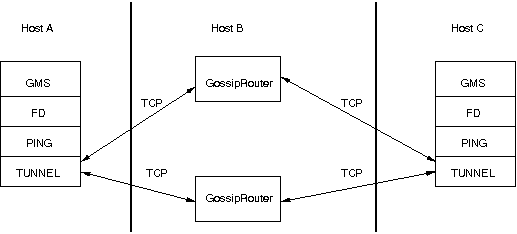
First, the GossipRouter process is created on host B. Note that host B should be outside the firewall, and all channels in the same group should use the same GossipRouter process. When a channel on host A is created, its TCPGOSSIP protocol will register its address with the GossipRouter and retrieve the initial membership (assume this is C). Now, a TCP connection with the GossipRouter is established by A; this will persist until A crashes or voluntarily leaves the group. When A multicasts a message to the group, GossipRouter looks up all group members (in this case, A and C) and forwards the message to all members, using their TCP connections. In the example, A would receive its own copy of the multicast message it sent, and another copy would be sent to C.
This scheme allows for example Java applets , which are only allowed to connect back to the host from which they were downloaded, to use JGroups: the HTTP server would be located on host B and the gossip and GossipRouter daemon would also run on that host. An applet downloaded to either A or C would be allowed to make a TCP connection to B. Also, applications behind a firewall would be able to talk to each other, joining a group.
However, there are several drawbacks: first, having to maintain a TCP connection for the duration of the connection might use up resources in the host system (e.g. in the GossipRouter), leading to scalability problems, second, this scheme is inappropriate when only a few channels are located behind firewalls, and the vast majority can indeed use IP multicast to communicate, and finally, it is not always possible to enable outgoing traffic on 2 ports in a firewall, e.g. when a user does not 'own' the firewall.
The concurrent stack (introduced in 2.5) provides a number of improvements over previous releases, which has some deficiencies:
- Large number of threads: each protocol had by default 2 threads, one for the up and one for the down queue. They could be disabled per protocol by setting up_thread or down_thread to false. In the new model, these threads have been removed.
- Sequential delivery of messages: JGroups used to have a single queue for incoming messages, processed by one thread. Therefore, messages from different senders were still processed in FIFO order. In 2.5 these messages can be processed in parallel.
- Out-of-band messages: when an application doesn't care about the ordering properties of a message, the OOB flag can be set and JGroups will deliver this particular message without regard for any ordering.
The architecture of the concurrent stack is shown in Figure 5.3, “The concurrent stack”. The changes were made entirely inside of the transport protocol (TP, with subclasses UDP, TCP and TCP_NIO). Therefore, to configure the concurrent stack, the user has to modify the config for (e.g.) UDP in the XML file.
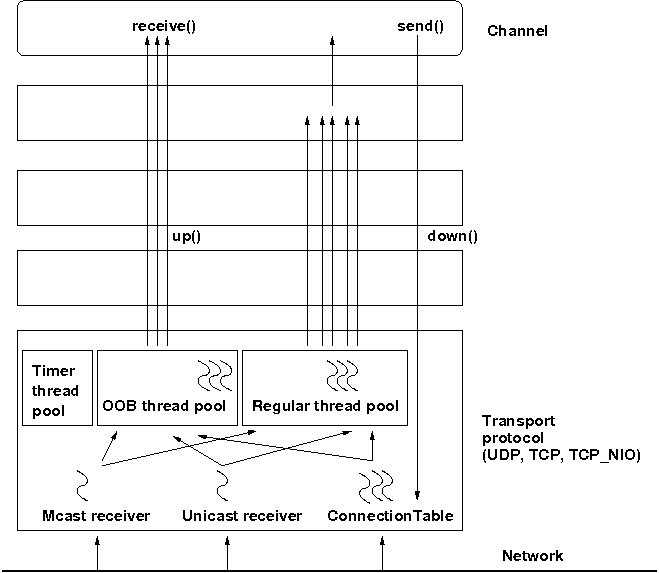
The concurrent stack consists of 2 thread pools (java.util.concurrent.Executor): the out-of-band (OOB) thread pool and the regular thread pool. Packets are received by multicast or unicast receiver threads (UDP) or a ConnectionTable (TCP, TCP_NIO). Packets marked as OOB (with Message.setFlag(Message.OOB)) are dispatched to the OOB thread pool, and all other packets are dispatched to the regular thread pool.
When a thread pool is disabled, then we use the thread of the caller (e.g. multicast or unicast receiver threads or the ConnectionTable) to send the message up the stack and into the application. Otherwise, the packet will be processed by a thread from the thread pool, which sends the message up the stack. When all current threads are busy, another thread might be created, up to the maximum number of threads defined. Alternatively, the packet might get queued up until a thread becomes available.
The point of using a thread pool is that the receiver threads should only receive the packets and forward them to the thread pools for processing, because unmarshalling and processing is slower than simply receiving the message and can benefit from parallelization.
Note that this is preliminary and names or properties might change
We are thinking of exposing the thread pools programmatically, meaning that a developer might be able to set both threads pools programmatically, e.g. using something like TP.setOOBThreadPool(Executor executor).
Here's an example of the new configuration:
                        <UDP
                                mcast_addr="228.10.10.10"
                                mcast_port="45588"

                                thread_pool.enabled="true"
                                thread_pool.min_threads="1"
                                thread_pool.max_threads="100"
                                thread_pool.keep_alive_time="20000"
                                thread_pool.queue_enabled="false"
                                thread_pool.queue_max_size="10"
                                thread_pool.rejection_policy="Run"

                                oob_thread_pool.enabled="true"
                                oob_thread_pool.min_threads="1"
                                oob_thread_pool.max_threads="4"
                                oob_thread_pool.keep_alive_time="30000"
                                oob_thread_pool.queue_enabled="true"
                                oob_thread_pool.queue_max_size="10"
                                oob_thread_pool.rejection_policy="Run"/>
The attributes for the 2 thread pools are prefixed with thread_pool and oob_thread_pool respectively.
The attributes are listed below. The roughly correspond to the options of a java.util.concurrent.ThreadPoolExecutor in JDK 5.
Table 5.1. Attributes of thread pools
| Name | Description |
|---|---|
| enabled | Whether of not to use a thread pool. If set to false, the caller's thread is used. |
| min_threads | The minimum number of threads to use. |
| max_threads | The maximum number of threads to use. |
| keep_alive_time | Number of milliseconds until an idle thread is removed from the pool |
| queue_enabled | Whether of not to use a (bounded) queue. If enabled, when all minimum threads are busy, work items are added to the queue. When the queue is full, additional threads are created, up to max_threads. When max_threads have been reached, the rejection policy is consulted. |
| max_size | The maximum number of elements in the queue. Ignored if the queue is disabled |
| rejection_policy | Determines what happens when the thread pool (and queue, if enabled) is full. The default is to run on the caller's thread. "Abort" throws an runtime exception. "Discard" discards the message, "DiscardOldest" discards the oldest entry in the queue. Note that these values might change, for example a "Wait" value might get added in the future. |
| thread_naming_pattern | Determines how threads are named that are running from thread pools in concurrent stack. Valid values include any combination of "cl" letters, where "c" includes the cluster name and "l" includes local address of the channel. The default is "cl" |
By removing the 2 queues/protocol and the associated 2 threads, we effectively reduce the number of threads needed to handle a message, and thus context switching overhead. We also get clear and unambiguous semantics for Channel.send(): now, all messages are sent down the stack on the caller's thread and the send() call only returns once the message has been put on the network. In addition, an exception will only be propagated back to the caller if the message has not yet been placed in a retransmit buffer. Otherwise, JGroups simply logs the error message but keeps retransmitting the message. Therefore, if the caller gets an exception, the message should be re-sent.
On the receiving side, a message is handled by a thread pool, either the regular or OOB thread pool. Both thread pools can be completely eliminated, so that we can save even more threads and thus further reduce context switching. The point is that the developer is now able to control the threading behavior almost completely.
Up to version 2.5, all messages received were processed by a single thread, even if the messages were sent by different senders. For instance, if sender A sent messages 1,2 and 3, and B sent message 34 and 45, and if A's messages were all received first, then B's messages 34 and 35 could only be processed after messages 1-3 from A were processed !
Now, we can process messages from different senders in parallel, e.g. messages 1, 2 and 3 from A can be processed by one thread from the thread pool and messages 34 and 35 from B can be processed on a different thread.
As a result, we get a speedup of almost N for a cluster of N if every node is sending messages and we configure the thread pool to have at least N threads. There is actually a unit test (ConcurrentStackTest.java) which demonstrates this.
In the previous paragraph, we showed how the concurrent stack delivers messages from different senders concurrently. But all (non-OOB) messages from the same sender P are delivered in the order in which P sent them. However, this is not good enough for certain types of applications.
Consider the case of an application which replicates HTTP sessions. If we have sessions X, Y and Z, then updates to these sessions are delivered in the order in which there were performed, e.g. X1, X2, X3, Y1, Z1, Z2, Z3, Y2, Y3, X4. This means that update Y1 has to wait until updates X1-3 have been delivered. If these updates take some time, e.g. spent in lock acquisition or deserialization, then all subsequent messages are delayed by the sum of the times taken by the messages ahead of them in the delivery order.
However, in most cases, updates to different web sessions should be completely unrelated, so they could be delivered concurrently. For instance, a modification to session X should not have any effect on session Y, therefore updates to X, Y and Z can be delivered concurrently.
One solution to this is out-of-band (OOB) messages (see next paragraph). However, OOB messages do not guarantee ordering, so updates X1-3 could be delivered as X1, X3, X2. If this is not wanted, but messages pertaining to a given web session should all be delivered concurrently between sessions, but ordered within a given session, then we can resort to scoped messages.
Scoped messages apply only to regular (non-OOB) messages, and are delivered concurrently between scopes, but ordered within a given scope. For example, if we used the sessions above (e.g. the jsessionid) as scopes, then the delivery could be as follows ('->' means sequential, '||' means concurrent):
X1 -> X2 -> X3 -> X4 || Y1 -> Y2 -> Y3 || Z1 -> Z2 -> Z3
This means that all updates to X are delivered in parallel to updates to Y and updates to Z. However, within a given scope, updates are delivered in the order in which they were performed, so X1 is delivered before X2, which is deliverd before X3 and so on.
Taking the above example, using scoped messages, update Y1 does not have to wait for updates X1-3 to complete, but is processed immediately.
To set the scope of a message, use method Message.setScope(short).
Scopes are implemented in a separate protocol called Section 7.13.3, “SCOPE”. This protocol has to be placed somewhere above ordering protocols like UNICAST or NAKACK (or SEQUENCER for that matter).
Uniqueness of scopes
Note that scopes should be as unique as possible. Compare this to hashing: the fewer collisions there are, the better the concurrency will be. So, if for example, two web sessions pick the same scope, then updates to those sessions will be delivered in the order in which they were sent, and not concurrently. While this doesn't cause erraneous behavior, it defies the purpose of SCOPE.
Also note that, if multicast and unicast messages have the same scope, they will be delivered in sequence. So if A multicasts messages to the group with scope 25, and A also unicasts messages to B with scope 25, then A's multicasts and unicasts will be delivered in order at B ! Again, this is correct, but since multicasts and unicasts are unrelated, might slow down things !
OOB messages completely ignore any ordering constraints the stack might have. Any message marked as OOB will be processed by the OOB thread pool. This is necessary in cases where we don't want the message processing to wait until all other messages from the same sender have been processed, e.g. in the heartbeat case: if sender P sends 5 messages and then a response to a heartbeat request received from some other node, then the time taken to process P's 5 messages might take longer than the heartbeat timeout, so that P might get falsely suspected ! However, if the heartbeat response is marked as OOB, then it will get processed by the OOB thread pool and therefore might be concurrent to its previously sent 5 messages and not trigger a false suspicion.
The 2 unit tests UNICAST_OOB_Test and NAKACK_OOB_Test demonstrate how OOB messages influence the ordering, for both unicast and multicast messages.
In 2.7, there are 3 thread pools and 4 thread factories in TP:
Table 5.2. Thread pools and factories in TP
| Name | Description |
|---|---|
| Default thread pool | This is the pools for handling incoming messages. It can be fetched using getDefaultThreadPool() and replaced using setDefaultThreadPool(). When setting a thread pool, the old thread pool (if any) will be shutdown and all of it tasks cancelled first |
| OOB thread pool | This is the pool for handling incoming OOB messages. Methods to get and set it are getOOBThreadPool() and setOOBThreadPool() |
| Timer thread pool | This is the thread pool for the timer. The max number of threads is set through the timer.num_threads property. The timer thread pool cannot be set, it can only be retrieved using getTimer(). However, the thread factory of the timer can be replaced (see below) |
| Default thread factory | This is the thread factory (org.jgroups.util.ThreadFactory) of the default thread pool, which handles incoming messages. A thread pool factory is used to name threads and possibly make them daemons. It can be accessed using getDefaultThreadPoolThreadFactory() and setDefaultThreadPoolThreadFactory() |
| OOB thread factory | This is the thread factory for the OOB thread pool. It can be retrieved using getOOBThreadPoolThreadFactory() and set using method setOOBThreadPoolThreadFactory() |
| Timer thread factory | This is the thread factory for the timer thread pool. It can be accessed using getTimerThreadFactory() and setTimerThreadFactory() |
| Global thread factory | The global thread factory can get used (e.g. by protocols) to create threads which don't live in the transport, e.g. the FD_SOCK server socket handler thread. Each protocol has a method getTransport(). Once the TP is obtained, getThreadFactory() can be called to get the global thread factory. The global thread factory can be replaced with setThreadFactory() |
In 2.7, the default and OOB thread pools can be shared between instances running inside the same JVM. The advantage here is that multiple channels running within the same JVM can pool (and therefore save) threads. The disadvantage is that thread naming will not show to which channel instance an incoming thread belongs to.
Note that we can not just shared thread pools between JChannels within the same JVM, but we can also share entire transports. For details see Section 5.2, “The shared transport: sharing a transport between multiple channels in a JVM”.
Note that in 2.8, shunning has been removed, so the sections below only apply to versions up to 2.7.
Let's say we have 4 members in a group: {A,B,C,D}. When a member (say D) is expelled from the group, e.g. because it didn't respond to are-you-alive messages, and later comes back, then it is shunned. Shunning causes a member to leave the group and re-join, if this is enabled on the Channel. To enable automatic re-connects, the AUTO_RECONNECT option has to be set on the Channel:
channel.setOpt(Channel.AUTO_RECONNECT, Boolean.TRUE);
To enable shunning, set FD.shun and GMS.shun to true.
Let's look at a more detailed example. Say member D is overloaded, and doesn't respond to are-you-alive messages (done by the failure detection (FD) protocol). It is therefore suspected and excluded. The new view for A, B and C will be {A,B,C}, however for D the view is still {A,B,C,D}. So when D comes back and sends messages to the group, or any individiual member, those messages will be discarded, because A,B and C don't see D in their view. D is shunned when A,B or C receive an are-you-alive message from D, or D shuns itself when it receives a view which doesn't include D. So shunning is always a unilateral decision. However, things may be different if all members exclude each other from the group. For example, say we have a switch connecting A, B, C and D. If someone pulls all plugs on the switch, or powers the switch down, then A, B, C and D will all form singleton groups, that is, each member thinks it's the only member in the group. When the switch goes back to normal, then each member will shun everybody else (a real shun fest :-)). This is clearly not desirable, so in this case shunning should be turned off:
                <FD timeout="2000" max_tries="3" shun="false"/>
                ...
                <pbcast.GMS join_timeout="3000" shun="false"/>
JGroups creates all of its sockets through a SocketFactory, which is located in the transport (TP) or TP.ProtocolAdapter (in a shared transport). The factory has methods to create sockets (Socket, ServerSocket, DatagramSocket and MulticastSocket) [12], closen sockets and list all open sockets. Every socket creation method has a service name, which could be for example "jgroups.fd_sock.srv_sock". The service name is used to look up a port (e.g. in a config file) and create the correct socket.
To provide one's own socket factory, the following has to be done: if we have a non-shared transport, the code below creates a SocketFactory implementation and sets it in the transport:
                JChannel ch;
                MySocketFactory factory; // e.g. extends DefaultSocketFactory
                ch=new JChannel("config.xml");
                ch.setSocketFactory(new MySocketFactory());
                ch.connect("demo");
If a shared transport is used, then we have to set 2 socket factories: 1 in the shared transport and one in the TP.ProtocolAdapter:
                JChannel c1=new JChannel("config.xml"), c2=new JChannel("config.xml");

                TP transport=c1.getProtocolStack().getTransport();
                transport.setSocketFactory(new MySocketFactory("transport"));

                c1.setSocketFactory(new MySocketFactory("first-cluster"));
                c2.setSocketFactory(new MySocketFactory("second-cluster"));

                c1.connect("first-cluster");
                c2.connect("second-cluster");
First, we grab one of the channels to fetch the transport and set a SocketFactory in it. Then we set one SocketFactory per channel that resides on the shared transport. When JChannel.connect() is called, the SocketFactory will be set in TP.ProtocolAdapter.
Network partitions can be caused by switch, router or network interface crashes, among other things. If we have a cluster {A,B,C,D,E} spread across 2 subnets {A,B,C} and {D,E} and the switch to which D and E are connected crashes, then we end up with a network partition, with subclusters {A,B,C} and {D,E}.
A, B and C can ping each other, but not D or E, and vice versa. We now have 2 coordinators, A and D. Both subclusters operate independently, for example, if we maintain a shared state, subcluster {A,B,C} replicate changes to A, B and C.
This means, that if during the partition, some clients access {A,B,C}, and others {D,E}, then we end up with different states in both subclusters. When a partition heals, the merge protocol (e.g. MERGE2) will notify A and D that there were 2 subclusters and merge them back into {A,B,C,D,E}, with A being the new coordinator and D ceasing to be coordinator.
The question is what happens with the 2 diverged substates ?
There are 2 solutions to merging substates: first we can attempt to create a new state from the 2 substates, and secondly we can shut down all members of the non primary partition, such that they have to re-join and possibly reacquire the state from a member in the primary partition.
In both cases, the application has to handle a MergeView (subclass of View), as shown in the code below:
                public void viewAccepted(View view) {
                    if(view instanceof MergeView) {
                        MergeView tmp=(MergeView)view;
                        Vector<View> subgroups=tmp.getSubgroups();
                        // merge state or determine primary partition
                        // run this in a separate thread !
                    }
                }
It is essential that the merge view handling code run on a separate thread if it needs more than a few milliseconds, or else it would block the calling thread.
The MergeView contains a list of views, each view represents a subgroups and has the list of members which formed this group.
The application has to merge the substates from the various subgroups ({A,B,C} and {D,E}) back into one single state for {A,B,C,D,E}. This task has to be done by the application because JGroups knows nothing about the application state, other than it is a byte buffer.
If the in-memory state is backed by a database, then the solution is easy: simply discard the in-memory state and fetch it (eagerly or lazily) from the DB again. This of course assumes that the members of the 2 subgroups were able to write their changes to the DB. However, this is often not the case, as connectivity to the DB might have been severed by the network partition.
Another solution could involve tagging the state with time stamps. On merging, we could compare the time stamps for the substates and let the substate with the more recent time stamps win.
Yet another solution could increase a counter for a state each time the state has been modified. The state with the highest counter wins.
Again, the merging of state can only be done by the application. Whatever algorithm is picked to merge state, it has to be deterministic.
The primary partition approach is simple: on merging, one subgroup is designated as the primary partition and all others as non-primary partitions. The members in the primary partition don't do anything, whereas the members in the non-primary partitions need to drop their state and re-initialize their state from fresh state obtained from a member of the primary partition.
The code to find the primary partition needs to be deterministic, so that all members pick the same primary partition. This could be for example the first view in the MergeView, or we could sort all members of the new MergeView and pick the subgroup which contained the new coordinator (the one from the consolidated MergeView). Another possible solution could be to pick the largest subgroup, and, if there is a tie, sort the tied views lexicographically (all Addresses have a compareTo() method) and pick the subgroup with the lowest ranked member.
Here's code which picks as primary partition the first view in the MergeView, then re-acquires the state from the new coordinator of the combined view:
                public static void main(String[] args) throws Exception {
                       final JChannel ch=new JChannel("/home/bela/udp.xml");
                       ch.setReceiver(new ExtendedReceiverAdapter() {
                           public void viewAccepted(View new_view) {
                               handleView(ch, new_view);
                           }
                       });
                       ch.connect("x");
                       while(ch.isConnected())
                           Util.sleep(5000);
                   }

                private static void handleView(JChannel ch, View new_view) {
                    if(new_view instanceof MergeView) {
                        ViewHandler handler=new ViewHandler(ch, (MergeView)new_view);
                        // requires separate thread as we don't want to block JGroups
                        handler.start();
                    }
                }

                private static class ViewHandler extends Thread {
                    JChannel ch;
                    MergeView view;

                    private ViewHandler(JChannel ch, MergeView view) {
                        this.ch=ch;
                        this.view=view;
                    }

                    public void run() {
                        Vector<View> subgroups=view.getSubgroups();
                        View tmp_view=subgroups.firstElement(); // picks the first
                        Address local_addr=ch.getLocalAddress();
                        if(!tmp_view.getMembers().contains(local_addr)) {
                            System.out.println("Not member of the new primary partition ("
                                         + tmp_view + "), will re-acquire the state");
                            try {
                                ch.getState(null, 30000);
                            }
                            catch(Exception ex) {
                            }
                        }
                        else {
                            System.out.println("Not member of the new primary partition ("
                                       + tmp_view + "), will do nothing");
                        }
                    }
                }
The handleView() method is called from viewAccepted(), which is called whenever there is a new view. It spawns a new thread which gets the subgroups from the MergeView, and picks the first subgroup to be the primary partition. Then, if it was a member of the primary partition, it does nothing, and if not, it reaqcuires the state from the coordinator of the primary partition (A).
The downside to the primary partition approach is that work (= state changes) on the non-primary partition is discarded on merging. However, that's only problematic if the data was purely in-memory data, and not backed by persistent storage. If the latter's the case, use state merging discussed above.
It would be simpler to shut down the non-primary partition as soon as the network partition is detected, but that a non trivial problem, as we don't know whether {D,E} simply crashed, or whether they're still alive, but were partitioned away by the crash of a switch. This is called a split brain syndrome, and means that none of the members has enough information to determine whether it is in the primary or non-primary partition, by simply exchanging messages.
In certain situations, we can avoid having multiple subgroups where every subgroup is able to make progress, and on merging having to discard state of the non-primary partitions.
If we have a fixed membership, e.g. the cluster always consists of 5 nodes, then we can run code on a view reception that determines the primary partition. This code
- assumes that the primary partition has to have at least 3 nodes
- any cluster which has less than 3 nodes doesn't accept modfications. This could be done for shared state for example, by simply making the {D,E} partition read-only. Clients can access the {D,E} partition and read state, but not modify it.
- As an alternative, clusters without at least 3 members could shut down, so in this case D and E would leave the cluster.
The algorithm is shown in pseudo code below:
                    On initialization:
                        - Mark the node as read-only

                    On view change V:
                        - If V has >= N members:
                            - If not read-write: get state from coord and switch to read-write
                        - Else: switch to read-only
Of course, the above mechanism requires that at least 3 nodes are up at any given time, so upgrades have to be done in a staggered way, taking only one node down at a time. In the worst case, however, this mechanism leaves the cluster read-only and notifies a system admin, who can fix the issue. This is still better than shutting the entire cluster down.
To change this, we can turn on virtual synchrony (by adding FLUSH to the top of the stack), which guarantees that
- A message M sent in V1 will be delivered in V1. So, in the example above, M1 would get delivered in view V1; by A, B and C, but not by D.
- The set of messages seen by members in V1 is the same for all members before a new view V2 is installed. This is important, as it ensures that all members in a given view see the same messages. For example, in a group {A,B,C}, C sends 5 messages. A receives all 5 messages, but B doesn't. Now C crashes before it can retransmit the messages to B. FLUSH will now ensure, that before installing V2={A,B} (excluding C), B gets C's 5 messages. This is done through the flush protocol, which has all members reconcile their messages before a new view is installed. In this case, A will send C's 5 messages to B.
Sometimes it is important to know that every node in the cluster received all messages up to a certain point, even if there is no new view being installed. To do this (initiate a manual flush), an application programmer can call Channel.startFlush() to start a flush and Channel.stopFlush() to terminate it.
Channel.startFlush() flushes all pending messages out of the system. This stops all senders (calling Channel.down() during a flush will block until the flush has completed)[13]. When startFlush() returns, the caller knows that (a) no messages will get sent anymore until stopFlush() is called and (b) all members have received all messages sent before startFlush() was called.
Channel.stopFlush() terminates the flush protocol, no blocked senders can resume sending messages.
Note that the FLUSH protocol has to be present on top of the stack, or else the flush will fail.
This section is a collection of best practices and tips and tricks for running large clusters on JGroups. By large clusters, we mean several hundred nodes in a cluster.
When we have a chatty protocol, scaling to a large number of nodes might be a problem: too many messages are sent and - because they are generated in addition to the regular traffic - this can have a negative impact on the cluster. A possible impact is that more of the regular messages are dropped, and have to be retransmitted, which impacts performance. Or heartbeats are dropped, leading to false suspicions. So while the negative effects of chatty protocols may not be seen in small clusters, they will be seen in large clusters !
A discovery protocol (e.g. PING, TCPPING, MPING etc) is run at startup, to discover the initial membership, and periodically by the merge protocol, to detect partitioned subclusters.
When we send a multicast discovery request to a large cluster, every node in the cluster might possibly reply with a discovery response sent back to the sender. So, in a cluster of 300 nodes, the discovery requester might be up to 299 discovery responses ! Even worse, because num_ping_requests in Discovery is by default set to 2, so we're sending 2 discovery requests, we might receive up to num_ping_requests * (N-1) discovery responses, even though we might be able to find out the coordinator after a few responses already !
To reduce the large number of responses, we can set a max_rank property: the value defines which members are going to send a discovery response. The rank is the index of a member in a cluster: in {A,B,C,D,E}, A's index is 1, B's index is 2 and so on. A max_rank of 3 would trigger discovery responses from only A, B and C, but not from D or E.
We highly recommend setting max_rank in large clusters.
This functionality was implemented in https://jira.jboss.org/browse/JGRP-1181.
Failure detection protocols determine when a member is unresponsive, and subsequently suspect it. Usually (FD, FD_ALL), messages (heartbeats) are used to determine the health of a member, but we can also use TCP connections (FD_SOCK) to connect to a member P, and suspect P when the connection is closed.
Heartbeating requires messages to be sent around, and we need to be careful to limit the number of messages sent by a failure detection protocol (1) to detect crashed members and (2) when a member has been suspected. The following sections discuss how to configure FD_ALL and FD_SOCK, the most commonly used failure detection protocols, for use in large clusters.
In 2.12, the RELAY protocol was added to JGroups (for the properties see Section 7.13.4, “RELAY”). It allows for bridging of remote clusters. For example, if we have a cluster in New York (NYC) and another one in San Francisco (SFO), then RELAY allows us to bridge NYC and SFO, so that multicast messages sent in NYC will be forwarded to SFO and vice versa.
The NYC and SFO clusters could for example use IP multicasting (UDP as transport), and the bridge could use TCP as transport. The SFO and NYC clusters don't even need to use the same cluster name.
Figure 5.4, “Relaying between different clusters” shows how the two clusters are bridged.
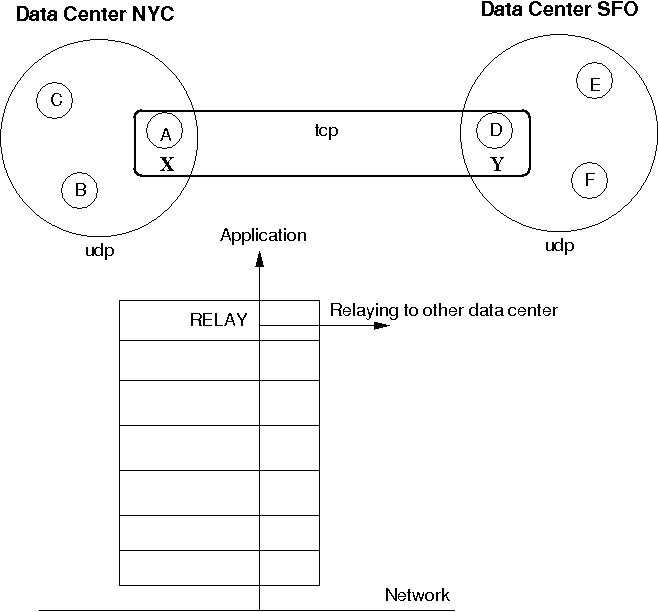
The cluster on the left side with nodes A (the coordinator), B and C is called "NYC" and use IP multicasting (UDP as transport). The cluster on the right side ("SFO") has nodes D (coordinator), E and F.
The bridge between the local clusters NYC and SFO is essentially another cluster with the coordinators (A and D) of the local clusters as members. The bridge typically uses TCP as transport, but any of the supported JGroups transports could be used (including UDP, if supported across a WAN, for instance).
Only a coordinator relays traffic between the local and remote cluster. When A crashes or leaves, then the next-in-line (B) takes over and starts relaying.
Relaying is done via the RELAY protocol added to the top of the stack. The bridge is configured with the bridge_props property, e.g. bridge_props="/home/bela/tcp.xml". This creates a JChannel inside RELAY.
Note that property "site" must be set in both subclusters. In the example above, we could set site="nyc" for the NYC subcluster and site="sfo" for the SFO ubcluster.
The design is described in detail in JGroups/doc/design/RELAY.txt (part of the source distribution). In a nutshell, multicast messages received in a local cluster are wrapped and forwarded to the remote cluster by a relay (= the coordinator of a local cluster). When a remote cluster receives such a message, it is unwrapped and put onto the local cluster.
JGroups uses subclasses of UUID (PayloadUUID) to ship the site name with an address. When we see an address with site="nyc" on the SFO side, then RELAY will forward the message to the SFO subcluster, and vice versa. When C multicasts a message in the NYC cluster, A will forward it to D, which will re-broadcast the message on its local cluster, with the sender being D. This means that the sender of the local broadcast will appear as D (so all retransmit requests got to D), but the original sender C is preserved in the header. At the RELAY protocol, the sender will be replaced with the original sender (C) having site="nyc". When node F wants to reply to the sender of the multicast, the destination of the message will be C, which is intercepted by the RELAY protocol and forwarded to the current relay (D). D then picks the correct destination (C) and sends the message to the remote cluster, where A makes sure C (the original sender) receives it.
An important design goal of RELAY is to be able to have completely autonomous clusters, so NYC doesn't for example have to block waiting for credits from SFO, or a node in the SFO cluster doesn't have to ask a node in NYC for retransmission of a missing message.
RELAY presents a global view to the application, e.g. a view received by nodes could be {D,E,F,A,B,C}. This view is the same on all nodes, and a global view is generated by taking the two local views, e.g. A|5 {A,B,C} and D|2 {D,E,F}, comparing the coordinators' addresses (the UUIDs for A and D) and concatenating the views into a list. So if D's UUID is greater than A's UUID, we first add D's members into the global view ({D,E,F}), and then A's members.
Therefore, we'll always see all of A's members, followed by all of D's members, or the other way round.
To see which nodes are local and which ones remote, we can iterate through the addresses (PayloadUUID) and use the site (PayloadUUID.getPayload()) name to for example differentiate between "nyc" and "sfo".
To setup a relay, we need essentially 3 XML configuration files: 2 to configure the local clusters and 1 for the bridge.
To configure the first local cluster, we can copy udp.xml from the JGroups distribution and add RELAY on top of it: <RELAY bridge_props="/home/bela/tcp.xml" />. Let's say we call this config relay.xml.
The second local cluster can be configured by copying relay.xml to relay2.xml. Then change the mcast_addr and/or mcast_port, so we actually have 2 different cluster in case we run instances of both clusters in the same network. Of course, if the nodes of one cluster are run in a different network from the nodes of the other cluster, and they cannot talk to each other, then we can simply use the same configuration.
The 'site' property needs to be configured in relay.xml and relay2.xml, and it has to be different. For example, relay.xml could use site="nyc" and relay2.xml could use site="sfo".
The bridge is configured by taking the stock tcp.xml and making sure both local clusters can see each other through TCP.
Daisychaining refers to a way of disseminating messages sent to the entire cluster.
The idea behind it is that it is inefficient to broadcast a message in clusters where IP multicasting is not available. For example, if we only have TCP available (as is the case in most clouds today), then we have to send a broadcast (or group) message N-1 times. If we want to broadcast M to a cluster of 10, we send the same message 9 times.
Example: if we have {A,B,C,D,E,F}, and A broadcasts M, then it sends it to B, then to C, then to D etc. If we have a 1 GB switch, and M is 1GB, then sending a broadcast to 9 members takes 9 seconds, even if we parallelize the sending of M. This is due to the fact that the link to the switch only sustains 1GB / sec. (Note that I'm conveniently ignoring the fact that the switch will start dropping packets if it is overloaded, causing TCP to retransmit, slowing things down)...
Let's introduce the concept of a round. A round is the time it takes to send or receive a message. In the above example, a round takes 1 second if we send 1 GB messages. In the existing N-1 approach, it takes X * (N-1) rounds to send X messages to a cluster of N nodes. So to broadcast 10 messages a the cluster of 10, it takes 90 rounds.
Enter DAISYCHAIN.
The idea is that, instead of sending a message to N-1 members, we only send it to our neighbor, which forwards it to its neighbor, and so on. For example, in {A,B,C,D,E}, D would broadcast a message by forwarding it to E, E forwards it to A, A to B, B to C and C to D. We use a time-to-live field, which gets decremented on every forward, and a message gets discarded when the time-to-live is 0.
The advantage is that, instead of taxing the link between a member and the switch to send N-1 messages, we distribute the traffic more evenly across the links between the nodes and the switch. Let's take a look at an example, where A broadcasts messages m1 and m2 in cluster {A,B,C,D}, '-->' means sending:
- Round 1: A(m1) --> B
- Round 2: A(m1) --> C
- Round 3: A(m1) --> D
- Round 4: A(m2) --> B
- Round 5: A(m2) --> C
- Round 6: A(m2) --> D
It takes 6 rounds to broadcast m1 and m2 to the cluster.
- Round 1: A(m1) --> B
- Round 2: A(m2) --> B || B(m1) --> C
- Round 3: B(m2) --> C || C(m1) --> D
- Round 4: C(m2) --> D
In round 1, A send m1 to B.
In round 2, A sends m2 to B, but B also forwards m1 (received in round 1) to C.
In round 3, A is done. B forwards m2 to C and C forwards m1 to D (in parallel, denoted by '||').
In round 4, C forwards m2 to D.
Let's take a look at this in terms of switch usage: in the N-1 approach, A can only send 125MB/sec, no matter how many members there are in the cluster, so it is constrained by the link capacity to the switch. (Note that A can also receive 125MB/sec in parallel with today's full duplex links).
So the link between A and the switch gets hot.
In the daisychaining approach, link usage is more even: if we look for example at round 2, A sending to B and B sending to C uses 2 different links, so there are no constraints regarding capacity of a link. The same goes for B sending to C and C sending to D.
In terms of rounds, the daisy chaining approach uses X + (N-2) rounds, so for a cluster size of 10 and broadcasting 10 messages, it requires only 18 rounds, compared to 90 for the N-1 approach !
To measure performance of DAISYCHAIN, a performance test (test.Perf) was run, with 4 nodes connected to a 1 GB switch; and every node sending 1 million 8K messages, for a total of 32GB received by every node. The config used was tcp.xml.
The N-1 approach yielded a throughput of 73 MB/node/sec, and the daisy chaining approach 107MB/node/sec !
Ergonomics is similar to the dynamic setting of optimal values for the JVM, e.g. garbage collection, memory sizes etc. In JGroups, ergonomics means that we try to dynamically determine and set optimal values for protocol properties. Examples are thread pool size, flow control credits, heartbeat frequency and so on.
[8] Although not as efficient (and using more bandwidth), it is sometimes the only possibility to reach group members.
[9] This can actually be used to test the MERGE2 protocol: start two members (forming two singleton groups because they don't find each other), then start the GossipRouter. After some time, the two members will merge into one group
[10] PING and TCPGOSSIP will be merged in the future.
[11] To do so, GossipRouter has to maintain a table between groups, member addresses and TCP connections.
[12] Currently, SocketFactory does not support creation of NIO sockets / channels.
[13] Note that block() will be called in a Receiver when the flush is about to start and unblock() will be called when it ends
This chapter discusses how to write custom protocols
Headers are mainly used by protocols, to ship additional information around with a message, without having to place it into the payload buffer, which is often occupied by the application already. However, headers can also be used by an application, e.g. to add information to a message, without having to squeeze it into the payload buffer.
A header has to extend org.jgroups.Header, have an empty public constructor and (currently) implement the Externalizable interface (writeExternal() and readExternal() methods). Note that the latter requirement (Externalizable) will probably go away in 3.0.
A header should also override size(), which returns the total number of bytes taken up in the output stream when an instance is marshalled using Streamable. Streamable is an interface for efficient marshalling with methods void writeTo(DataOutputStream out) throws IOException; and void readFrom(DataInputStream in) throws IOException, IllegalAccessException, InstantiationException;. Method writeTo() needs to write all relevant instance variables to the output stream and readFrom() needs to read them back in. It is important that size() returns the correct number of bytes, because some components such a message bundling in the transport depend on this, as they need to measure the exact number of bytes before sending a message off. If size() returns fewer bytes than what will actually be written to the stream, then it is possible that (if we use UDP with a 65535 bytes maximum) the datagram packet is dropped by UDP !
The final requirement is to add the newly created header class to jg-magic-map.xml (in the ./conf directory), or - if this is not a JGroups internal protocol - to add the class to ClassConfigurator. This can be done with method ClassConfigurator.getInstance().put(1899, MyHeader.class).
The code below shows how an application defines a custom header, MyHeader, and uses it to attach additional information to message sent (to itself):
                public class bla {

                    public static void main(String[] args) throws ChannelException, ClassNotFoundException {
                        JChannel ch=new JChannel();
                        ch.connect("demo");
                        ch.setReceiver(new ReceiverAdapter() {
                            public void receive(Message msg) {
                                MyHeader hdr=(MyHeader)msg.getHeader("x");
                                System.out.println("-- received message " + msg + ", header is " + hdr);
                            }
                        });

                        ClassConfigurator.getInstance().add((short)1900, MyHeader.class);

                        int cnt=1;
                        for(int i=0; i < 5; i++) {
                            Message msg=new Message();
                            msg.putHeader((short)1900, new MyHeader(cnt++));
                            ch.send(msg);
                        }
                        ch.close();
                    }


                    public static class MyHeader extends Header implements Streamable {
                        int counter=0;

                        public MyHeader() {
                        }

                        private MyHeader(int counter) {
                            this.counter=counter;
                        }

                        public String toString() {
                            return "counter=" + counter;
                        }

                        public int size() {
                            return Global.INT_SIZE;
                        }

                        public void writeTo(DataOutputStream out) throws IOException {
                            out.writeInt(counter);
                        }

                        public void readFrom(DataInputStream in) throws IOException, IllegalAccessException, InstantiationException {
                            counter=in.readInt();
                        }
                    }
                }
The MyHeader class has an empty public constructor and implements the writeExternal() and readExternal() methods with no-op implementations.
The state is represented as an integer counter. Method size() returns 4 bytes (Global.INT_SIZE), which is the number of bytes written by writeTo() and read by readFrom().
Before sending messages with instances of MyHeader attached, the program registers the MyHeader class with the ClassConfigurator. The example uses a magic number of 1900, but any number greater than 1024 can be used. If the magic number was already taken, an IllegalAccessException would be thrown.
The final part is adding an instance of MyHeader to a message using Message.putHeader(). The first argument is a name which has to be unique across all headers for a given message. Usually, protocols use the protocol name (e.g. "UDP", "NAKACK"), so these names should not be used by an application. The second argument is an instance of the header.
Getting a header is done through Message.getHeader() which takes the name as argument. This name of course has to be the same as the one used in putHeader().
This section is work in progress; we strive to update the documentation as we make changes to the code.
The most important properties are described on the wiki. The idea is that users take one of the predefined configurations (shipped with JGroups) and make only minor changes to it.
For each protocol define:
Properties provided
Required services
Provided services
Behavior
Table 7.1. Properties
| Name | Description |
|---|---|
| bind_addr | The bind address which should be used by this transport. The following special values are also recognized: GLOBAL, SITE_LOCAL, LINK_LOCAL and NON_LOOPBACK |
| bind_interface_str | The interface (NIC) which should be used by this transport |
| bind_port | The port to which the transport binds. Default of 0 binds to any (ephemeral) port |
| bundler_capacity | The max number of elements in a bundler if the bundler supports size limitations |
| bundler_type | The type of bundler used. Has to be "old" (default) or "new" |
| diagnostics_addr | Address for diagnostic probing. Default is 224.0.75.75 |
| diagnostics_port | Port for diagnostic probing. Default is 7500 |
| disable_loopback | |
| discard_incompatible_packets | Discard packets with a different version if true. Default is false |
| enable_bundling | Enable bundling of smaller messages into bigger ones. Default is true |
| enable_diagnostics | Switch to enable diagnostic probing. Default is true |
| enable_unicast_bundling | Enable bundling of smaller messages into bigger ones for unicast messages. Default is false |
| ergonomics | Enables ergonomics: dynamically find the best values for properties at runtime |
| id | Give the protocol a different ID if needed so we can have multiple instances of it in the same stack |
| ip_mcast | Multicast toggle. If false multiple unicast datagrams are sent instead of one multicast. Default is true |
| ip_ttl | The time-to-live (TTL) for multicast datagram packets. Default is 8 |
| level | Sets the logger level (see javadocs) |
| log_discard_msgs | whether or not warnings about messages from different groups are logged |
| logical_addr_cache_expiration | Time (in ms) after which entries in the logical address cache marked as removable are removed |
| logical_addr_cache_max_size | Max number of elements in the logical address cache before eviction starts |
| loopback | Messages to self are looped back immediately if true |
| max_bundle_size | Maximum number of bytes for messages to be queued until they are sent |
| max_bundle_timeout | Max number of milliseconds until queued messages are sent |
| mcast_group_addr | The multicast address used for sending and receiving packets. Default is 228.8.8.8 |
| mcast_port | The multicast port used for sending and receiving packets. Default is 7600 |
| mcast_recv_buf_size | Receive buffer size of the multicast datagram socket. Default is 500'000 bytes |
| mcast_send_buf_size | Send buffer size of the multicast datagram socket. Default is 100'000 bytes |
| name | Give the protocol a different name if needed so we can have multiple instances of it in the same stack (also change ID) |
| oob_thread_pool.keep_alive_time | Timeout in ms to remove idle threads from the OOB pool |
| oob_thread_pool.max_threads | Max thread pool size for the OOB thread pool |
| oob_thread_pool.min_threads | Minimum thread pool size for the OOB thread pool |
| oob_thread_pool_enabled | Switch for enabling thread pool for OOB messages. Default=true |
| oob_thread_pool_queue_enabled | Use queue to enqueue incoming OOB messages |
| oob_thread_pool_queue_max_size | Maximum queue size for incoming OOB messages. Default is 500 |
| oob_thread_pool_rejection_policy | Thread rejection policy. Possible values are Abort, Discard, DiscardOldest and Run. Default is Discard |
| port_range | The range of valid ports, from bind_port to end_port. Infinite if 0 |
| receive_interfaces | Comma delimited list of interfaces (IP addresses or interface names) to receive multicasts on |
| receive_on_all_interfaces | If true, the transport should use all available interfaces to receive multicast messages |
| singleton_name | If assigned enable this transport to be a singleton (shared) transport |
| stats | Determines whether to collect statistics (and expose them via JMX). Default is true |
| thread_naming_pattern | Thread naming pattern for threads in this channel. Default is cl |
| thread_pool.keep_alive_time | Timeout in milliseconds to remove idle thread from regular pool |
| thread_pool.max_threads | Maximum thread pool size for the regular thread pool |
| thread_pool.min_threads | Minimum thread pool size for the regular thread pool |
| thread_pool_enabled | Switch for enabling thread pool for regular messages. Default true |
| thread_pool_queue_enabled | Use queue to enqueue incoming regular messages. Default is true |
| thread_pool_queue_max_size | Maximum queue size for incoming OOB messages. Default is 500 |
| thread_pool_rejection_policy | Thread rejection policy. Possible values are Abort, Discard, DiscardOldest and Run. Default is Discard |
| tick_time | Tick duration in the HashedTimingWheel timer. Only applicable if timer_type is "wheel" |
| timer.keep_alive_time | Timeout in ms to remove idle threads from the timer pool |
| timer.max_threads | Max thread pool size for the timer thread pool |
| timer.min_threads | Minimum thread pool size for the timer thread pool |
| timer_queue_max_size | Max number of elements on a timer queue |
| timer_type | Type of timer to be used. Valid values are "old" (DefaultTimeScheduler, used up to 2.10), "new" (TimeScheduler2) and "wheel". Note that this property might disappear in future releases, if one of the 3 timers is chosen as default timer |
| tos | Traffic class for sending unicast and multicast datagrams. Default is 8 |
| ucast_recv_buf_size | Receive buffer size of the unicast datagram socket. Default is 64'000 bytes |
| ucast_send_buf_size | Send buffer size of the unicast datagram socket. Default is 100'000 bytes |
| wheel_size | Number of ticks in the HashedTimingWheel timer. Only applicable if timer_type is "wheel" |
Table 7.2. Properties
| Name | Description |
|---|---|
| bind_addr | The bind address which should be used by this transport. The following special values are also recognized: GLOBAL, SITE_LOCAL, LINK_LOCAL and NON_LOOPBACK |
| bind_interface_str | The interface (NIC) which should be used by this transport |
| bind_port | The port to which the transport binds. Default of 0 binds to any (ephemeral) port |
| bundler_capacity | The max number of elements in a bundler if the bundler supports size limitations |
| bundler_type | The type of bundler used. Has to be "old" (default) or "new" |
| conn_expire_time | Max time connection can be idle before being reaped (in ms) |
| diagnostics_addr | Address for diagnostic probing. Default is 224.0.75.75 |
| diagnostics_port | Port for diagnostic probing. Default is 7500 |
| discard_incompatible_packets | Discard packets with a different version if true. Default is false |
| enable_bundling | Enable bundling of smaller messages into bigger ones. Default is true |
| enable_diagnostics | Switch to enable diagnostic probing. Default is true |
| enable_unicast_bundling | Enable bundling of smaller messages into bigger ones for unicast messages. Default is false |
| ergonomics | Enables ergonomics: dynamically find the best values for properties at runtime |
| external_addr | Use "external_addr" if you have hosts on different networks, behind firewalls. On each firewall, set up a port forwarding rule (sometimes called "virtual server") to the local IP (e.g. 192.168.1.100) of the host then on each host, set "external_addr" TCP transport parameter to the external (public IP) address of the firewall. |
| id | Give the protocol a different ID if needed so we can have multiple instances of it in the same stack |
| level | Sets the logger level (see javadocs) |
| linger | SO_LINGER in msec. Default of -1 disables it |
| log_discard_msgs | whether or not warnings about messages from different groups are logged |
| logical_addr_cache_expiration | Time (in ms) after which entries in the logical address cache marked as removable are removed |
| logical_addr_cache_max_size | Max number of elements in the logical address cache before eviction starts |
| loopback | Messages to self are looped back immediately if true |
| max_bundle_size | Maximum number of bytes for messages to be queued until they are sent |
| max_bundle_timeout | Max number of milliseconds until queued messages are sent |
| name | Give the protocol a different name if needed so we can have multiple instances of it in the same stack (also change ID) |
| oob_thread_pool.keep_alive_time | Timeout in ms to remove idle threads from the OOB pool |
| oob_thread_pool.max_threads | Max thread pool size for the OOB thread pool |
| oob_thread_pool.min_threads | Minimum thread pool size for the OOB thread pool |
| oob_thread_pool_enabled | Switch for enabling thread pool for OOB messages. Default=true |
| oob_thread_pool_queue_enabled | Use queue to enqueue incoming OOB messages |
| oob_thread_pool_queue_max_size | Maximum queue size for incoming OOB messages. Default is 500 |
| oob_thread_pool_rejection_policy | Thread rejection policy. Possible values are Abort, Discard, DiscardOldest and Run. Default is Discard |
| peer_addr_read_timeout | Max time to block on reading of peer address |
| port_range | The range of valid ports, from bind_port to end_port. Infinite if 0 |
| reaper_interval | Reaper interval in msec. Default is 0 (no reaping) |
| receive_interfaces | Comma delimited list of interfaces (IP addresses or interface names) to receive multicasts on |
| receive_on_all_interfaces | If true, the transport should use all available interfaces to receive multicast messages |
| recv_buf_size | Receiver buffer size in bytes |
| send_buf_size | Send buffer size in bytes |
| send_queue_size | Max number of messages in a send queue |
| singleton_name | If assigned enable this transport to be a singleton (shared) transport |
| sock_conn_timeout | Max time allowed for a socket creation in connection table |
| stats | Determines whether to collect statistics (and expose them via JMX). Default is true |
| tcp_nodelay | Should TCP no delay flag be turned on |
| thread_naming_pattern | Thread naming pattern for threads in this channel. Default is cl |
| thread_pool.keep_alive_time | Timeout in milliseconds to remove idle thread from regular pool |
| thread_pool.max_threads | Maximum thread pool size for the regular thread pool |
| thread_pool.min_threads | Minimum thread pool size for the regular thread pool |
| thread_pool_enabled | Switch for enabling thread pool for regular messages. Default true |
| thread_pool_queue_enabled | Use queue to enqueue incoming regular messages. Default is true |
| thread_pool_queue_max_size | Maximum queue size for incoming OOB messages. Default is 500 |
| thread_pool_rejection_policy | Thread rejection policy. Possible values are Abort, Discard, DiscardOldest and Run. Default is Discard |
| tick_time | Tick duration in the HashedTimingWheel timer. Only applicable if timer_type is "wheel" |
| timer.keep_alive_time | Timeout in ms to remove idle threads from the timer pool |
| timer.max_threads | Max thread pool size for the timer thread pool |
| timer.min_threads | Minimum thread pool size for the timer thread pool |
| timer_queue_max_size | Max number of elements on a timer queue |
| timer_type | Type of timer to be used. Valid values are "old" (DefaultTimeScheduler, used up to 2.10), "new" (TimeScheduler2) and "wheel". Note that this property might disappear in future releases, if one of the 3 timers is chosen as default timer |
| use_send_queues | Should separate send queues be used for each connection |
| wheel_size | Number of ticks in the HashedTimingWheel timer. Only applicable if timer_type is "wheel" |
Table 7.3. Properties (experimental)
| Name | Description |
|---|---|
| bind_addr | The bind address which should be used by this transport. The following special values are also recognized: GLOBAL, SITE_LOCAL, LINK_LOCAL and NON_LOOPBACK |
| bind_interface_str | The interface (NIC) which should be used by this transport |
| bind_port | The port to which the transport binds. Default of 0 binds to any (ephemeral) port |
| bundler_capacity | The max number of elements in a bundler if the bundler supports size limitations |
| bundler_type | The type of bundler used. Has to be "old" (default) or "new" |
| diagnostics_addr | Address for diagnostic probing. Default is 224.0.75.75 |
| diagnostics_port | Port for diagnostic probing. Default is 7500 |
| discard_incompatible_packets | Discard packets with a different version if true. Default is false |
| enable_bundling | Enable bundling of smaller messages into bigger ones. Default is true |
| enable_diagnostics | Switch to enable diagnostic probing. Default is true |
| enable_unicast_bundling | Enable bundling of smaller messages into bigger ones for unicast messages. Default is false |
| ergonomics | Enables ergonomics: dynamically find the best values for properties at runtime |
| id | Give the protocol a different ID if needed so we can have multiple instances of it in the same stack |
| level | Sets the logger level (see javadocs) |
| log_discard_msgs | whether or not warnings about messages from different groups are logged |
| logical_addr_cache_expiration | Time (in ms) after which entries in the logical address cache marked as removable are removed |
| logical_addr_cache_max_size | Max number of elements in the logical address cache before eviction starts |
| loopback | Messages to self are looped back immediately if true |
| max_bundle_size | Maximum number of bytes for messages to be queued until they are sent |
| max_bundle_timeout | Max number of milliseconds until queued messages are sent |
| name | Give the protocol a different name if needed so we can have multiple instances of it in the same stack (also change ID) |
| oob_thread_pool.keep_alive_time | Timeout in ms to remove idle threads from the OOB pool |
| oob_thread_pool.max_threads | Max thread pool size for the OOB thread pool |
| oob_thread_pool.min_threads | Minimum thread pool size for the OOB thread pool |
| oob_thread_pool_enabled | Switch for enabling thread pool for OOB messages. Default=true |
| oob_thread_pool_queue_enabled | Use queue to enqueue incoming OOB messages |
| oob_thread_pool_queue_max_size | Maximum queue size for incoming OOB messages. Default is 500 |
| oob_thread_pool_rejection_policy | Thread rejection policy. Possible values are Abort, Discard, DiscardOldest and Run. Default is Discard |
| port_range | The range of valid ports, from bind_port to end_port. Infinite if 0 |
| receive_interfaces | Comma delimited list of interfaces (IP addresses or interface names) to receive multicasts on |
| receive_on_all_interfaces | If true, the transport should use all available interfaces to receive multicast messages |
| reconnect_interval | Interval in msec to attempt connecting back to router in case of torn connection. Default is 5000 msec |
| router_host | Router host address |
| router_port | Router port |
| singleton_name | If assigned enable this transport to be a singleton (shared) transport |
| stats | Determines whether to collect statistics (and expose them via JMX). Default is true |
| tcp_nodelay | Should TCP no delay flag be turned on |
| thread_naming_pattern | Thread naming pattern for threads in this channel. Default is cl |
| thread_pool.keep_alive_time | Timeout in milliseconds to remove idle thread from regular pool |
| thread_pool.max_threads | Maximum thread pool size for the regular thread pool |
| thread_pool.min_threads | Minimum thread pool size for the regular thread pool |
| thread_pool_enabled | Switch for enabling thread pool for regular messages. Default true |
| thread_pool_queue_enabled | Use queue to enqueue incoming regular messages. Default is true |
| thread_pool_queue_max_size | Maximum queue size for incoming OOB messages. Default is 500 |
| thread_pool_rejection_policy | Thread rejection policy. Possible values are Abort, Discard, DiscardOldest and Run. Default is Discard |
| tick_time | Tick duration in the HashedTimingWheel timer. Only applicable if timer_type is "wheel" |
| timer.keep_alive_time | Timeout in ms to remove idle threads from the timer pool |
| timer.max_threads | Max thread pool size for the timer thread pool |
| timer.min_threads | Minimum thread pool size for the timer thread pool |
| timer_queue_max_size | Max number of elements on a timer queue |
| timer_type | Type of timer to be used. Valid values are "old" (DefaultTimeScheduler, used up to 2.10), "new" (TimeScheduler2) and "wheel". Note that this property might disappear in future releases, if one of the 3 timers is chosen as default timer |
| wheel_size | Number of ticks in the HashedTimingWheel timer. Only applicable if timer_type is "wheel" |
Table 7.4. Properties
| Name | Description |
|---|---|
| break_on_coord_rsp | Return from the discovery phase as soon as we have 1 coordinator response |
| discovery_timeout | Time (in ms) to wait for our own discovery message to be received. 0 means don't wait. If the discovery message is not received within discovery_timeout ms, a warning will be logged |
| ergonomics | Enables ergonomics: dynamically find the best values for properties at runtime |
| id | Give the protocol a different ID if needed so we can have multiple instances of it in the same stack |
| level | Sets the logger level (see javadocs) |
| max_rank | Only members with a rank <= max_rank will send a discovery response. 1 means only the coordinator will reply. 0 disables this; everyone replies. JIRA: https://jira.jboss.org/browse/JGRP-1181 |
| name | Give the protocol a different name if needed so we can have multiple instances of it in the same stack (also change ID) |
| num_initial_members | Minimum number of initial members to get a response from. Default is 2 |
| num_initial_srv_members | Minimum number of server responses (PingData.isServer()=true). If this value is greater than 0, we'll ignore num_initial_members |
| num_ping_requests | Number of discovery requests to be sent distributed over timeout. Default is 2 |
| return_entire_cache | Whether or not to return the entire logical-physical address cache mappings on a discovery request, or not. Default is false, except for TCPPING |
| stats | Determines whether to collect statistics (and expose them via JMX). Default is true |
| timeout | Timeout to wait for the initial members. Default is 3000 msec |
FILE_PING can be used instead of GossipRouter in cases where no external process is desired.
Table 7.5. Properties
| Name | Description |
|---|---|
| break_on_coord_rsp | Return from the discovery phase as soon as we have 1 coordinator response |
| discovery_timeout | Time (in ms) to wait for our own discovery message to be received. 0 means don't wait. If the discovery message is not received within discovery_timeout ms, a warning will be logged |
| ergonomics | Enables ergonomics: dynamically find the best values for properties at runtime |
| id | Give the protocol a different ID if needed so we can have multiple instances of it in the same stack |
| level | Sets the logger level (see javadocs) |
| max_rank | Only members with a rank <= max_rank will send a discovery response. 1 means only the coordinator will reply. 0 disables this; everyone replies. JIRA: https://jira.jboss.org/browse/JGRP-1181 |
| name | Give the protocol a different name if needed so we can have multiple instances of it in the same stack (also change ID) |
| num_initial_members | Minimum number of initial members to get a response from. Default is 2 |
| num_initial_srv_members | Minimum number of server responses (PingData.isServer()=true). If this value is greater than 0, we'll ignore num_initial_members |
| num_ping_requests | Number of discovery requests to be sent distributed over timeout. Default is 2 |
| return_entire_cache | Whether or not to return the entire logical-physical address cache mappings on a discovery request, or not. Default is false, except for TCPPING |
| stats | Determines whether to collect statistics (and expose them via JMX). Default is true |
| timeout | Timeout to wait for the initial members. Default is 3000 msec |
JDBC_PING is an alternative to S3_PING by using Amazon RDS instead of S3.
Table 7.6. Properties
| Name | Description |
|---|---|
| break_on_coord_rsp | Return from the discovery phase as soon as we have 1 coordinator response |
| connection_driver | The JDBC connection driver name |
| connection_password | The JDBC connection password |
| connection_url | The JDBC connection URL |
| connection_username | The JDBC connection username |
| datasource_jndi_name | To use a DataSource registered in JNDI, specify the JNDI name here. This is an alternative to all connection_* configuration options: if this property is not empty, then all connection relatedproperties must be empty. |
| delete_single_sql | SQL used to delete a row. Customizable, but keep the order of parameters and pick compatible types: 1)Own Address, as String 2)Cluster name, as String |
| ergonomics | Enables ergonomics: dynamically find the best values for properties at runtime |
| id | Give the protocol a different ID if needed so we can have multiple instances of it in the same stack |
| initialize_sql | If not empty, this SQL statement will be performed at startup.Customize it to create the needed table on those databases which permit table creation attempt without loosing data, such as PostgreSQL and MySQL (using IF NOT EXISTS). To allow for creation attempts, errors performing this statement will be loggedbut not considered fatal. To avoid any DDL operation, set this to an empty string. |
| insert_single_sql | SQL used to insert a new row. Customizable, but keep the order of parameters and pick compatible types: 1)Own Address, as String 2)Cluster name, as String 3)Serialized PingData as byte[] |
| interval | Interval (in milliseconds) at which the own Address is written. 0 disables it. |
| level | Sets the logger level (see javadocs) |
| location | The absolute path of the shared file |
| max_rank | Only members with a rank <= max_rank will send a discovery response. 1 means only the coordinator will reply. 0 disables this; everyone replies. JIRA: https://jira.jboss.org/browse/JGRP-1181 |
| name | Give the protocol a different name if needed so we can have multiple instances of it in the same stack (also change ID) |
| num_initial_members | Minimum number of initial members to get a response from. Default is 2 |
| num_initial_srv_members | Minimum number of server responses (PingData.isServer()=true). If this value is greater than 0, we'll ignore num_initial_members |
| num_ping_requests | Number of discovery requests to be sent distributed over timeout. Default is 2 |
| return_entire_cache | Whether or not to return the entire logical-physical address cache mappings on a discovery request, or not. Default is false, except for TCPPING |
| select_all_pingdata_sql | SQL used to fetch all node's PingData. Customizable, but keep the order of parameters and pick compatible types: only one parameter needed, String compatible, representing the Cluster name. Must return a byte[], the Serialized PingData as it was stored by the insert_single_sql statement |
| stats | Determines whether to collect statistics (and expose them via JMX). Default is true |
| timeout | Timeout to wait for the initial members. Default is 3000 msec |
Table 7.7. Properties
| Name | Description |
|---|---|
| break_on_coord_rsp | Return from the discovery phase as soon as we have 1 coordinator response |
| ergonomics | Enables ergonomics: dynamically find the best values for properties at runtime |
| id | Give the protocol a different ID if needed so we can have multiple instances of it in the same stack |
| initial_hosts | Comma delimited list of hosts to be contacted for initial membership |
| level | Sets the logger level (see javadocs) |
| max_dynamic_hosts | max number of hosts to keep beyond the ones in initial_hosts |
| max_rank | Only members with a rank <= max_rank will send a discovery response. 1 means only the coordinator will reply. 0 disables this; everyone replies. JIRA: https://jira.jboss.org/browse/JGRP-1181 |
| name | Give the protocol a different name if needed so we can have multiple instances of it in the same stack (also change ID) |
| num_initial_members | Minimum number of initial members to get a response from. Default is 2 |
| num_initial_srv_members | Minimum number of server responses (PingData.isServer()=true). If this value is greater than 0, we'll ignore num_initial_members |
| num_ping_requests | Number of discovery requests to be sent distributed over timeout. Default is 2 |
| port_range | Number of ports to be probed for initial membership. Default is 1 |
| return_entire_cache | Whether or not to return the entire logical-physical address cache mappings on a discovery request, or not. Default is false, except for TCPPING |
| stats | Determines whether to collect statistics (and expose them via JMX). Default is true |
| timeout | Timeout to wait for the initial members. Default is 3000 msec |
Table 7.8. Properties
| Name | Description |
|---|---|
| break_on_coord_rsp | Return from the discovery phase as soon as we have 1 coordinator response |
| ergonomics | Enables ergonomics: dynamically find the best values for properties at runtime |
| id | Give the protocol a different ID if needed so we can have multiple instances of it in the same stack |
| initial_hosts | Comma delimited list of hosts to be contacted for initial membership |
| level | Sets the logger level (see javadocs) |
| max_rank | Only members with a rank <= max_rank will send a discovery response. 1 means only the coordinator will reply. 0 disables this; everyone replies. JIRA: https://jira.jboss.org/browse/JGRP-1181 |
| name | Give the protocol a different name if needed so we can have multiple instances of it in the same stack (also change ID) |
| num_initial_members | Minimum number of initial members to get a response from. Default is 2 |
| num_initial_srv_members | Minimum number of server responses (PingData.isServer()=true). If this value is greater than 0, we'll ignore num_initial_members |
| num_ping_requests | Number of discovery requests to be sent distributed over timeout. Default is 2 |
| reconnect_interval | Interval (ms) by which a disconnected stub attempts to reconnect to the GossipRouter |
| return_entire_cache | Whether or not to return the entire logical-physical address cache mappings on a discovery request, or not. Default is false, except for TCPPING |
| sock_conn_timeout | Max time for socket creation. Default is 1000 msec |
| sock_read_timeout | Max time in milliseconds to block on a read. 0 blocks forever |
| stats | Determines whether to collect statistics (and expose them via JMX). Default is true |
| timeout | Timeout to wait for the initial members. Default is 3000 msec |
Table 7.9. Properties
| Name | Description |
|---|---|
| bind_addr | Bind address for multicast socket. The following special values are also recognized: GLOBAL, SITE_LOCAL, LINK_LOCAL and NON_LOOPBACK |
| bind_interface_str | The interface (NIC) which should be used by this transport |
| break_on_coord_rsp | Return from the discovery phase as soon as we have 1 coordinator response |
| discovery_timeout | Time (in ms) to wait for our own discovery message to be received. 0 means don't wait. If the discovery message is not received within discovery_timeout ms, a warning will be logged |
| ergonomics | Enables ergonomics: dynamically find the best values for properties at runtime |
| id | Give the protocol a different ID if needed so we can have multiple instances of it in the same stack |
| ip_ttl | Time to live for discovery packets. Default is 8 |
| level | Sets the logger level (see javadocs) |
| max_rank | Only members with a rank <= max_rank will send a discovery response. 1 means only the coordinator will reply. 0 disables this; everyone replies. JIRA: https://jira.jboss.org/browse/JGRP-1181 |
| mcast_addr | |
| mcast_port | Multicast port for discovery packets. Default is 7555 |
| name | Give the protocol a different name if needed so we can have multiple instances of it in the same stack (also change ID) |
| num_initial_members | Minimum number of initial members to get a response from. Default is 2 |
| num_initial_srv_members | Minimum number of server responses (PingData.isServer()=true). If this value is greater than 0, we'll ignore num_initial_members |
| num_ping_requests | Number of discovery requests to be sent distributed over timeout. Default is 2 |
| receive_interfaces | List of interfaces to receive multicasts on |
| receive_on_all_interfaces | If true, the transport should use all available interfaces to receive multicast messages. Default is false |
| return_entire_cache | Whether or not to return the entire logical-physical address cache mappings on a discovery request, or not. Default is false, except for TCPPING |
| send_interfaces | List of interfaces to send multicasts on |
| send_on_all_interfaces | Whether send messages are sent on all interfaces. Default is false |
| stats | Determines whether to collect statistics (and expose them via JMX). Default is true |
| timeout | Timeout to wait for the initial members. Default is 3000 msec |
BPING uses UDP broadcasts to discover other nodes. The default broadcast address (dest) is 255.255.255.255, and should be replaced with a subnet specific broadcast, e.g. 192.168.1.255.
Table 7.10. Properties (experimental)
| Name | Description |
|---|---|
| bind_port | Port for discovery packets |
| break_on_coord_rsp | Return from the discovery phase as soon as we have 1 coordinator response |
| dest | Target address for broadcasts. This should be restricted to the local subnet, e.g. 192.168.1.255 |
| discovery_timeout | Time (in ms) to wait for our own discovery message to be received. 0 means don't wait. If the discovery message is not received within discovery_timeout ms, a warning will be logged |
| ergonomics | Enables ergonomics: dynamically find the best values for properties at runtime |
| id | Give the protocol a different ID if needed so we can have multiple instances of it in the same stack |
| level | Sets the logger level (see javadocs) |
| max_rank | Only members with a rank <= max_rank will send a discovery response. 1 means only the coordinator will reply. 0 disables this; everyone replies. JIRA: https://jira.jboss.org/browse/JGRP-1181 |
| name | Give the protocol a different name if needed so we can have multiple instances of it in the same stack (also change ID) |
| num_initial_members | Minimum number of initial members to get a response from. Default is 2 |
| num_initial_srv_members | Minimum number of server responses (PingData.isServer()=true). If this value is greater than 0, we'll ignore num_initial_members |
| num_ping_requests | Number of discovery requests to be sent distributed over timeout. Default is 2 |
| port_range | Sends discovery packets to ports 8555 to (8555+port_range) |
| return_entire_cache | Whether or not to return the entire logical-physical address cache mappings on a discovery request, or not. Default is false, except for TCPPING |
| stats | Determines whether to collect statistics (and expose them via JMX). Default is true |
| timeout | Timeout to wait for the initial members. Default is 3000 msec |
S3_PING is primarily meant to be used on Amazon EC2 where multicast traffic is not allowed and no external process (GossipRouter) is desired. When Amazon RDS is preferred over S3, or if a shared database is used, an alternative is to use JDBC_PING.
Table 7.11. Properties (experimental)
| Name | Description |
|---|---|
| access_key | The access key to AWS (S3) |
| break_on_coord_rsp | Return from the discovery phase as soon as we have 1 coordinator response |
| ergonomics | Enables ergonomics: dynamically find the best values for properties at runtime |
| id | Give the protocol a different ID if needed so we can have multiple instances of it in the same stack |
| interval | Interval (in milliseconds) at which the own Address is written. 0 disables it. |
| level | Sets the logger level (see javadocs) |
| location | The absolute path of the shared file |
| max_rank | Only members with a rank <= max_rank will send a discovery response. 1 means only the coordinator will reply. 0 disables this; everyone replies. JIRA: https://jira.jboss.org/browse/JGRP-1181 |
| name | Give the protocol a different name if needed so we can have multiple instances of it in the same stack (also change ID) |
| num_initial_members | Minimum number of initial members to get a response from. Default is 2 |
| num_initial_srv_members | Minimum number of server responses (PingData.isServer()=true). If this value is greater than 0, we'll ignore num_initial_members |
| num_ping_requests | Number of discovery requests to be sent distributed over timeout. Default is 2 |
| pre_signed_delete_url | When non-null, we use this pre-signed URL for DELETEs |
| pre_signed_put_url | When non-null, we use this pre-signed URL for PUTs |
| prefix | When non-null, we set location to prefix-UUID |
| return_entire_cache | Whether or not to return the entire logical-physical address cache mappings on a discovery request, or not. Default is false, except for TCPPING |
| secret_access_key | The secret access key to AWS (S3) |
| stats | Determines whether to collect statistics (and expose them via JMX). Default is true |
| timeout | Timeout to wait for the initial members. Default is 3000 msec |
Table 7.12. Properties
| Name | Description |
|---|---|
| ergonomics | Enables ergonomics: dynamically find the best values for properties at runtime |
| id | Give the protocol a different ID if needed so we can have multiple instances of it in the same stack |
| inconsistent_view_threshold | Number of inconsistent views with only 1 coord after a MERGE event is sent up |
| level | Sets the logger level (see javadocs) |
| max_interval | Maximum time in ms between runs to discover other clusters |
| merge_fast | When receiving a multicast message, checks if the sender is member of the cluster. If not, initiates a merge |
| merge_fast_delay | The delay (in milliseconds) after which a merge fast execution is started |
| min_interval | Minimum time in msbetween runs to discover other clusters |
| name | Give the protocol a different name if needed so we can have multiple instances of it in the same stack (also change ID) |
| stats | Determines whether to collect statistics (and expose them via JMX). Default is true |
Failure detection based on heartbeat messages. If reply is not received without timeout ms, max_tries times, a member is declared suspected, and will be excluded by GMS
Each member send a message containing a "FD" - HEARTBEAT header to its neighbor to the right (identified by the ping_dest address). The heartbeats are sent by the inner class Monitor. When the neighbor receives the HEARTBEAT, it replies with a message containing a "FD" - HEARTBEAT_ACK header. The first member watches for "FD" - HEARTBEAT_ACK replies from its neigbor. For each received reply, it resets the last_ack timestamp (sets it to current time) and num_tries counter (sets it to 0). The same Monitor instance that sends heartbeats whatches the difference between current time and last_ack. If this difference grows over timeout, the Monitor cycles several more times (until max_tries) is reached) and then sends a SUSPECT message for the neighbor's address. The SUSPECT message is sent down the stack, is addressed to all members, and is as a regular message with a FdHeader.SUSPECT header.
Table 7.13. Properties
| Name | Description |
|---|---|
| ergonomics | Enables ergonomics: dynamically find the best values for properties at runtime |
| id | Give the protocol a different ID if needed so we can have multiple instances of it in the same stack |
| level | Sets the logger level (see javadocs) |
| max_tries | Number of times to send an are-you-alive message |
| name | Give the protocol a different name if needed so we can have multiple instances of it in the same stack (also change ID) |
| stats | Determines whether to collect statistics (and expose them via JMX). Default is true |
| timeout | Timeout to suspect a node P if neither a heartbeat nor data were received from P. Default is 3000 msec |
Failure detection based on simple heartbeat protocol. Every member periodically multicasts a heartbeat. Every member also maintains a table of all members (minus itself). When data or a heartbeat from P are received, we reset the timestamp for P to the current time. Periodically, we check for expired members, and suspect those.
Example: <FD_ALL interval="3000" timeout="10000"/>
In the example above, we send a heartbeat every 3 seconds and suspect members if we haven't received a heartbeat (or traffic) for more than 10 seconds. Note that since we check the timestamps every 'interval' milliseconds, we will suspect a member after roughly 4 * 3s == 12 seconds. If we set the timeout to 8500, then we would suspect a member after 3 * 3 secs == 9 seconds.
Table 7.14. Properties
| Name | Description |
|---|---|
| ergonomics | Enables ergonomics: dynamically find the best values for properties at runtime |
| id | Give the protocol a different ID if needed so we can have multiple instances of it in the same stack |
| interval | Interval in which a HEARTBEAT is sent to the cluster |
| level | Sets the logger level (see javadocs) |
| msg_counts_as_heartbeat | Treat messages received from members as heartbeats. Note that this means we're updating a value in a hashmap every time a message is passing up the stack through FD_ALL, which is costly. Default is false |
| name | Give the protocol a different name if needed so we can have multiple instances of it in the same stack (also change ID) |
| stats | Determines whether to collect statistics (and expose them via JMX). Default is true |
| timeout | Timeout after which a node P is suspected if neither a heartbeat nor data were received from P |
Failure detection protocol based on a ring of TCP sockets created between group members. Each member in a group connects to its neighbor (last member connects to first) thus forming a ring. Member B is suspected when its neighbor A detects abnormally closed TCP socket (presumably due to a node B crash). However, if a member B is about to leave gracefully, it lets its neighbor A know, so that it does not become suspected.
If you are using a multi NIC machine note that JGroups versions prior to 2.2.8 have FD_SOCK implementation that does not assume this possibility. Therefore JVM can possibly select NIC unreachable to its neighbor and setup FD_SOCK server socket on it. Neighbor would be unable to connect to that server socket thus resulting in immediate suspecting of a member. Suspected member is kicked out of the group, tries to rejoin, and thus goes into join/leave loop. JGroups version 2.2.8 introduces srv_sock_bind_addr property so you can specify network interface where FD_SOCK TCP server socket should be bound. This network interface is most likely the same interface used for other JGroups traffic. JGroups versions 2.2.9 and newer consult bind.address system property or you can specify network interface directly as FD_SOCK bind_addr property.
Table 7.16. Properties
| Name | Description |
|---|---|
| bind_addr | The NIC on which the ServerSocket should listen on. The following special values are also recognized: GLOBAL, SITE_LOCAL, LINK_LOCAL and NON_LOOPBACK |
| bind_interface_str | The interface (NIC) which should be used by this transport |
| client_bind_port | Start port for client socket. Default value of 0 picks a random port |
| ergonomics | Enables ergonomics: dynamically find the best values for properties at runtime |
| get_cache_timeout | Timeout for getting socket cache from coordinator. Default is 1000 msec |
| id | Give the protocol a different ID if needed so we can have multiple instances of it in the same stack |
| keep_alive | Whether to use KEEP_ALIVE on the ping socket or not. Default is true |
| level | Sets the logger level (see javadocs) |
| name | Give the protocol a different name if needed so we can have multiple instances of it in the same stack (also change ID) |
| num_tries | Number of attempts coordinator is solicited for socket cache until we give up. Default is 3 |
| port_range | Number of ports to probe for start_port and client_bind_port |
| sock_conn_timeout | Max time in millis to wait for ping Socket.connect() to return |
| start_port | Start port for server socket. Default value of 0 picks a random port |
| stats | Determines whether to collect statistics (and expose them via JMX). Default is true |
| suspect_msg_interval | Interval for broadcasting suspect messages. Default is 5000 msec |
Table 7.17. Properties
| Name | Description |
|---|---|
| bind_addr | Interface for ICMP pings. Used if use_icmp is true The following special values are also recognized: GLOBAL, SITE_LOCAL, LINK_LOCAL and NON_LOOPBACK |
| bind_interface_str | The interface (NIC) which should be used by this transport |
| ergonomics | Enables ergonomics: dynamically find the best values for properties at runtime |
| id | Give the protocol a different ID if needed so we can have multiple instances of it in the same stack |
| level | Sets the logger level (see javadocs) |
| name | Give the protocol a different name if needed so we can have multiple instances of it in the same stack (also change ID) |
| num_msgs | Number of verify heartbeats sent to a suspected member |
| stats | Determines whether to collect statistics (and expose them via JMX). Default is true |
| timeout | Number of millisecs to wait for a response from a suspected member |
| use_icmp | Use InetAddress.isReachable() to verify suspected member instead of regular messages |
NAKACK provides reliable delivery and FIFO (= First In First Out) properties for messages sent to all nodes in a cluster.
Reliable delivery means that no message sent by a sender will ever be lost, as all messages are numbered with sequence numbers (by sender) and retransmission requests are sent to the sender of a message[14] if that sequence number is not received.
FIFO order means that all messages from a given sender are received in exactly the order in which they were sent.
Table 7.18. Properties
| Name | Description |
|---|---|
| discard_delivered_msgs | Should messages delivered to application be discarded |
| ergonomics | Enables ergonomics: dynamically find the best values for properties at runtime |
| exponential_backoff | The first value (in milliseconds) to use in the exponential backoff. Enabled if greater than 0. Default is 0 |
| gc_lag | Garbage collection lag |
| id | Give the protocol a different ID if needed so we can have multiple instances of it in the same stack |
| level | Sets the logger level (see javadocs) |
| log_discard_msgs | discards warnings about promiscuous traffic |
| log_not_found_msgs | If true, trashes warnings about retransmission messages not found in the xmit_table (used for testing) |
| max_msg_batch_size | Max number of messages to be removed from a NakReceiverWindow. This property might get removed anytime, so don't use it ! |
| max_rebroadcast_timeout | Timeout to rebroadcast messages. Default is 2000 msec |
| name | Give the protocol a different name if needed so we can have multiple instances of it in the same stack (also change ID) |
| print_stability_history_on_failed_xmit | Should stability history be printed if we fail in retransmission. Default is false |
| retransmit_timeouts | Timeout before requesting retransmissions. Default is 600, 1200, 2400, 4800 |
| stats | Determines whether to collect statistics (and expose them via JMX). Default is true |
| use_mcast_xmit | Retransmit messages using multicast rather than unicast |
| use_mcast_xmit_req | Use a multicast to request retransmission of missing messages. Default is false |
| use_range_based_retransmitter | Whether to use the old retransmitter which retransmits individual messages or the new one which uses ranges of retransmitted messages. Default is true. Note that this property will be removed in 3.0; it is only used to switch back to the old (and proven) retransmitter mechanism if issues occur |
| use_stats_for_retransmission | Use statistics gathered from actual retransmission times to compute new retransmission times. Default is false |
| xmit_from_random_member | Ask a random member for retransmission of a missing message. Default is false |
| xmit_history_max_size | Size of retransmission history. Default is 50 entries |
| xmit_table_max_compaction_time | Number of milliseconds after which the matrix in the retransmission table is compacted (only for experts) |
| xmit_table_msgs_per_row | Number of elements of a row of the matrix in the retransmission table (only for experts). The capacity of the matrix is xmit_table_num_rows * xmit_table_msgs_per_row |
| xmit_table_num_rows | Number of rows of the matrix in the retransmission table (only for experts) |
| xmit_table_resize_factor | Resize factor of the matrix in the retransmission table (only for experts) |
UNICAST provides reliable delivery and FIFO (= First In First Out) properties for point-to-point messages between one sender and one receiver.
Reliable delivery means that no message sent by a sender will ever be lost, as all messages are numbered with sequence numbers (by sender) and retransmission requests are sent to the sender of a message[15] if that sequence number is not received.
FIFO order means that all messages from a given sender are received in exactly the order in which they were sent.
On top of a reliable transport, such as TCP, UNICAST is not really needed. However, concurrent delivery of messages from the same sender is prevented by UNICAST by acquiring a lock on the sender's retransmission table, so unless concurrent delivery is desired, UNICAST should not be removed from the stack even if TCP is used.
Table 7.19. Properties
| Name | Description |
|---|---|
| ergonomics | Enables ergonomics: dynamically find the best values for properties at runtime |
| id | Give the protocol a different ID if needed so we can have multiple instances of it in the same stack |
| level | Sets the logger level (see javadocs) |
| loopback | Whether to loop back messages sent to self. Default is false |
| max_msg_batch_size | Max number of messages to be removed from the AckReceiverWindow. This property might get removed anytime, so don't use it ! |
| max_retransmit_time | Max number of milliseconds we try to retransmit a message to any given member. After that, the connection is removed. Any new connection to that member will start with seqno #1 again. 0 disables this |
| name | Give the protocol a different name if needed so we can have multiple instances of it in the same stack (also change ID) |
| stats | Determines whether to collect statistics (and expose them via JMX). Default is true |
UNICAST2 provides lossless, ordered, communication between 2 members. Contrary to UNICAST, it uses negative acks (similar to NAKACK) rather than positive acks. This reduces the communication overhead required for sending an ack for every message.
Table 7.20. Properties (experimental)
| Name | Description |
|---|---|
| ergonomics | Enables ergonomics: dynamically find the best values for properties at runtime |
| id | Give the protocol a different ID if needed so we can have multiple instances of it in the same stack |
| level | Sets the logger level (see javadocs) |
| max_bytes | Max number of bytes before a stability message is sent to the sender |
| max_msg_batch_size | Max number of messages to be removed from a NakReceiverWindow. This property might get removed anytime, so don't use it ! |
| max_retransmit_time | Max number of milliseconds we try to retransmit a message to any given member. After that, the connection is removed. Any new connection to that member will start with seqno #1 again. 0 disables this |
| max_stable_msgs | Max number of STABLE messages sent for the same highest_received seqno. A value < 1 is invalid |
| name | Give the protocol a different name if needed so we can have multiple instances of it in the same stack (also change ID) |
| stable_interval | Max number of milliseconds before a stability message is sent to the sender(s) |
| stats | Determines whether to collect statistics (and expose them via JMX). Default is true |
| use_range_based_retransmitter | Whether to use the old retransmitter which retransmits individual messages or the new one which uses ranges of retransmitted messages. Default is true. Note that this property will be removed in 3.0; it is only used to switch back to the old (and proven) retransmitter mechanism if issues occur |
| xmit_table_automatic_purging | If enabled, the removal of a message from the retransmission table causes an automatic purge (only for experts) |
| xmit_table_max_compaction_time | Number of milliseconds after which the matrix in the retransmission table is compacted (only for experts) |
| xmit_table_msgs_per_row | Number of elements of a row of the matrix in the retransmission table (only for experts). The capacity of the matrix is xmit_table_num_rows * xmit_table_msgs_per_row |
| xmit_table_num_rows | Number of rows of the matrix in the retransmission table (only for experts) |
| xmit_table_resize_factor | Resize factor of the matrix in the retransmission table (only for experts) |
Table 7.21. Properties
| Name | Description |
|---|---|
| ergonomics | Enables ergonomics: dynamically find the best values for properties at runtime |
| frag_size | The max number of bytes in a message. Larger messages will be fragmented. Default is 8192 bytes |
| id | Give the protocol a different ID if needed so we can have multiple instances of it in the same stack |
| level | Sets the logger level (see javadocs) |
| max_retained_buffer | The max size in bytes for the byte array output buffer |
| name | Give the protocol a different name if needed so we can have multiple instances of it in the same stack (also change ID) |
| stats | Determines whether to collect statistics (and expose them via JMX). Default is true |
SEQUENCER provider total order for multicast (=group) messages by forwarding messages to the current coordinator, which then sends the messages to the cluster on behalf of the original sender. Because it is always the same sender (whose messages are delivered in FIFO order), a global (or total) order is established.
Sending members add every forwarded message M to a buffer and remove M when they receive it. Should the current coordinator crash, all buffered messages are forwarded to the new coordinator.
Note that retransmissions go to the original sender, not to the coordinator.
Table 7.22. Properties (experimental)
| Name | Description |
|---|---|
| ergonomics | Enables ergonomics: dynamically find the best values for properties at runtime |
| id | Give the protocol a different ID if needed so we can have multiple instances of it in the same stack |
| level | Sets the logger level (see javadocs) |
| name | Give the protocol a different name if needed so we can have multiple instances of it in the same stack (also change ID) |
| stats | Determines whether to collect statistics (and expose them via JMX). Default is true |
Group membership takes care of joining new members, handling leave requests by existing members, and handling SUSPECT messages for crashed members, as emitted by failure detection protocols. The algorithm for joining a new member is essentially:
                - loop
                - find initial members (discovery)
                - if no responses:
                - become singleton group and break out of the loop
                - else:
                - determine the coordinator (oldest member) from the responses
                - send JOIN request to coordinator
                - wait for JOIN response
                - if JOIN response received:
                - install view and break out of the loop
                - else
                - sleep for 5 seconds and continue the loop
Table 7.23. Properties
| Name | Description |
|---|---|
| disable_initial_coord | If true this member can never become coordinator. Default is false |
| ergonomics | Enables ergonomics: dynamically find the best values for properties at runtime |
| flushInvokerClass | |
| handle_concurrent_startup | Temporary switch. Default is true and should not be changed |
| id | Give the protocol a different ID if needed so we can have multiple instances of it in the same stack |
| join_timeout | Join timeout |
| leave_timeout | Leave timeout |
| level | Sets the logger level (see javadocs) |
| log_collect_msgs | Logs failures for collecting all view acks if true |
| max_bundling_time | Max view bundling timeout if view bundling is turned on. Default is 50 msec |
| merge_timeout | Timeout to complete merge |
| name | Give the protocol a different name if needed so we can have multiple instances of it in the same stack (also change ID) |
| num_prev_mbrs | Max number of old members to keep in history. Default is 50 |
| print_local_addr | Print local address of this member after connect. Default is true |
| print_physical_addrs | Print physical address(es) on startup |
| resume_task_timeout | Timeout to resume ViewHandler. Default is 10000 msec |
| stats | Determines whether to collect statistics (and expose them via JMX). Default is true |
| use_flush_if_present | Use flush for view changes. Default is true |
| view_ack_collection_timeout | Time in ms to wait for all VIEW acks (0 == wait forever. Default is 2000 msec |
| view_bundling | View bundling toggle |
Consider the following situation: a new member wants to join a group. The prodedure to do so is:
Multicast an (unreliable) discovery request (ping)
Wait for n responses or m milliseconds (whichever is first)
Every member responds with the address of the coordinator
If the initial responses are > 0: determine the coordinator and start the JOIN protocolg
If the initial response are 0: become coordinator, assuming that no one else is out there
However, the problem is that the initial mcast discovery request might get lost, e.g. when multiple members start at the same time, the outgoing network buffer might overflow, and the mcast packet might get dropped. Nobody receives it and thus the sender will not receive any responses, resulting in an initial membership of 0. This could result in multiple coordinators, and multiple subgroups forming. How can we overcome this problem ? There are 3 solutions:
Increase the timeout, or number of responses received. This will only help if the reason of the empty membership was a slow host. If the mcast packet was dropped, this solution won't help
Add the MERGE(2) protocol. This doesn't actually prevent multiple initial cordinators, but rectifies the problem by merging different subgroups back into one. Note that this involves state merging which needs to be done by the application.
(new) Prevent members from becoming coordinator on initial startup. This solution is applicable when we know which member is going to be the initial coordinator of a fresh group. We don't care about afterwards, then coordinatorship can migrate to another member. In this case, we configure the member that is always supposed to be started first with disable_initial_coord=false (the default) and all other members with disable_initial_coord=true.This works as described below.
When the initial membership is received, and is null, and the property disable_initial_coord is true, then we just continue in the loop and retry receving the initial membership (until it is non-null). If the property is false, we are allowed to become coordinator, and will do so. Note that - if a member is started as first member of a group - but its property is set to true, then it will loop until another member whose disable_initial_coord property is set to false, is started.
Table 7.24. Properties
| Name | Description |
|---|---|
| alias | Alias used for recovering the key. Change the default |
| asymAlgorithm | Cipher engine transformation for asymmetric algorithm. Default is RSA |
| asymInit | Initial public/private key length. Default is 512 |
| asymProvider | Cryptographic Service Provider. Default is Bouncy Castle Provider |
| encrypt_entire_message | |
| ergonomics | Enables ergonomics: dynamically find the best values for properties at runtime |
| id | Give the protocol a different ID if needed so we can have multiple instances of it in the same stack |
| keyPassword | Password for recovering the key. Change the default |
| keyStoreName | File on classpath that contains keystore repository |
| level | Sets the logger level (see javadocs) |
| name | Give the protocol a different name if needed so we can have multiple instances of it in the same stack (also change ID) |
| stats | Determines whether to collect statistics (and expose them via JMX). Default is true |
| storePassword | Password used to check the integrity/unlock the keystore. Change the default |
| symAlgorithm | Cipher engine transformation for symmetric algorithm. Default is AES |
| symInit | Initial key length for matching symmetric algorithm. Default is 128 |
| symProvider | Cryptographic Service Provider. Default is Bouncy Castle Provider |
In order to transfer application state to a joining member of a group pbcast.STATE_TRANSFER has to load entire state into memory and send it to a joining member. Major limitation of this approach is that the state transfer that is very large (>1Gb) would likely result in OutOfMemoryException. In order to alleviate this problem a new state transfer methodology, based on a streaming state transfer, was introduced in JGroups 2.4
Streaming state transfer supports both partial and full state transfer.
Streaming state transfer provides an InputStream to a state reader and an OutputStream to a state writer. OutputStream and InputStream abstractions enable state transfer in byte chunks thus resulting in smaller memory requirements. For example, if application state consists a huge DOM tree, whose aggregate size is 2GB (and which has partly been passivated to disk), then the state provider (ie. the coordinator) can simply iterate over the DOM tree (activating the parts which have been passivated out to disk), and write to the OutputStream as it traverses the tree. The state receiver will simply read from the InputStream and reconstruct the tree on its side, possibly again passivating parts to disk.
Rather than having to provide a 2GB byte[] buffer, streaming state transfer transfers the state in chunks of N bytes where N is user configurable.
Prior to 2.6.9 and 2.8 releases streaming state transfer relied exclusively on its own tcp sockets to transfer state between members. The downside of tcp socket approach is that it is not firewall friendly. If use_default_transport property of pbcast.STREAMING_STATE_TRANSFER is set to true streaming state transfer will use normal messages to transfer state. This approach besides being completely transparent to application is also firewall friendly. However, as expected, tcp sockets have better performance.
Streaming state transfer, just as regular byte based state transfer, can be used in both pull and push mode. Similarly to the current getState and setState methods of org.jgroups.MessageListener, application interested in streaming state transfer in a push mode would implement streaming getState method(s) by sending/writing state through a provided OutputStream reference and setState method(s) by receiving/reading state through a provided InputStream reference. In order to use streaming state transfer in a push mode, existing ExtendedMessageListener has been expanded to include additional four methods:
                        public interface ExtendedMessageListener
                        {

                        /*non-streaming callback methods ommitted for clarity*/


                        /**
                        * Allows an application to write a state through a provided OutputStream.
                        * An application is obligated to always close the given OutputStream reference.
                        *
                        * @param ostream the OutputStream
                        * @see OutputStream#close()
                        */
                        public void getState(OutputStream ostream);

                        /**
                        * Allows an application to write a partial state through a provided OutputStream.
                        * An application is obligated to always close the given OutputStream reference.
                        *
                        * @param state_id id of the partial state requested
                        * @param ostream the OutputStream
                        *
                        * @see OutputStream#close()
                        */
                        public void getState(String state_id, OutputStream ostream);


                        /**
                        * Allows an application to read a state through a provided InputStream.
                        * An application is obligated to always close the given InputStream reference.
                        *
                        * @param istream the InputStream
                        * @see InputStream#close()
                        */
                        public void setState(InputStream istream);

                        /**
                        * Allows an application to read a partial state through a provided InputStream.
                        * An application is obligated to always close the given InputStream reference.
                        *
                        * @param state_id id of the partial state requested
                        * @param istream the InputStream
                        *
                        * @see InputStream#close()
                        */
                        public void setState(String state_id, InputStream istream);

                        }
For a pull mode (when application uses channel.receive() to fetch events) two new event classes will be introduced:
StreamingGetStateEvent
StreamingSetStateEvent
These two events/classes are very similar to existing GetStateEvent and SetStateEvent but introduce a new field; StreamingGetStateEvent has an OutputStream and StreamingSetStateEvent has an InputStream.
The following code snippet demonstrates how to pull events from a channel, processing StreamingGetStateEvent and sending hypothetical state through a provided OutputStream reference. Handling of StreamingSetStateEvent is analogous to this example:
...
                    Object obj=channel.receive(0);
                    if(obj instanceof StreamingGetStateEvent) {
                    StreamingGetStateEvent evt=(StreamingGetStateEvent)obj;
                    OutputStream oos = null;
                    try {
                    oos = new ObjectOutputStream(evt.getArg());
                    oos.writeObject(state);
                    oos.flush();
                    } catch (Exception e) {}
                    finally{
                    try {
                    oos.close();
                    } catch (IOException e) {
                    System.err.println(e);
                    }
                    }
                    }
                    ...
API that initiates state transfer on a JChannel level has the following methods:
public boolean getState(Address target,long timeout)throws
                        ChannelNotConnectedException,ChannelClosedException;
                        public boolean getState(Address target,String state_id,long timeout)throws
                        ChannelNotConnectedException,ChannelClosedException;
Introduction of STREAMING_STATE_TRANSFER does not change the current API.
State transfer type choice is static, implicit and mutually exclusive. JChannel cannot use both STREAMING_STATE_TRANSFER and STATE_TRANSFER in one JChannel configuration.
STREAMING_STATE_TRANSFER allows the following confguration parameters:
Table 7.25. Properties
| Name | Description |
|---|---|
| bind_addr | The interface (NIC) used to accept state requests. The following special values are also recognized: GLOBAL, SITE_LOCAL, LINK_LOCAL and NON_LOOPBACK |
| bind_interface_str | The interface (NIC) which should be used by this transport |
| bind_port | The port listening for state requests. Default value of 0 binds to any (ephemeral) port |
| buffer_queue_size | If default transport is used the total state buffer size before state producer is blocked. Default is 81920 bytes |
| ergonomics | Enables ergonomics: dynamically find the best values for properties at runtime |
| id | Give the protocol a different ID if needed so we can have multiple instances of it in the same stack |
| level | Sets the logger level (see javadocs) |
| max_pool | Maximum number of pool threads serving state requests. Default is 5 |
| name | Give the protocol a different name if needed so we can have multiple instances of it in the same stack (also change ID) |
| pool_thread_keep_alive | Keep alive for pool threads serving state requests. Default is 20000 msec |
| socket_buffer_size | Buffer size for state transfer. Default is 8192 bytes |
| stats | Determines whether to collect statistics (and expose them via JMX). Default is true |
| use_default_transport | If true default transport is used for state transfer rather than seperate TCP sockets. Default is false |
Threading model used for state writing in a member providing state and state reading in a member receiving a state is tunable. For state provider thread pool is used to spawn threads providing state. Thus member providing state, in a push mode, will be able to concurrently serve N state requests where N is max_threads configuration parameter of the thread pool. If there are no further state transfer requests pool threads will be automatically reaped after configurable "pool_thread_keep_alive" timeout expires. For a channel operating in the push mode state reader channel can read state by piggybacking on jgroups protocol stack thread or optionally use a separate thread. State reader should use a separate thread if state reading is expensive (eg. large state, serialization) thus potentially affecting liveness of jgroups protocol thread. Since most state transfers are very short (<2-3 sec) by default we do not use a separate thread.
Flow control takes care of adjusting the rate of a message sender to the rate of the slowest receiver over time. If a sender continuously sends messages at a rate that is faster than the receiver(s), the receivers will either queue up messages, or the messages will get discarded by the receiver(s), triggering costly retransmissions. In addition, there is spurious traffic on the cluster, causing even more retransmissions.
Flow control throttles the sender so the receivers are not overrun with messages.
FC uses a credit based system, where each sender has max_credits credits and decrements them whenever a message is sent. The sender blocks when the credits fall below 0, and only resumes sending messages when it receives a replenishment message from the receivers.
The receivers maintain a table of credits for all senders and decrement the given sender's credits as well, when a message is received.
When a sender's credits drops below a threshold, the receiver will send a replenishment message to the sender. The threshold is defined by min_bytes or min_threshold.
Table 7.26. Properties
| Name | Description |
|---|---|
| ergonomics | Enables ergonomics: dynamically find the best values for properties at runtime |
| id | Give the protocol a different ID if needed so we can have multiple instances of it in the same stack |
| ignore_synchronous_response | Does not block a down message if it is a result of handling an up message in thesame thread. Fixes JGRP-928 |
| level | Sets the logger level (see javadocs) |
| max_block_time | Max time (in milliseconds) to block. Default is 5000 msec |
| max_block_times | Max times to block for the listed messages sizes (Message.getLength()). Example: "1000:10,5000:30,10000:500" |
| max_credits | Max number of bytes to send per receiver until an ack must be received to proceed. Default is 500000 bytes |
| min_credits | Computed as max_credits x min_theshold unless explicitly set |
| min_threshold | The threshold (as a percentage of max_credits) at which a receiver sends more credits to a sender. Example: if max_credits is 1'000'000, and min_threshold 0.25, then we send ca. 250'000 credits to P once we've received 250'000 bytes from P |
| name | Give the protocol a different name if needed so we can have multiple instances of it in the same stack (also change ID) |
| stats | Determines whether to collect statistics (and expose them via JMX). Default is true |
A simplified version of FC. FC can actually still overrun receivers when the transport's latency is very small. SFC is a simple flow control protocol for group (= multipoint) messages.
Every sender has max_credits bytes for sending multicast messages to the group.
Every multicast message (we don't consider unicast messages) decrements max_credits by its size. When max_credits falls below 0, the sender asks all receivers for new credits and blocks until *all* credits have been received from all members.
When the receiver receives a credit request, it checks whether it has received max_credits bytes from the requester since the last credit request. If yes, it sends new credits to the requester and resets the max_credits for the requester. Else, it takes a note of the credit request from P and - when max_credits bytes have finally been received from P - it sends the credits to P and resets max_credits for P.
The maximum amount of memory for received messages is therefore <number of senders> * max_credits.
The relationship with STABLE is as follows: when a member Q is slow, it will prevent STABLE from collecting messages above the ones seen by Q (everybody else has seen more messages). However, because Q will *not* send credits back to the senders until it has processed all messages worth max_credits bytes, the senders will block. This in turn allows STABLE to progress and eventually garbage collect most messages from all senders. Therefore, SFC and STABLE complement each other, with SFC blocking senders so that STABLE can catch up.
SFC is currently experimental, we recommend to use MFC and UFC (see below) instead.
Table 7.27. Properties (experimental)
| Name | Description |
|---|---|
| ergonomics | Enables ergonomics: dynamically find the best values for properties at runtime |
| id | Give the protocol a different ID if needed so we can have multiple instances of it in the same stack |
| level | Sets the logger level (see javadocs) |
| max_block_time | Max time (in milliseconds) to block. Default is 5000 msec |
| max_credits | Max number of bytes to send per receiver until an ack must be received to proceed. Default is 2000000 bytes |
| name | Give the protocol a different name if needed so we can have multiple instances of it in the same stack (also change ID) |
| stats | Determines whether to collect statistics (and expose them via JMX). Default is true |
In 2.10, FC was separated into MFC (Multicast Flow Control) and Unicast Flow Control (UFC). The reason was that multicast flow control should not be impeded by unicast flow control, and vice versa. Also, performance for the separate implementations could be increased, plus they can be individually omitted. For example, if no unicast flow control is needed, UFC can be left out of the stack configuration.
Table 7.28. Properties
| Name | Description |
|---|---|
| ergonomics | Enables ergonomics: dynamically find the best values for properties at runtime |
| id | Give the protocol a different ID if needed so we can have multiple instances of it in the same stack |
| ignore_synchronous_response | Does not block a down message if it is a result of handling an up message in thesame thread. Fixes JGRP-928 |
| level | Sets the logger level (see javadocs) |
| max_block_time | Max time (in milliseconds) to block. Default is 5000 msec |
| max_block_times | Max times to block for the listed messages sizes (Message.getLength()). Example: "1000:10,5000:30,10000:500" |
| max_credits | Max number of bytes to send per receiver until an ack must be received to proceed |
| min_credits | Computed as max_credits x min_theshold unless explicitly set |
| min_threshold | The threshold (as a percentage of max_credits) at which a receiver sends more credits to a sender. Example: if max_credits is 1'000'000, and min_threshold 0.25, then we send ca. 250'000 credits to P once we've got only 250'000 credits left for P (we've received 750'000 bytes from P) |
| name | Give the protocol a different name if needed so we can have multiple instances of it in the same stack (also change ID) |
| stats | Determines whether to collect statistics (and expose them via JMX). Default is true |
Table 7.29. Properties
| Name | Description |
|---|---|
| ergonomics | Enables ergonomics: dynamically find the best values for properties at runtime |
| id | Give the protocol a different ID if needed so we can have multiple instances of it in the same stack |
| ignore_synchronous_response | Does not block a down message if it is a result of handling an up message in thesame thread. Fixes JGRP-928 |
| level | Sets the logger level (see javadocs) |
| max_block_time | Max time (in milliseconds) to block. Default is 5000 msec |
| max_block_times | Max times to block for the listed messages sizes (Message.getLength()). Example: "1000:10,5000:30,10000:500" |
| max_credits | Max number of bytes to send per receiver until an ack must be received to proceed |
| min_credits | Computed as max_credits x min_theshold unless explicitly set |
| min_threshold | The threshold (as a percentage of max_credits) at which a receiver sends more credits to a sender. Example: if max_credits is 1'000'000, and min_threshold 0.25, then we send ca. 250'000 credits to P once we've got only 250'000 credits left for P (we've received 750'000 bytes from P) |
| name | Give the protocol a different name if needed so we can have multiple instances of it in the same stack (also change ID) |
| stats | Determines whether to collect statistics (and expose them via JMX). Default is true |
To serve potential retransmission requests, a member has to store received messages until it is known that every member in the cluster has received them. Message stability for a given message M means that M has been seen by everyone in the cluster.
The stability protocol periodically (or when a certain number of bytes have been received) initiates a consensus protocol, which multicasts a stable message containing the highest message numbers for a given member. This is called a digest.
When everyone has received everybody else's stable messages, a digest is computed which consists of the minimum sequence numbers of all received digests so far. This is the stability vector, and contain only message sequence numbers that have been seen by everyone.
This stability vector is the broadcast to the group and everyone can remove messages from their retransmission tables whose sequence numbers are smaller than the ones received in the stability vector. These messages can then be garbage collected.
Table 7.30. Properties
| Name | Description |
|---|---|
| cap | Max percentage of the max heap (-Xmx) to be used for max_bytes. Only used if ergonomics is enabled. 0 disables setting max_bytes dynamically. |
| desired_avg_gossip | Average time to send a STABLE message. Default is 20000 msec |
| ergonomics | Enables ergonomics: dynamically find the best values for properties at runtime |
| id | Give the protocol a different ID if needed so we can have multiple instances of it in the same stack |
| level | Sets the logger level (see javadocs) |
| max_bytes | Maximum number of bytes received in all messages before sending a STABLE message is triggered .If ergonomics is enabled, this value is computed as max(MAX_HEAP * cap, N * max_bytes) where N = number of members |
| name | Give the protocol a different name if needed so we can have multiple instances of it in the same stack (also change ID) |
| stability_delay | Delay before stability message is sent. Default is 6000 msec |
| stats | Determines whether to collect statistics (and expose them via JMX). Default is true |
Table 7.31. Properties
| Name | Description |
|---|---|
| compression_level | Compression level 0-9 (0=no compression, 9=best compression). Default is 9 |
| ergonomics | Enables ergonomics: dynamically find the best values for properties at runtime |
| id | Give the protocol a different ID if needed so we can have multiple instances of it in the same stack |
| level | Sets the logger level (see javadocs) |
| min_size | Minimal payload size of a message (in bytes) for compression to kick in. Default is 500 bytes |
| name | Give the protocol a different name if needed so we can have multiple instances of it in the same stack (also change ID) |
| pool_size | Number of inflaters/deflaters for concurrent processing. Default is 2 |
| stats | Determines whether to collect statistics (and expose them via JMX). Default is true |
Flushing forces group members to send all their pending messages prior to a certain event. The process of flushing acquiesces the cluster so that state transfer or a join can be done. It is also called the stop-the-world model as nobody will be able to send messages while a flush is in process. Flush is used:
State transfer
When a member requests state transfer it tells everyone to stop sending messages and waits for everyone's ack. Then it asks the application for its state and ships it back to the requester. After the requester has received and set the state successfully, the requester tells everyone to resume sending messages.
View changes (e.g.a join). Before installing a new view V2, flushing would ensure that all messages *sent* in the current view V1 are indeed *delivered* in V1, rather than in V2 (in all non-faulty members). This is essentially Virtual Synchrony.
FLUSH is designed as another protocol positioned just below the channel, e.g. above STATE_TRANSFER and FC. STATE_TRANSFER and GMS protocol request flush by sending a SUSPEND event up the stack, where it is handled by the FLUSH protcol. The SUSPEND_OK ack sent back by the FLUSH protocol let's the caller know that the flush has completed. When done (e.g. view was installed or state transferred), the protocol sends up a RESUME event, which will allow everyone in the cluster to resume sending.
Channel can be notified that FLUSH phase has been started by turning channel block option on. By default it is turned off. If channel blocking is turned on FLUSH notifies application layer that channel has been blocked by sending EVENT.BLOCK event. Channel responds by sending EVENT.BLOCK_OK event down to FLUSH protocol. We recommend turning on channel block notification only if channel is used in push mode. In push mode application that uses channel can perform block logic by implementing MembershipListener.block() callback method.
Table 7.32. Properties
| Name | Description |
|---|---|
| enable_reconciliation | Reconciliation phase toggle. Default is true |
| end_flush_timeout | Timeout to wait for UNBLOCK after STOP_FLUSH is issued. Default is 2000 msec |
| ergonomics | Enables ergonomics: dynamically find the best values for properties at runtime |
| id | Give the protocol a different ID if needed so we can have multiple instances of it in the same stack |
| level | Sets the logger level (see javadocs) |
| name | Give the protocol a different name if needed so we can have multiple instances of it in the same stack (also change ID) |
| retry_timeout | Retry timeout after an unsuccessful attempt to quiet the cluster (first flush phase). Default is 3000 msec |
| start_flush_timeout | Timeout (per atttempt) to quiet the cluster during the first flush phase. Default is 2000 msec |
| stats | Determines whether to collect statistics (and expose them via JMX). Default is true |
| timeout | Max time to keep channel blocked in flush. Default is 8000 msec |
As discussed in Section 5.4.4, “Scopes: concurrent message delivery for messages from the same sender”, the SCOPE protocol is used to deliver updates to different scopes concurrently. It has to be placed somewhere above UNICAST and NAKACK.
SCOPE has a separate thread pool. The reason why the default thread pool from the transport wasn't used is that the default thread pool has a different purpose. For example, it can use a queue to which all incoming messages are added, which would defy the purpose of concurrent delivery in SCOPE. As a matter of fact, using a queue would most likely delay messages get sent up into SCOPE !
Also, the default pool's rejection policy might not be "run", so the SCOPE implementation would have to catch rejection exceptions and engage in a retry protocol, which is complex and wastes resources.
The configuration of the thread pool is shown below. If you expect concurrent messages to N different scopes, then the max pool size would ideally be set to N. However, in most cases, this is not necessary as (a) the messages might not be to different scopes or (b) not all N scopes might get messages at the same time. So even if the max pool size is a bit smaller, the cost of this is slight delays, in the sense that a message for scope Y might wait until the thread processing message for scope X is available.
To remove unused scopes, an expiry policy is provided: expiration_time is the number of milliseconds after which an idle scope is removed. An idle scope is a scope which hasn't seen any messages for expiration_time milliseconds. The expiration_interval value defines the number of milliseconds at which the expiry task runs. Setting both values to 0 disables expiration; it would then have to be done manually (see Section 5.4.4, “Scopes: concurrent message delivery for messages from the same sender” for details).
Table 7.33. Properties (experimental)
| Name | Description |
|---|---|
| ergonomics | Enables ergonomics: dynamically find the best values for properties at runtime |
| expiration_interval | Interval in milliseconds at which the expiry task tries to remove expired scopes |
| expiration_time | Time in milliseconds after which an expired scope will get removed. An expired scope is one to which no messages have been added in max_expiration_time milliseconds. 0 never expires scopes |
| id | Give the protocol a different ID if needed so we can have multiple instances of it in the same stack |
| level | Sets the logger level (see javadocs) |
| name | Give the protocol a different name if needed so we can have multiple instances of it in the same stack (also change ID) |
| stats | Determines whether to collect statistics (and expose them via JMX). Default is true |
| thread_naming_pattern | Thread naming pattern for threads in this channel. Default is cl |
| thread_pool.keep_alive_time | Timeout in milliseconds to remove idle thread from regular pool |
| thread_pool.max_threads | Maximum thread pool size for the regular thread pool |
| thread_pool.min_threads | Minimum thread pool size for the regular thread pool |
RELAY bridges traffic between seperate clusters, see Section 5.9, “Bridging between remote clusters” for details.
Table 7.34. Properties (experimental)
| Name | Description |
|---|---|
| bridge_name | Name of the bridge cluster |
| bridge_props | Properties of the bridge cluster (e.g. tcp.xml) |
| ergonomics | Enables ergonomics: dynamically find the best values for properties at runtime |
| id | Give the protocol a different ID if needed so we can have multiple instances of it in the same stack |
| level | Sets the logger level (see javadocs) |
| name | Give the protocol a different name if needed so we can have multiple instances of it in the same stack (also change ID) |
| present_global_views | Drops views received from below and instead generates global views and passes them up. A global view consists of the local view and the remote view, ordered by view ID. If true, no protocolwhich requires (local) views can sit on top of RELAY |
| relay | If set to false, don't perform relaying. Used e.g. for backup clusters; unidirectional replication from one cluster to another, but not back. Can be changed at runtime |
| site | Description of the local cluster, e.g. "nyc". This is added to every address, so itshould be short. This is a mandatory property and must be set |
| stats | Determines whether to collect statistics (and expose them via JMX). Default is true |
STOMP is a JGroups protocol which implements the STOMP protocol. Currently (as of Nov 2010), transactions and acks are not implemented.
The location of a STOMP protocol in a stack is shown in Figure 7.1, “STOMP in a protocol stack”.
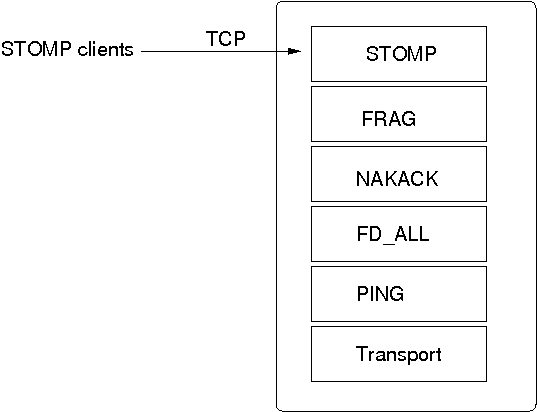
The STOMP protocol should be near the top of the stack.
A STOMP instance listens on a TCP socket for client connections. The port and bind address of the server socket can be defined via properties.
A client can send SUBSCRIBE commands for various destinations. When a SEND for a given destination is received, STOMP adds a header to the message and broadcasts it to all cluster nodes. Every node then in turn forwards the message to all of its connected clients which have subscribed to the same destination. When a destination is not given, STOMP simply forwards the message to all connected clients.
Traffic can be generated by clients and by servers. In the latter case, we could for example have code executing in the address space of a JGroups (server) node. In the former case, clients use the SEND command to send messages to a JGroups server and receive messages via the MESSAGE command. If there is code on the server which generates messages, it is important that both client and server code agree on a marshalling format, e.g. JSON, so that they understand each other's messages.
Clients can be written in any language, as long as they understand the STOMP protocol. Note that the JGroups STOMP protocol implementation sends additional information (e.g. INFO) to clients; non-JGroups STOMP clients should simply ignore them.
JGroups comes with a STOMP client (org.jgroups.client.StompConnection) and a demo (StompDraw). Both need to be started with the address and port of a JGroups cluster node. Once they have been started, the JGroups STOMP protocol will notify clients of cluster changes, which is needed so client can failover to another JGroups server node when a node is shut down. E.g. when a client connects to C, after connection, it'll get a list of endpoints (e.g. A,B,C,D). When C is terminated, or crashes, the client automatically reconnects to any of the remaining nodes, e.g. A, B, or D. When this happens, a client is also re-subscribed to the destinations it registered for.
The JGroups STOMP protocol can be used when we have clients, which are either not in the same network segment as the JGroups server nodes, or which don't want to become full-blown JGroups server nodes. Figure 7.2, “STOMP architecture” shows a typical setup.
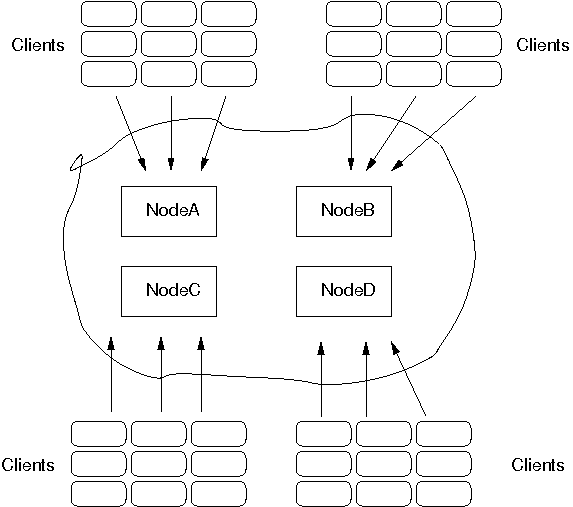
There are 4 nodes in a cluster. Say the cluster is in a LAN, and communication is via IP multicasting (UDP as transport). We now have clients which do not want to be part of the cluster themselves, e.g. because they're in a different geographic location (and we don't want to switch the main cluster to TCP), or because clients are frequently started and stopped, and therefore the cost of startup and joining wouldn't be amortized over the lifetime of a client. Another reason could be that clients are written in a different language, or perhaps, we don't want a large cluster, which could be the case if we for example have 10 JGroups server nodes and 1000 clients connected to them.
In the example, we see 9 clients connected to every JGroups cluster node. If a client connected to node A sends a message to destination /topics/chat, then the message is multicast from node A to all other nodes (B, C and D). Every node then forwards the message to those clients which have previously subscribed to /topics/chat.
When node A crashes (or leaves) the JGroups STOMP clients (org.jgroups.client.StompConnection) simply pick another server node and connect to it.
The properties for STOMP are shown below:
Table 7.35. Properties (experimental)
| Name | Description |
|---|---|
| bind_addr | The bind address which should be used by the server socket. The following special values are also recognized: GLOBAL, SITE_LOCAL, LINK_LOCAL and NON_LOOPBACK |
| endpoint_addr | If set, then endpoint will be set to this address |
| ergonomics | Enables ergonomics: dynamically find the best values for properties at runtime |
| exact_destination_match | If set to false, then a destination of /a/b match /a/b/c, a/b/d, a/b/c/d etc |
| forward_non_client_generated_msgs | Forward received messages which don't have a StompHeader to clients |
| id | Give the protocol a different ID if needed so we can have multiple instances of it in the same stack |
| level | Sets the logger level (see javadocs) |
| name | Give the protocol a different name if needed so we can have multiple instances of it in the same stack (also change ID) |
| port | Port on which the STOMP protocol listens for requests |
| send_info | If true, information such as a list of endpoints, or views, will be sent to all clients (via the INFO command). This allows for example intelligent clients to connect to a different server should a connection be closed. |
| stats | Determines whether to collect statistics (and expose them via JMX). Default is true |
The DAISYCHAIN protocol is discussed in Section 5.10, “Daisychaining”.
Table 7.36. Properties (experimental)
| Name | Description |
|---|---|
| ergonomics | Enables ergonomics: dynamically find the best values for properties at runtime |
| forward_queue_size | The number of messages in the forward queue. This queue is used to host messages that need to be forwarded by us on behalf of our neighbor |
| id | Give the protocol a different ID if needed so we can have multiple instances of it in the same stack |
| level | Sets the logger level (see javadocs) |
| loopback | Loop back multicast messages |
| name | Give the protocol a different name if needed so we can have multiple instances of it in the same stack (also change ID) |
| send_queue_size | The number of messages in the send queue. This queue is used to host messages that need to be sent |
| stats | Determines whether to collect statistics (and expose them via JMX). Default is true |
RATE_LIMITER can be used to set a limit on the data sent per time unit. When sending data, only max_bytes can be sent per time_period milliseconds. E.g. if max_bytes="50M" and time_period="1000", then a sender can only send 50MBytes / sec max.
Table 7.37. Properties (experimental)
| Name | Description |
|---|---|
| ergonomics | Enables ergonomics: dynamically find the best values for properties at runtime |
| id | Give the protocol a different ID if needed so we can have multiple instances of it in the same stack |
| level | Sets the logger level (see javadocs) |
| max_bytes | Max number of bytes to be sent in time_period ms. Blocks the sender if exceeded until a new time period has started |
| name | Give the protocol a different name if needed so we can have multiple instances of it in the same stack (also change ID) |
| stats | Determines whether to collect statistics (and expose them via JMX). Default is true |
| time_period | Number of milliseconds during which max_bytes bytes can be sent |
There are currently 2 locking protocols: org.jgroups.protocols.CENTRAL_LOCK and org.jgroups.protocols.PEER_LOCK.
CENTRAL_LOCK has the current coordinator of a cluster grants locks, so every node has to communicate with the coordinator to acquire or release a lock. Lock requests by different nodes for the same lock are processed in the order in which they are received.
A coordinator maintains a lock table. To prevent losing the knowledge of who holds which locks, the coordinator can push lock information to a number of backups defined by num_backups. If num_backups is 0, no replication of lock information happens. If num_backups is greater than 0, then the coordinator pushes information about acquired and released locks to all backup nodes. Topology changes might create new backup nodes, and lock information is pushed to those on becoming a new backup node.
The advantage of CENTRAL_LOCK is that all lock requests are granted in the same order across the cluster, which is not the case with PEER_LOCK.
Table 7.38. Properties (experimental)
| Name | Description |
|---|---|
| bypass_bundling | bypasses message bundling if set |
| ergonomics | Enables ergonomics: dynamically find the best values for properties at runtime |
| id | Give the protocol a different ID if needed so we can have multiple instances of it in the same stack |
| level | Sets the logger level (see javadocs) |
| name | Give the protocol a different name if needed so we can have multiple instances of it in the same stack (also change ID) |
| num_backups | Number of backups to the coordinator. Server locks get replicated to these nodes as well |
| stats | Determines whether to collect statistics (and expose them via JMX). Default is true |
PEER_LOCK acquires a lock by contacting all cluster nodes, and lock acquisition is only successful if all non-faulty cluster nodes (peers) grant it.
Unless a total order configuration is used (e.g. org.jgroups.protocols.SEQUENCER based), lock requests for the same resource from different senders may be received in different order, so deadlocks can occur. Example:
- Nodes A and B
- A and B call lock(X) at the same time
- A receives L(X,A) followed by L(X,B): locks X(A), queues L(X,B)
- B receives L(X,B) followed by L(X,A): locks X(B), queues L(X,A)
To acquire a lock, we need lock grants from both A and B, but this will never happen here. To fix this, either add SEQUENCER to the configuration, so that all lock requests are received in the same global order at both A and B, or use java.util.concurrent.locks.Lock.tryLock(long,javaTimeUnit) with retries if a lock cannot be acquired.
Table 7.39. Properties (experimental)
| Name | Description |
|---|---|
| bypass_bundling | bypasses message bundling if set |
| ergonomics | Enables ergonomics: dynamically find the best values for properties at runtime |
| id | Give the protocol a different ID if needed so we can have multiple instances of it in the same stack |
| level | Sets the logger level (see javadocs) |
| name | Give the protocol a different name if needed so we can have multiple instances of it in the same stack (also change ID) |
| stats | Determines whether to collect statistics (and expose them via JMX). Default is true |
CENTRAL_EXECUTOR is an implementation of Executing which is needed by the ExecutionService.
Table 7.40. Properties (experimental)
| Name | Description |
|---|---|
| bypass_bundling | bypasses message bundling if set |
| ergonomics | Enables ergonomics: dynamically find the best values for properties at runtime |
| id | Give the protocol a different ID if needed so we can have multiple instances of it in the same stack |
| level | Sets the logger level (see javadocs) |
| name | Give the protocol a different name if needed so we can have multiple instances of it in the same stack (also change ID) |
| num_backups | Number of backups to the coordinator. Queue State gets replicated to these nodes as well |
| stats | Determines whether to collect statistics (and expose them via JMX). Default is true |
[14] Note that NAKACK can also be configured to send retransmission requests for M to anyone in the cluster, rather than only to the sender of M.
[Ensemble:1997] The Ensemble Distributed Communication System , CS Dept Cornell University , 1997 . http://www.cs.cornell.edu/Info/Projects/Ensemble/index.html .